5
Access Keypad Installation Guide
placement (not crooked) of all exposed components is the hallmark of a
professional installation.
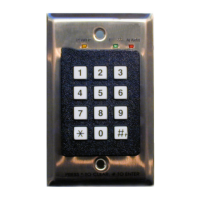
4 Run the supplied keypad cable from the
KEYPAD jack on the controller
front panel into the electrical box and connect to the keypad jack.
5 Mount the keypad into the electrical box or into the retrofit bracket with the
supplied screws.
Mode 2 Passcode Programming Procedure
When the keypad is in Mode 2, five memory slots on the keypad are available for pro-
gramming. Slots 1 and 3 are used for Bypass codes. Slots 2 and 4 are used for Reset codes.
A fifth slot is used for the Master Pass Code. The default codes assigned to the keypad
memory slots are:
• Bypass: 1938
• Reset: 1939
•Master: 987654
When you program the codes, you may use one code for both bypass slots and one code
for both Reset slots, but you cannot use the same code for Bypass and Reset. Usually, you
program separate codes and provide them to separate user groups.
To chan ge t he d e f au l t Bypass or Reset codes, follow these steps:
1 Make sure the keypad has power.
2 Enter the Master Pass Code.
3 Press
#.
4 Enter the slot number (1 or 3 for Bypass, 2 or 4 for Reset).
5 Press
#.
6 Enter a new passcode (3 to 6 digits).
7 Press
#.
8 Note the new passcode(s) and store in a safe place.
To chan ge t he d e f au l t Master Pass Code, follow these steps:
1 Make sure the keypad has power.
2 Enter the Master Pass Code.
3 Press
#.
4 Enter the Master Pass Code again.


 To Next Page