
 Need help?
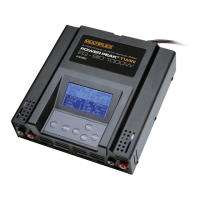
Do you have a question about the ROBBE Power Peak Twin EQ-BID and is the answer not in the manual?
Lists optional accessories compatible with the charger for enhanced functionality and usage.
Detailed explanation of the INC, DEC, and ENTER buttons for menu navigation, value adjustment, and process initiation.
Instructions on correctly connecting the battery pack and power supply, emphasizing polarity and safety precautions.
Procedure to select the preferred language for the charger's menu interface from English, Deutsch, or French.
Details on customizing display contrast, backlight, and setting a user name for personalization.
Overview of the charger's menu structure, including MEMORY VIEW, USER SETTINGS, DATA VIEW, and CYCLE VIEW.
Explains how to select and program memory slots for storing battery charge/discharge parameters.
Guides on setting temperature units, button beep, finish melody, and selecting melodies for charge completion.
Describes the display of battery parameters such as input/output voltage, temperature, charge/discharge times, and internal resistance.
Details how to view cycle data, including charged/discharged capacity and voltage levels for up to 10 cycles.
Details the three sections of the working display, showing real-time data for ongoing charging, discharging, or cycling processes.
Explains the various text messages shown after a process, indicating the reason for cut-off, such as DELTA PEAK or TEMPERATURE.
Instructions on how to access and view stored battery data, such as max capacity, directly from the BID chip/key.
 General
| Brand | ROBBE |
|---|---|
| Model | Power Peak Twin EQ-BID |
| Category | Battery Charger |
| Language | English |



 To Next Page