www.robbe.com
6 ENGLISH
USER MANUAL
RO-CONTROL V2 ESC
Modellsport
RO-CONTROL 3-40 V2 3-4S -40(60)A BEC Nr.: 8739
RO-CONTROL 4-50 V2 3-4S -50(70)A BEC Nr.: 8738
RO-CONTROL 6- 80 V2 3-6S - 80(100)A SWITCH BEC Nr.: 8736
RO-CONTROL 6-100 V2 3-6S -100(120)A SWITCH BEC Nr.: 8735
1 “B-” Brake Type (1 Short B)
2 “B-B-” Brake Force (2 Short Bs)
3 “B-B-B-” Voltage Cutoff Type (3 Short Bs)
4 “B-B-B-B-” LiPo Cells (4 Short Bs)
5 “B——” Cutoff Voltage (1 Long B)
6 “B——B-” Start-up Mode
(1 Long B &
1 Short B)
I. ENTER THE PROGRAMMING
Turn on the transmitter, move the throttle stick to the top position, and connect a battery to the ESC, 2 seconds later, the
motor will beep ”B-B-” rst, then emit 5 seconds later to indicate that you are in the ESC programming mode.
►
II. SELECT PARAMETER ITEMS
After entering the programming, you’ll hear the following 12 kinds of beeps circularly. Move the throttle stick to the bot-
tom position within 3 seconds after you hear some kind of beeps, you’ll enter the corresponding parameter item.
7 “B——B-B-” Timing
(1 Long B &
2 Short Bs)
8 “B——B-B-B-” Active Freewheeling
(1 Long B &
3 Short Bs)
9 “B——B-B-B-B-” Search Mode
(1 Long B &
4 Short Bs)
10 “B——B——” Factory Reset (2 Long Bs)
11 “B——B——B-” Exit
(2 Long Bs &
1 Short B)
Note: A long “B——” equals to 5 short “B-”, so a long “B——” and a short “B-” represent the 6th item in “Select Parameter Items”.
►
►
►
III. SELECT PARAMETER VALUES
The motor will beep different kinds of beeps circularly, move the throttle stick to the
top position after you hear some kind of beeps will get you to the corresponding pa
-
rameter value, then you’ll hear the motor emit “ ” to indicate the value is saved,
then get back to “Select Parameter Items” and continue to select other parameter
items that you want to adjust.
Values (Bs) 1 2 3 4 5
Items B- B-B- B-B-B- B-B-B-B B--
1 Brake Type Disabled Normal Reverse Linear Reverse
2 Brake Force Low Medium High
3 Voltage Cutoff Type Soft Hard
4 LiPo Cells Auto Calc. 3S 4S 5S 6S
5 Cutoff Voltage Disabled Low Medium High
6 Start-up Mode Normal Soft Very Soft
7 Timing Low Medium High
8 Acitve Freewheeling On Off
9 Search Mode Off 5min 10min 15min
VI. EXIT THE
PROGRAMMING
Move the throttle stick to
the bottom position within 3
seconds after you hear “Two
long and One short beeps”
(emitting from the motor) can
get you exit the programming
mode. The motor beeps
“Number” beeps to indicate
the number of LiPo cells you
have plugged in, and then
a long beep to indicate the
power system is ready to go.
Attention: You need to power your ESC off and then on after adjusting parameters. Otherwise, new
parameters won’t take effect.
ATTENTION
05. ESC PROGRAMMING
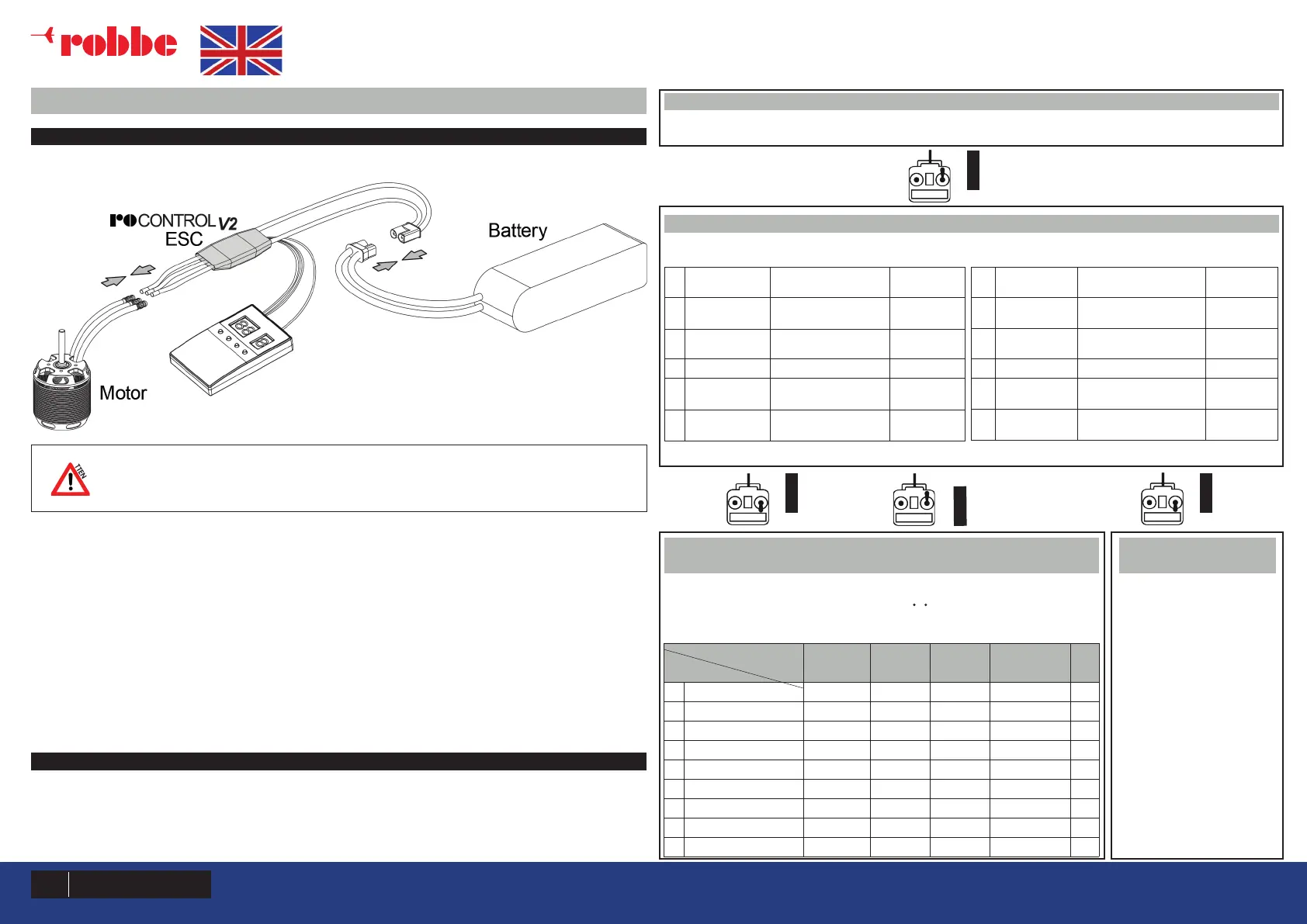
1 PROGRAM YOUR ESC WITH A LED PROGRAM BOX
1. Wiring;
1).
Plug the programming cable (on your ESC) into the programming port on the LED program box.
Note: Need plug the throttle signal cable into the power port on the LED program box and the programming wire (
yellow wire ) into the programming port on the LED program box.
2).
(With a battery connected to your ESC), after connected a LED program box to the ESC, you need to disconnect the
battery rst and then reconnect it to the ESC to enter the programming mode, check and set parameters.
The portable program box is an optional accessory applicable for eld use. Its friendly interface makes the ESC pro
-
gramming easy and quick. Connect a battery to your ESC after connecting a LED program box to the ESC, all program-
mable items will show up a few seconds later. You can select the item you want to program and the setting you want
to choose via “ITEM” & “VALUE” buttons on the program box, and then press the “OK” button to save all new settings to
your ESC.
2 PROGRAM YOUR ESC WITH THE TRANSMITTER
It consists of 4 steps: Enter the programming → Select parameter items → Select parameter values →
Exit the programming
1515


 To Next Page
 Loading...