Setting alarm times
The alarms can be set to wake you by either the buzzer or the radio.
Your alarm clock radio has 2 separate alarms which can be set to activate
at different times.
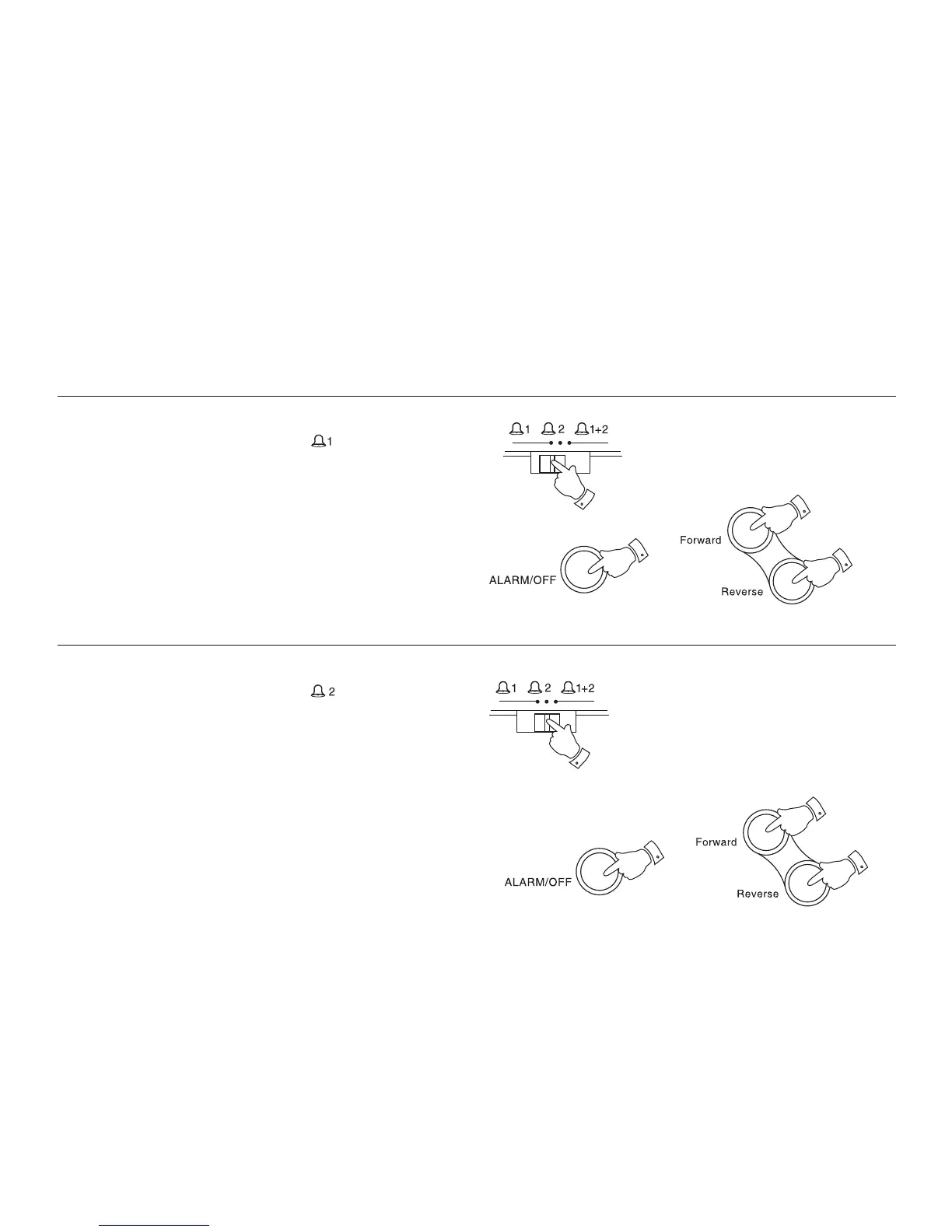
Setting alarm 1
1. Slide the Alarm function switch to the ‘ ’ position.
2. Press and hold down the ALARM/OFF button.
3. Whilst holding down the ALARM/OFF button press the Forward
or Reverse buttons to set the required alarm time. Release the
buttons when the correct alarm time is reached. The clock uses a 12
hour display with a PM indicator. Ensure that the correct 12 hour
cycle is selected.
Setting alarm 2
1. Slide the Alarm function switch to the ' ' position.
2. Press and hold down the ALARM/OFF button.
3. Whilst holding down the ALARM/OFF button press the Forward
or Reverse buttons to set the required alarm time. Release the
buttons when the correct alarm time is reached. The clock uses a 12
hour display with a PM indicator. Ensure that the correct 12 hour
cycle is selected.
5


 To Next Page