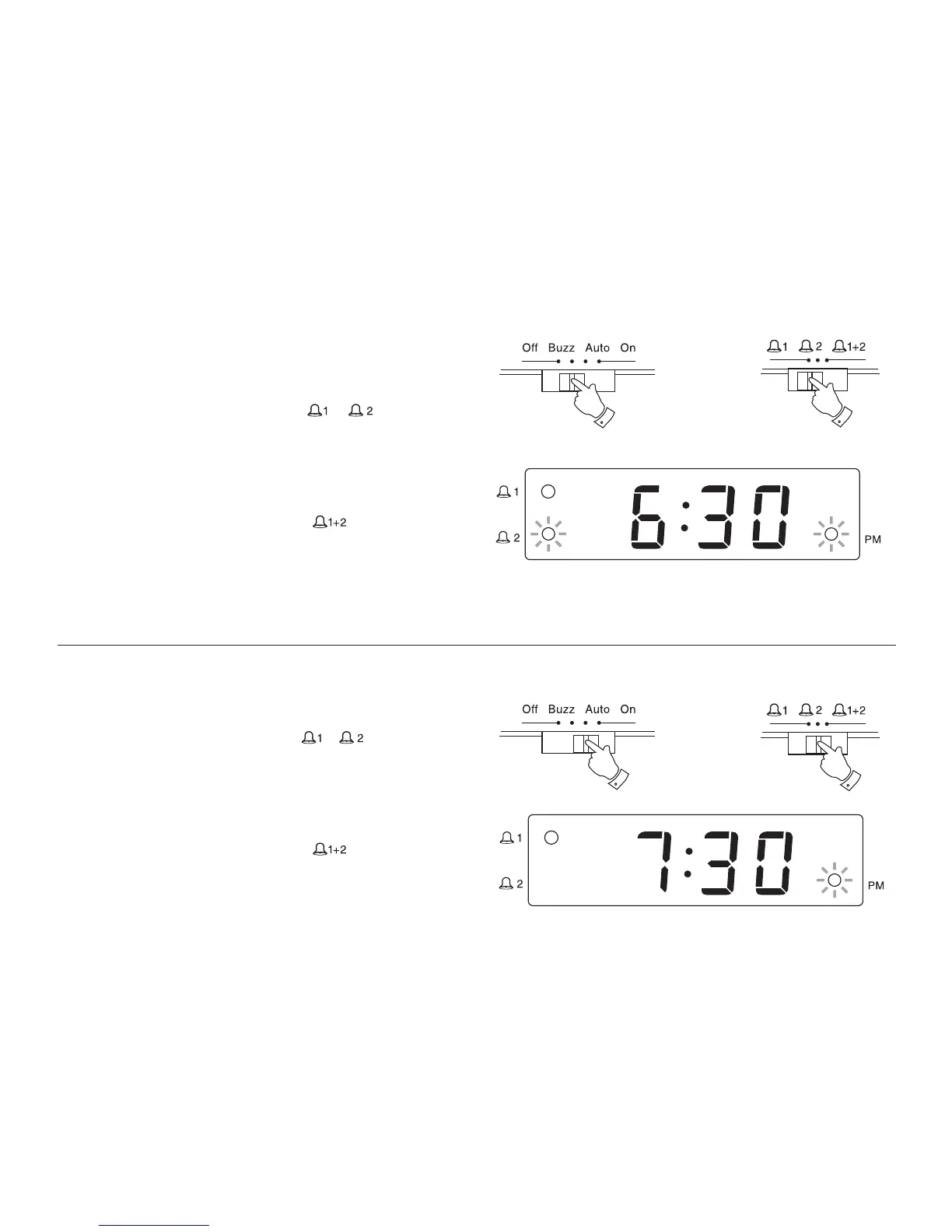
Setting the alarms to wake to buzzer
1. Set the alarm time as previously described.
2. Set the Function switch to the 'Buzz' position.
3. Set the Alarm selector switch to the ' ' or' ' position. The
corresponding Alarm indicators will light.
The buzzer alarm will sound every day at the preset time for 60
minutes. To turn off the alarm until the next day press the ALARM/
OFF button. To turn off the alarm permanently set the Function
switch to the 'Off' position.
4. Setting the alarm selector switch to the’ ’ position will allow
two alarm times each day.
e.g. one alarm time for yourself and one alarm time for your partner.
To make a distinction between alarm 1 and alarm 2 the alarm signals
have a different sound pitch:
Alarm 1 = higher pitch alarm signal
Alarm 2 = lower pitch alarm signal
Setting the alarms to wake to radio
1. Set the alarm time as previously described.
2. Set the Function switch to the 'Auto' position.
3. Set the Alarm selector switch to the ' 'or' ' or position. The
corresponding Alarm indicators will light.
The radio alarm will sound every day at the preset time for 60 minutes.
To turn off the alarm until the next day press the ALARM/OFF button.
To turn off the alarm permanently set the Function switch to the
'Off' position.
4. Setting the alarm selector switch to the’ ’ position wiil allow
two alarm times each day.
e.g. one alarm time for yourself and one alarm time for your partner.
7



 To Next Page