If you need any further advice, please call our Technical Helpline on :-
020 8758 0338 (Mon-Fri)
26
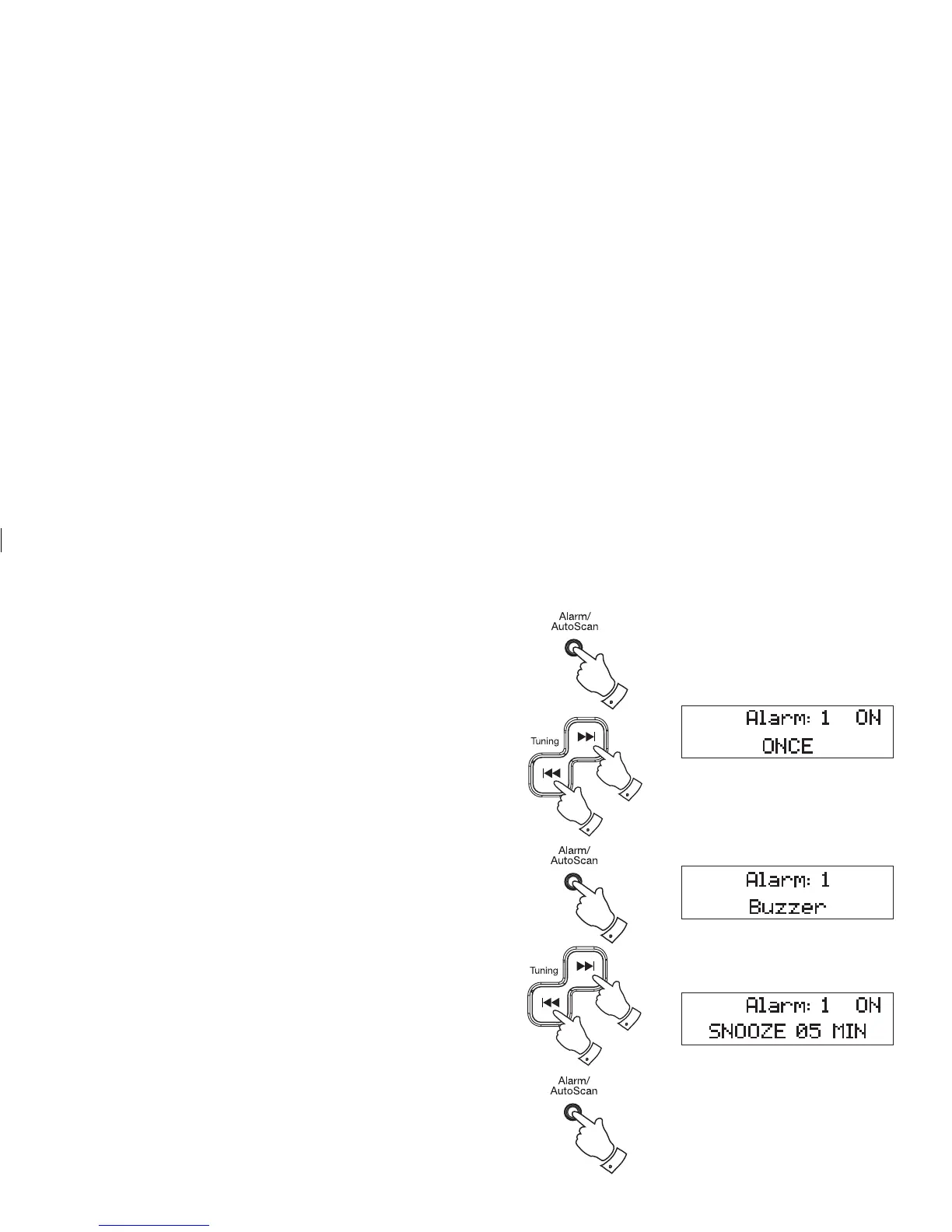
6. Press the Alarm button to confi rm the setting and to enter the alarm
day option menu. You can select between once, daily, Mon-Fri, Mon-
Sat and Sat-Sun.
Display
Once (Once) - Will sound at one time only
Mon-Sun (Daily) - Will sound every day
Mon-Fri (1-5) - Will sound every weekday
Mon-Sat (1-6) - Will sound from Monday to Saturday
Sat-Sun (6-7) - Will sound only on weekends
7. Press the Skip Up or Down buttons to select the desired Alarm day
option.
8. Press the Alarm button to confi rm the alarm day setting and to enter
the alarm mode selection menu.
9. Press the Skip Up or Down buttons to select the desired alarm
mode. You can choose between OFF, BUZZER, DAB, CD and FM.
Then press the Alarm button to confi rm the setting. When the alarm
mode is set to "OFF" the alarm will be disabled.
10. Then "Snooze 5 minutes" will be shown on the display. Press the
Skip Up or Down buttons to select the desired snooze timer from
5, 10,15 and 20 minutes. Then press the Alarm button to confi rm the
setting.
7,9
7,9
10
10
6
8,9
10













 To Next Page