EasyManua.ls Logo

Roberts CRD-37 - User Manual

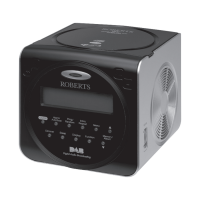
Roberts CRD-37
40 pages
Print Icon
To Next Page IconTo Next Page
Loading...
CRD-37
DAB / FM RDS / CD Clock radio with MP3 / WMA playback facility
Please read this manual before use
ROBERTS
Sound for Generations
Question and Answer IconNeed help?

Do you have a question about the Roberts CRD-37 and is the answer not in the manual?

Summary

CRD-37 Clock Radio Features

Radio Reception Capabilities

Details DAB and FM (RDS) waveband reception.

Front Panel Controls Overview

Front Button Functions

Details the function of each button on the front of the unit.

Rear Panel Connectivity

Initial Clock Radio Setup

First-Time Operation Guide

Step-by-step guide for initial setup and first-time operation.

DAB Radio Operation

Tuning DAB Stations

Instructions for tuning into DAB radio stations.

DAB Station Selection

Finding New DAB Stations

Performing a DAB Station Scan

How to scan for and find new DAB radio stations.

DAB Tuning and Signal Strength

FM Radio Operation

FM Auto-Scan Tuning

How to perform an automatic scan for FM stations.

FM Manual Tuning

Presetting Radio Stations

Storing Favourite Stations

Step-by-step guide to saving stations into memory presets.

Recalling Preset Stations

MP3;WMA CD Playback Features

CD Player Basic Operations

Inserting and Starting CD Playback

How to insert a CD and start playback.

CD Playback Management

Selecting Tracks on CD

Alarm Mode Configuration

Setting Alarm Times and Frequencies

How to set alarm times and choose daily or specific day options.

Alarm Setting Options

Selecting Alarm Day Schedules

Choosing when the alarm will sound (e.g., daily, weekdays).

Choosing Alarm Sound Type and Snooze

Selecting alarm source (OFF, Buzzer, DAB, CD, FM) and snooze duration.

Managing Alarm Functions

Sleep Timer Function

Setting the Automatic Sleep Timer

How to set the radio to turn off automatically after a set time.

System Maintenance and Updates

Performing a Factory System Reset

Steps to reset the clock radio to factory defaults.

Important Safety and General Advice

Mains Power Adaptor Guidelines

Critical information about the mains adaptor and socket accessibility.

Product Technical Specifications

Device Specifications Summary

Lists power requirements, frequency coverage, and circuit features.

Product Guarantee and Warranty

Summary

CRD-37 Clock Radio Features

Radio Reception Capabilities

Details DAB and FM (RDS) waveband reception.

Front Panel Controls Overview

Front Button Functions

Details the function of each button on the front of the unit.

Rear Panel Connectivity

Initial Clock Radio Setup

First-Time Operation Guide

Step-by-step guide for initial setup and first-time operation.

DAB Radio Operation

Tuning DAB Stations

Instructions for tuning into DAB radio stations.

DAB Station Selection

Finding New DAB Stations

Performing a DAB Station Scan

How to scan for and find new DAB radio stations.

DAB Tuning and Signal Strength

FM Radio Operation

FM Auto-Scan Tuning

How to perform an automatic scan for FM stations.

FM Manual Tuning

Presetting Radio Stations

Storing Favourite Stations

Step-by-step guide to saving stations into memory presets.

Recalling Preset Stations

MP3;WMA CD Playback Features

CD Player Basic Operations

Inserting and Starting CD Playback

How to insert a CD and start playback.

CD Playback Management

Selecting Tracks on CD

Alarm Mode Configuration

Setting Alarm Times and Frequencies

How to set alarm times and choose daily or specific day options.

Alarm Setting Options

Selecting Alarm Day Schedules

Choosing when the alarm will sound (e.g., daily, weekdays).

Choosing Alarm Sound Type and Snooze

Selecting alarm source (OFF, Buzzer, DAB, CD, FM) and snooze duration.

Managing Alarm Functions

Sleep Timer Function

Setting the Automatic Sleep Timer

How to set the radio to turn off automatically after a set time.

System Maintenance and Updates

Performing a Factory System Reset

Steps to reset the clock radio to factory defaults.

Important Safety and General Advice

Mains Power Adaptor Guidelines

Critical information about the mains adaptor and socket accessibility.

Product Technical Specifications

Device Specifications Summary

Lists power requirements, frequency coverage, and circuit features.

Product Guarantee and Warranty

Roberts CRD-37 Specifications

General IconGeneral
BrandRoberts
ModelCRD-37
CategoryClock Radio
LanguageEnglish

Related product manuals