EasyManua.ls Logo

Roberts iDream CRD-42 - User Manual

Roberts iDream CRD-42
40 pages
Print Icon
To Next Page IconTo Next Page
Loading...
Please read this manual before use
ROBERTS
Sound for Generations
®
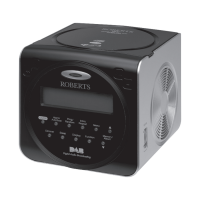
DAB / FM RDS digital clock radio
with dock for iPod
model CRD-42
Question and Answer IconNeed help?

Do you have a question about the Roberts iDream CRD-42 and is the answer not in the manual?

Summary

Top Panel Controls

Playback and Alarm Buttons

Includes Snooze, Play/Pause, Rewind, Sleep, and Alarm buttons.

System and Tuning Buttons

Buttons for Menu, Info, Mode, Select, Tuning, and Volume controls.

iPod Dock and IR Sensor

The connection port for iPod and the infrared receiver.

Front Panel Controls

LCD Display and Front Buttons

The front panel display and buttons like Preset, Tuning, Select, and On/Standby.

Rear Panel Connections

Sockets, Switch, and Aerial

Includes Dimmer, Aerial, Headphone, Aux In, DC In, and Speakers.

Remote Control Layout

Remote Control Operation Buttons

Buttons for Power, Playback, Alarm, Sleep, and Snooze functions.

Remote Control Navigation and Tuning

Buttons for Menu, Mode, Select, Tuning, Volume, and Info.

Remote Battery Replacement

Procedure for Battery Change

Step-by-step instructions for replacing the battery in the remote control.

Initial Radio Setup

First-Time Power On and Scan

Connecting power, placing the radio, and performing the initial station scan.

Basic Radio Operation

Powering On and Station Selection

How to turn the radio on and select stations.

DAB Signal Strength

Understanding the signal strength indicator for DAB reception.

DAB Station Tuning

Step-by-Step DAB Station Selection

Guide to tuning and selecting DAB radio stations.

Volume Control

Adjusting the listening volume after selecting a station.

DAB Station Information

Secondary Services and Display Modes

Accessing secondary services and cycling through display options.

DAB Display Details

Displaying DAB Station Data

Shows Multiplex, Time, Date, Frequency, Bit Rate, and Signal Error.

Finding New DAB Stations

Performing DAB Station Scans

Using LOC SCAN and FULLSCAN for finding new DAB stations.

Manual DAB Tuning

Tuning and Signal Strength

Manually tuning to frequencies and checking signal strength.

DAB Dynamic Range Control

Adjusting DRC Levels

Setting compression levels for audio clarity in noisy environments.

FM Radio Operation

FM Auto-Tuning and RDS Data

Scanning FM stations automatically and displaying RDS information.

Manual FM Tuning

Tuning FM Stations Manually

Step-by-step guide to manually tuning FM radio stations.

FM Display Modes

RDS Display Options

Cycling through station name, scrolling text, programme type, time, date, and frequency.

Station Presets

Storing Favourite Stations

Procedure for saving preferred DAB and FM radio stations into memory.

Recalling Preset Stations

Accessing Stored Stations

Tuning to stations that have been previously saved as presets.

iPod Docking

Connecting and Operating iPod

How to dock your iPod and select iPod playback mode.

iPod Playback Control

Playback, Navigation, and Search

Using radio controls for iPod playback, navigation, and track search.

Alarm Settings

Configuring Alarm 1 and 2

Steps to set alarm times and enable or disable alarms.

Alarm Configuration Details

Setting Alarm Time and Source

Setting the alarm hour, minute, day, and audio source.

Alarm Management

Alarm Symbols and iPod Alarm Setup

Understanding alarm indicators and specific setup for iPod alarms.

Viewing and Cancelling Alarms

Checking and Stopping Alarms

How to view current alarm settings and stop an active alarm.

Snooze Function

Using and Setting Snooze Duration

Activating the snooze function and customizing its duration.

Sleep Timer

Setting and Cancelling Sleep Timer

Configuring the radio to turn off automatically after a set time.

Manual Clock Setting

Setting Clock Hour and Minute

Manually adjusting the hour and minute for the clock display.

Manual Clock Date Setting

Setting Clock Year, Month, and Day

Manually adjusting the year, month, and day for the clock display.

Auto Clock Set Mode

Re-enabling Automatic Time Sync

Returning the clock to automatically set time from DAB broadcast.

Display Features

Clock Display and Brightness

Standby clock display format and adjusting screen brightness.

Software Version

Checking Software Information

Viewing the clock radio's software version number.

System Reset

Performing a Factory Reset

Resetting the radio to factory defaults to resolve operational issues.

Headphone Socket

Connecting Headphones

Details on the 3.5mm stereo headphone socket and its use.

Auxiliary Input

Connecting External Audio Sources

Using the 3.5mm auxiliary input socket for external audio devices.

Safety Cautions

Handling and Environmental Precautions

Warnings regarding water, heat exposure, ventilation, and flame sources.

Technical Specifications

Power, Frequency, and Circuit Features

Details on power requirements, frequency coverage, and circuit features.

Product Guarantee

Warranty Terms and Claims

Information on the guarantee period, exclusions, and how to make a claim.

Summary

Top Panel Controls

Playback and Alarm Buttons

Includes Snooze, Play/Pause, Rewind, Sleep, and Alarm buttons.

System and Tuning Buttons

Buttons for Menu, Info, Mode, Select, Tuning, and Volume controls.

iPod Dock and IR Sensor

The connection port for iPod and the infrared receiver.

Front Panel Controls

LCD Display and Front Buttons

The front panel display and buttons like Preset, Tuning, Select, and On/Standby.

Rear Panel Connections

Sockets, Switch, and Aerial

Includes Dimmer, Aerial, Headphone, Aux In, DC In, and Speakers.

Remote Control Layout

Remote Control Operation Buttons

Buttons for Power, Playback, Alarm, Sleep, and Snooze functions.

Remote Control Navigation and Tuning

Buttons for Menu, Mode, Select, Tuning, Volume, and Info.

Remote Battery Replacement

Procedure for Battery Change

Step-by-step instructions for replacing the battery in the remote control.

Initial Radio Setup

First-Time Power On and Scan

Connecting power, placing the radio, and performing the initial station scan.

Basic Radio Operation

Powering On and Station Selection

How to turn the radio on and select stations.

DAB Signal Strength

Understanding the signal strength indicator for DAB reception.

DAB Station Tuning

Step-by-Step DAB Station Selection

Guide to tuning and selecting DAB radio stations.

Volume Control

Adjusting the listening volume after selecting a station.

DAB Station Information

Secondary Services and Display Modes

Accessing secondary services and cycling through display options.

DAB Display Details

Displaying DAB Station Data

Shows Multiplex, Time, Date, Frequency, Bit Rate, and Signal Error.

Finding New DAB Stations

Performing DAB Station Scans

Using LOC SCAN and FULLSCAN for finding new DAB stations.

Manual DAB Tuning

Tuning and Signal Strength

Manually tuning to frequencies and checking signal strength.

DAB Dynamic Range Control

Adjusting DRC Levels

Setting compression levels for audio clarity in noisy environments.

FM Radio Operation

FM Auto-Tuning and RDS Data

Scanning FM stations automatically and displaying RDS information.

Manual FM Tuning

Tuning FM Stations Manually

Step-by-step guide to manually tuning FM radio stations.

FM Display Modes

RDS Display Options

Cycling through station name, scrolling text, programme type, time, date, and frequency.

Station Presets

Storing Favourite Stations

Procedure for saving preferred DAB and FM radio stations into memory.

Recalling Preset Stations

Accessing Stored Stations

Tuning to stations that have been previously saved as presets.

iPod Docking

Connecting and Operating iPod

How to dock your iPod and select iPod playback mode.

iPod Playback Control

Playback, Navigation, and Search

Using radio controls for iPod playback, navigation, and track search.

Alarm Settings

Configuring Alarm 1 and 2

Steps to set alarm times and enable or disable alarms.

Alarm Configuration Details

Setting Alarm Time and Source

Setting the alarm hour, minute, day, and audio source.

Alarm Management

Alarm Symbols and iPod Alarm Setup

Understanding alarm indicators and specific setup for iPod alarms.

Viewing and Cancelling Alarms

Checking and Stopping Alarms

How to view current alarm settings and stop an active alarm.

Snooze Function

Using and Setting Snooze Duration

Activating the snooze function and customizing its duration.

Sleep Timer

Setting and Cancelling Sleep Timer

Configuring the radio to turn off automatically after a set time.

Manual Clock Setting

Setting Clock Hour and Minute

Manually adjusting the hour and minute for the clock display.

Manual Clock Date Setting

Setting Clock Year, Month, and Day

Manually adjusting the year, month, and day for the clock display.

Auto Clock Set Mode

Re-enabling Automatic Time Sync

Returning the clock to automatically set time from DAB broadcast.

Display Features

Clock Display and Brightness

Standby clock display format and adjusting screen brightness.

Software Version

Checking Software Information

Viewing the clock radio's software version number.

System Reset

Performing a Factory Reset

Resetting the radio to factory defaults to resolve operational issues.

Headphone Socket

Connecting Headphones

Details on the 3.5mm stereo headphone socket and its use.

Auxiliary Input

Connecting External Audio Sources

Using the 3.5mm auxiliary input socket for external audio devices.

Safety Cautions

Handling and Environmental Precautions

Warnings regarding water, heat exposure, ventilation, and flame sources.

Technical Specifications

Power, Frequency, and Circuit Features

Details on power requirements, frequency coverage, and circuit features.

Product Guarantee

Warranty Terms and Claims

Information on the guarantee period, exclusions, and how to make a claim.

Roberts iDream CRD-42 Specifications

General IconGeneral
BrandRoberts
ModeliDream CRD-42
CategoryClock Radio
LanguageEnglish

Related product manuals