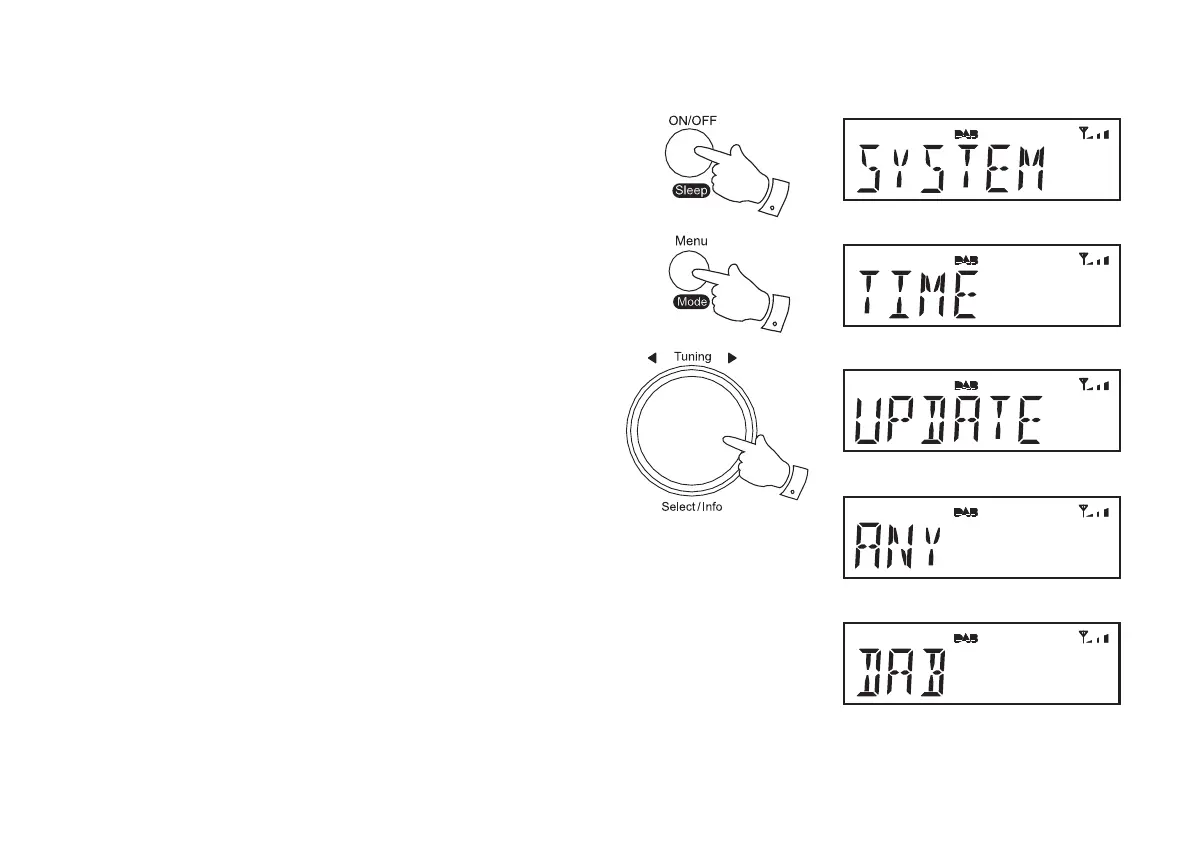
Automatically updating the clock
<RXUFORFNUDGLRZLOOXVXDOO\VHWWKHFORFNWLPHXVLQJWKH'$%VLJQDO<RX
PD\VSHFLI\WKDWWKHFORFNUDGLRVHWVLWVFORFNXVLQJVLJQDOVIURPWKH'$%
RU)0ZDYHEDQGHLWKHUZDYHEDQGRUQRQH,I\RXFKRRVHQRQH\RXZLOO
QHHGWRVHWWKHFORFNPDQXDOO\
1. Press and release the On/Off button to switch on the clock radio.
2. Press and release the Menu/Mode button. The menu will show on
WKHGLVSOD\
,I XVLQJ '$% RU )0PRGHV URWDWHWKH Tuning/Select control until
'SYSTEM' DSSHDUV RQ WKH GLVSOD\ 3UHVV DQG UHOHDVH WKH Tuning/
Select control.
4. Rotate the Tuning/Select control until 'TIME'DSSHDUVRQWKHGLVSOD\
Press and release the Tuning/Select control.
5. Rotate the Tuning/Select control until 'UPDATE' appears on the
GLVSOD\3UHVVDQGUHOHDVHWKHTuning/Select control.
5RWDWHWKHTuning/Select FRQWUROWRFKRRVHDQXSGDWHRSWLRQIURP
'$%)0$1<RU121(
7. Press and release the Tuning/Select FRQWUROWRFRQ¿UP\RXUFKRLFH
8. The clock radio will set its time according to the information received.
7KHFORFNUDGLRZLOOUHWXUQWRWKHSUHYLRXVPHQXGLVSOD\
,IDVLJQDOLVQRWIRXQG\RXVKRXOGWKHQHLWKHUSRVLWLRQWKHFORFNUDGLRRU
LWVDHULDOVRWKDWDVLJQDOFDQEHUHFHLYHGRUUHYHUWWRPDQXDOFORFNPRGH
VHHSDJH
1
2













 To Next Page