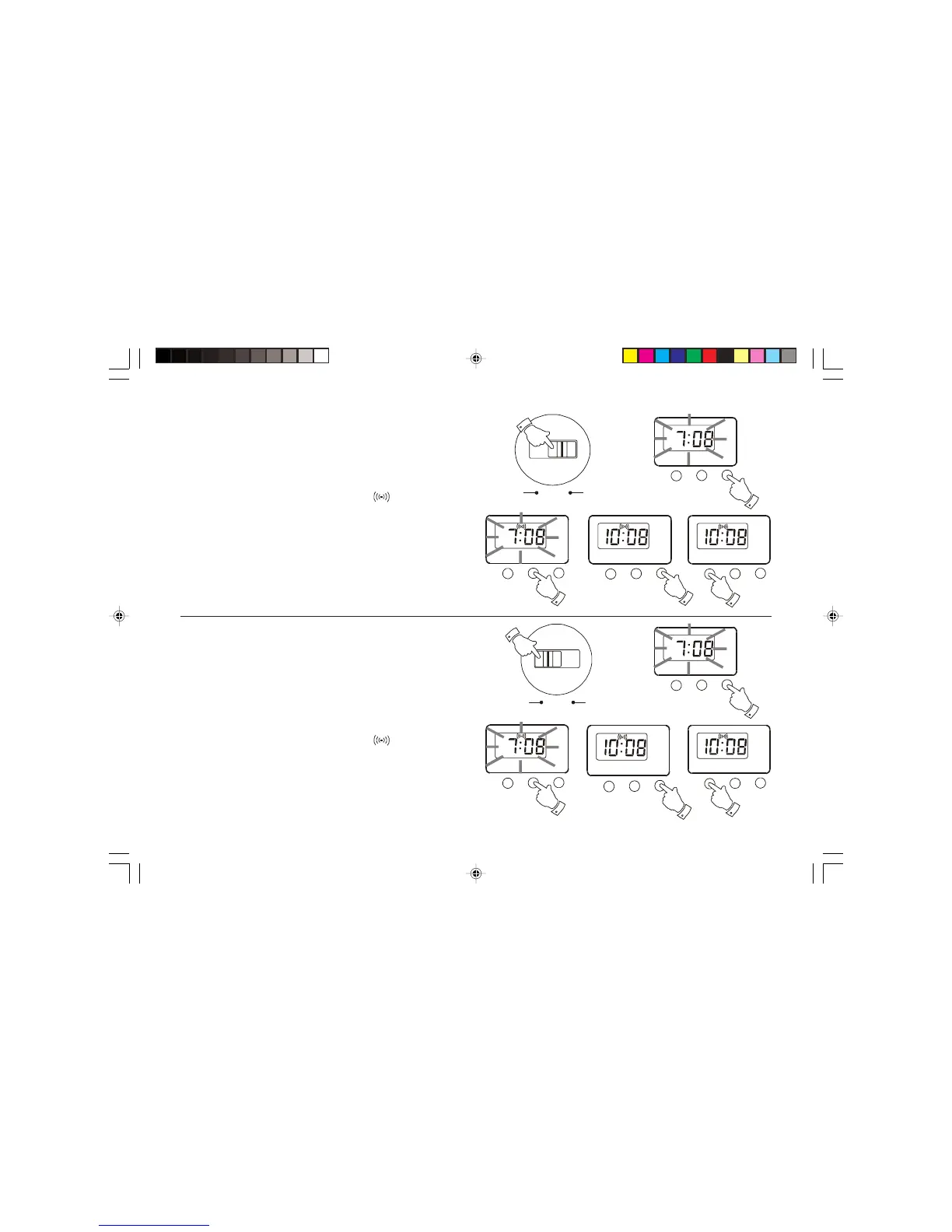
Setting the alarm to wake to radio
1. Set the alarm as previously described.
2. Tune in to the desired station, and adjust the volume to the required
level.
3. Set the Operation switch to the 'Auto' position.
4. Press the Set button the hours and minutes digits will flash.
5. Repeatedly press the Mode button until the
symbol is showing.
6. Press the Set button three times to return to the normal clock display.
The radio will now turn on at the selected alarm time.
7. To cancel the alarm whilst the alarm is sounding press the Alarm off
button.
Alarm off
Setting the alarm to wake to buzzer
1. Set the alarm as previously described.
2. Set the Operation switch to the 'Buzz' position.
3. Press the Set button the hours and minutes digits will flash.
4. Repeatedly press the Mode button until the
symbol is showing.
5. Press the Set button three times to return to the normal clock display.
The radio will now turn on at the selected alarm time.
6. To cancel the alarm whilst the alarm is sounding press the Alarm off
button.
Alarm off


 To Next Page