F.Skip
B.Skip
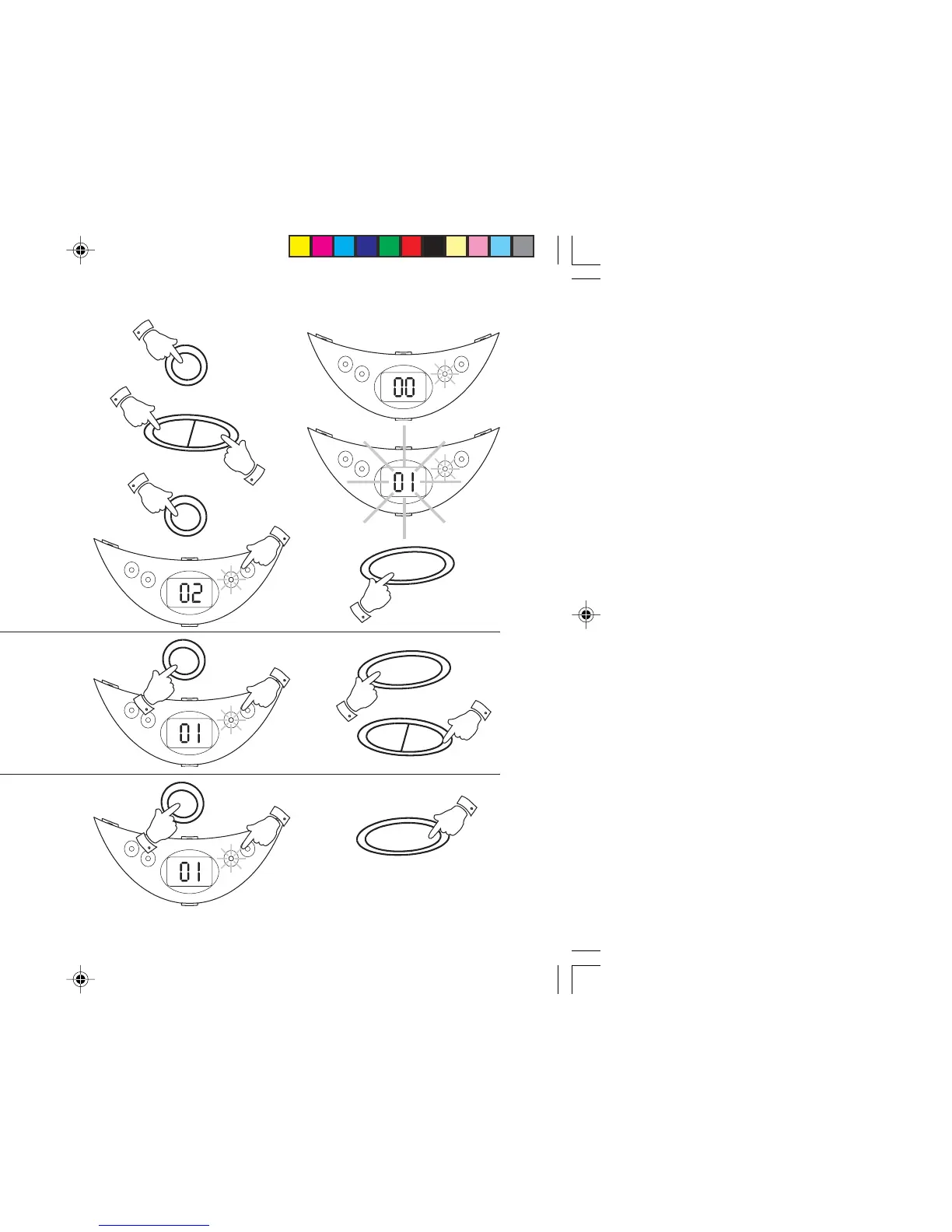
Programmed play
By programming the player you can play up to 20 tracks in any desired
order.
1. Whilst the CD is in STOP mode, press the Prog button. The
Programme indicator will start to flash and the display will show
‘00’.
2. Select the first track using the F. Skip or B. Skip buttons. The track
number and the Programme indicator light flashes. Store this
track by pressing the Prog button.
3. The Programme indicator will flash and the display will show
‘02’.
4. Repeat the above steps until you have completed your program.
Press the Play/Pause button to commence play of the selected
tracks.
Erasing a programme
1. Whilst the CD is in STOP mode, press the Prog button. The
Programme indicator will flash.
2. Press the Stop button to cancel the programme. Programmes are
also erased by:- Opening the CD door, moving the Function switch
to the 'Tape/Off' or 'Radio' positions and if the power supply is
interrupted in any way.
13
Checking a programme
1. Whilst the CD is in STOP mode, press the Prog button. The
Programme indicator will flash
2. Press the Play/Pause button to start playback of the programme.
3. Repeatedly press and release the F. Skip button to step through
the programme. The display will show the programmed track
numbers and playback of the track will start.
Prog.
F.Skip
B.Skip
Prog.
Play
/Pause
Prog.
Prog.
Stop
1
2
2
2
3
4
Play
/Pause
1
1
2
3
1
2
On
Repeat
Play/Pause
Prog.
On
Repeat
Play/Pause
Prog.
CD9960.pmd 11/24/2003, 12:23 PM13



 To Next Page