105
Touch panel sensitivity control
The sensitivity of the touch panel may be adjusted. The default setting will
normally be found to provide satisfactory operation, however, the touch
panel system may respond differently depending upon the moisture of the
skin. The touch panel sensitivity may be set to low, normal or high.
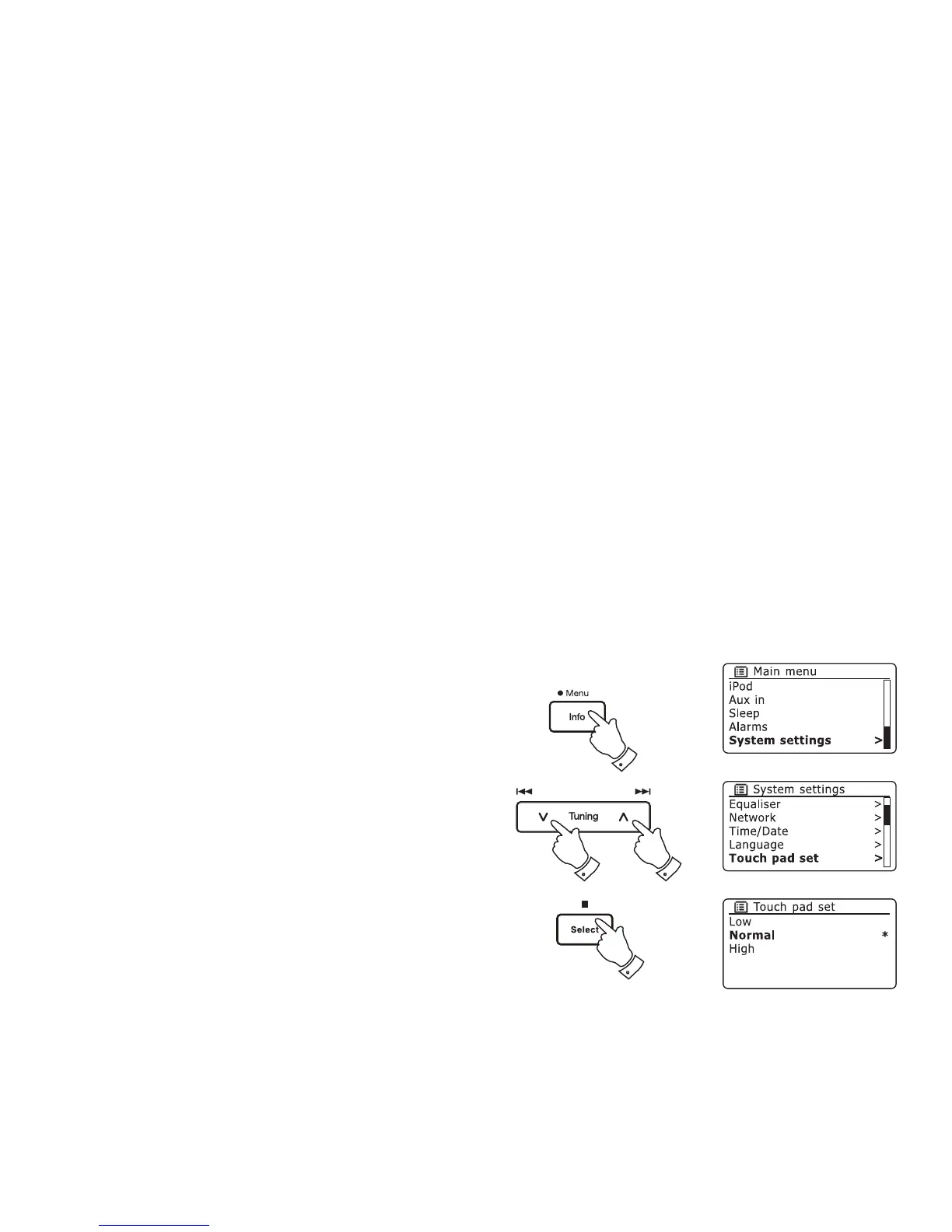
1. Access the menu for the current mode by pressing and holding the
Menu button.
2. Press the Menu Up or Down buttons until 'System settings' is highlighted
on the display. Press the Select button to enter the system settings
menu.
3. Press the Menu Up or Down button until 'Touch pad set' is highlighted on
the display. Press the Select button to enter the adjustment mode.
4. Press the Menu Up or Down buttons to highlight the desired touch
panel sensitivity level.
5. Press and release the Select button to save the new setting.
The default setting after a system reset is Normal.
2-4
2-4
2-5
1














 To Next Page