If you need any further advice, please call our Technical Helpline on 020 8758 0338 (Mon-Fri)
88
SD / USB
Deleting fi les cont.
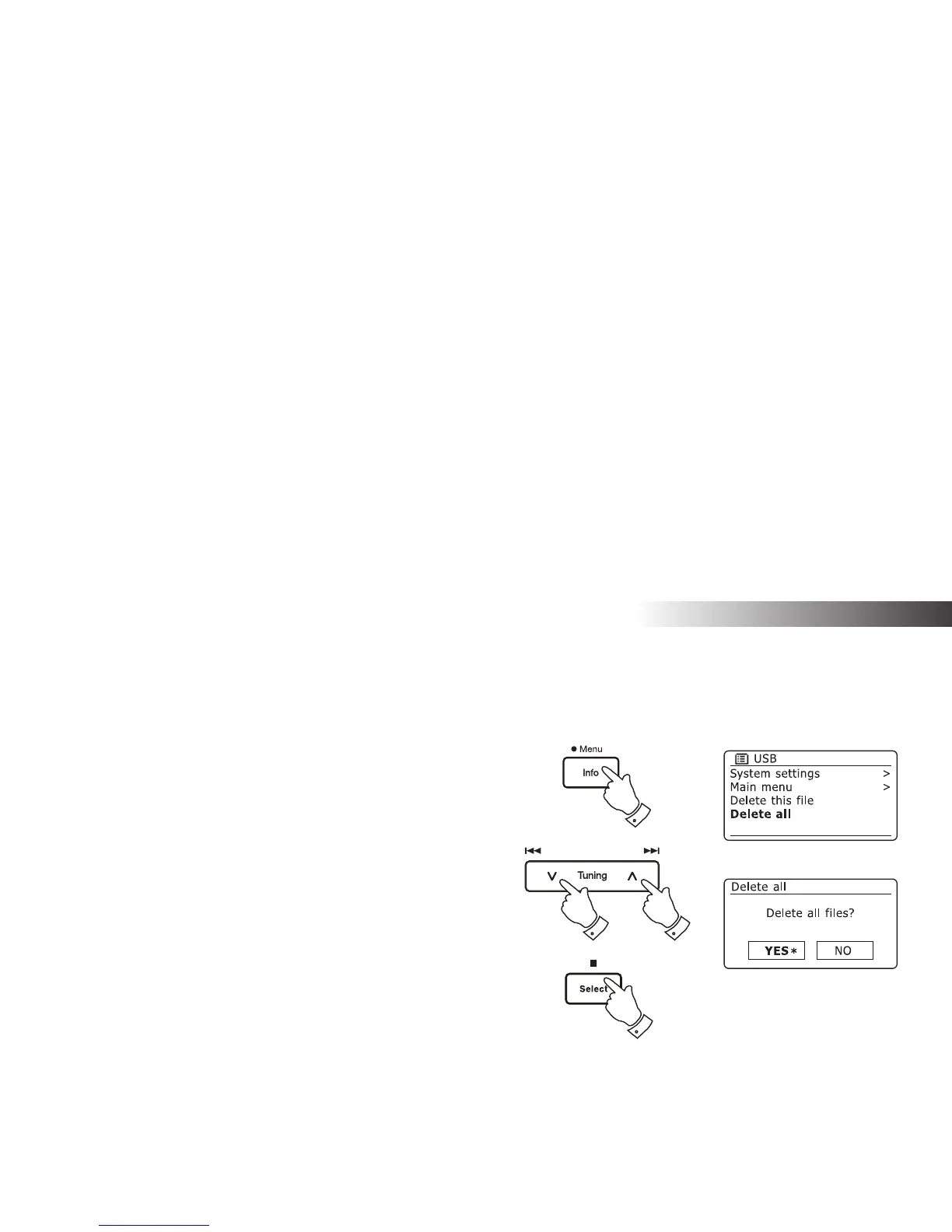
Deleting all fi les
1. With the radio in USB or SD mode, and with the media inserted press
and hold the Menu button.
2. Press the Menu Up or Down buttons until 'Delete all' is highlighted
on the display.
3. Press the Select button. The display will ask you if you wish to 'Delete
all fi les?'
4. If you do not wish to delete all the fi les, use the Menu Up or Down
button to highlight 'NO' and press the Select button to confi rm.
Alternatively, to delete all the fi les on the media use the Menu Up or
Down button to highlight 'YES' and press the Select button to confi rm
deletion.
All the fi les will be deleted. If there are no more fi les left on the media,
then the display will show 'No Music File'.
The operation will generally only take a few seconds. When completed,
the display will show
'No Music File'.
Note: Once the fi les have been deleted, it is not possible to recover the
previous contents.
1
2,4
2,4
3,4














 To Next Page