14
Programmed play
By programming the player you can play up to 20 tracks in any desired
order.
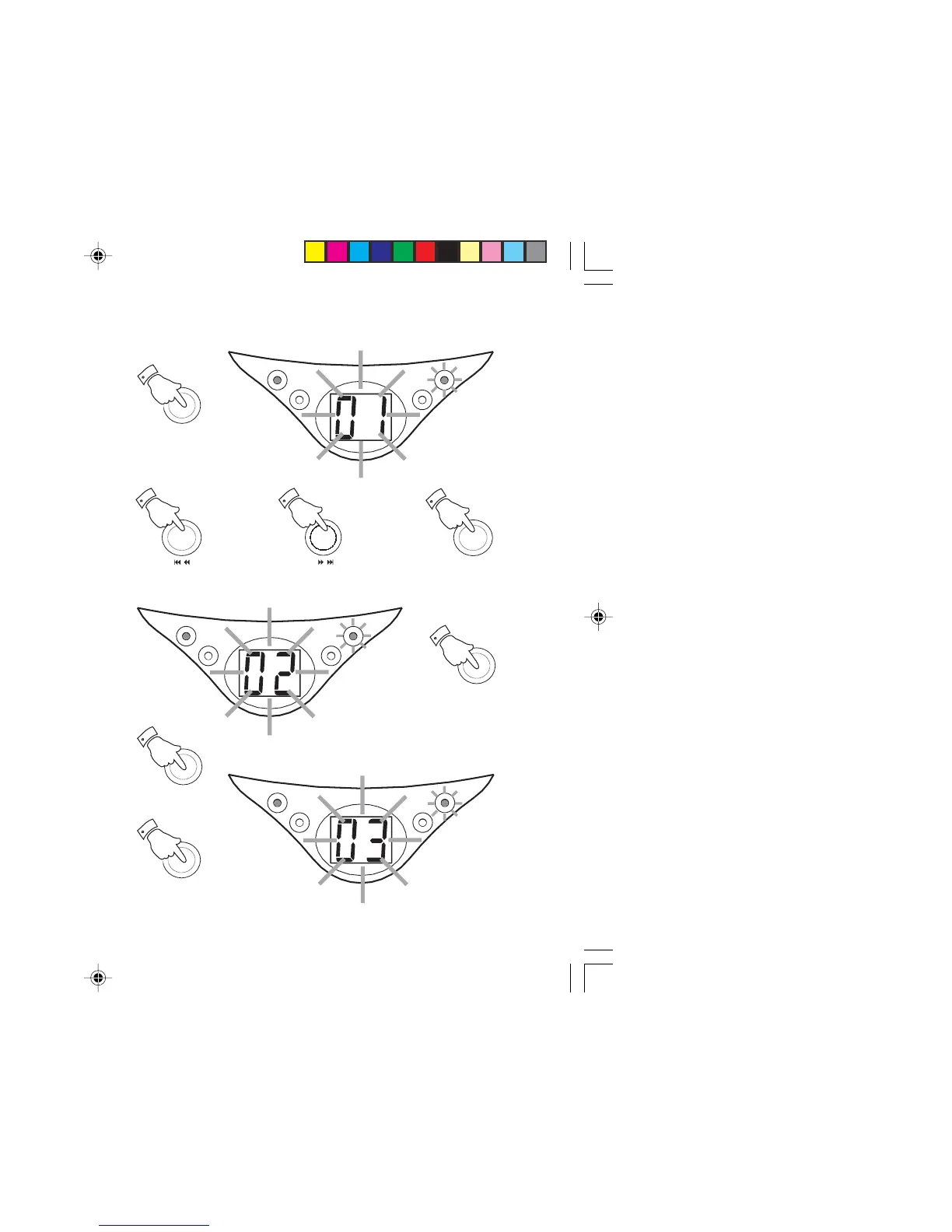
1. Whilst the CD is in Stop mode, press the
Program button
. The
display
will flash ‘01’ once before flashing '00'. The
Program
indicator
will flash.
2. Select the first track using the
F.skip
or
B.skip
buttons
. The track
number will flash on the display. Store this track by pressing the
Program button
. The display
will flash the next counter number
(‘02’) once before flashing '00'.
3. Repeat the above steps until you have completed your program
(maximum 20 tracks). Press the
Play/Pause
button to commence
play of the selected tracks.
4. To stop the program press the
Stop button
. The display will show
the total number of tracks. To resume program play press the
Program button
, the display will flash the program counter
number ('03') once before flashing the programmed track number.
PROGRAM
1
/
2
/
2
PROGRAM
2
PLAY/PAUSE
3
PROGRAM
4
STOP
4
PLAY/PAUSE
POWER
REPEAT
PROGRAM
PLAY/PAUSE
POWER
REPEAT
PROGRAM


 To Next Page