15
Editing a programme
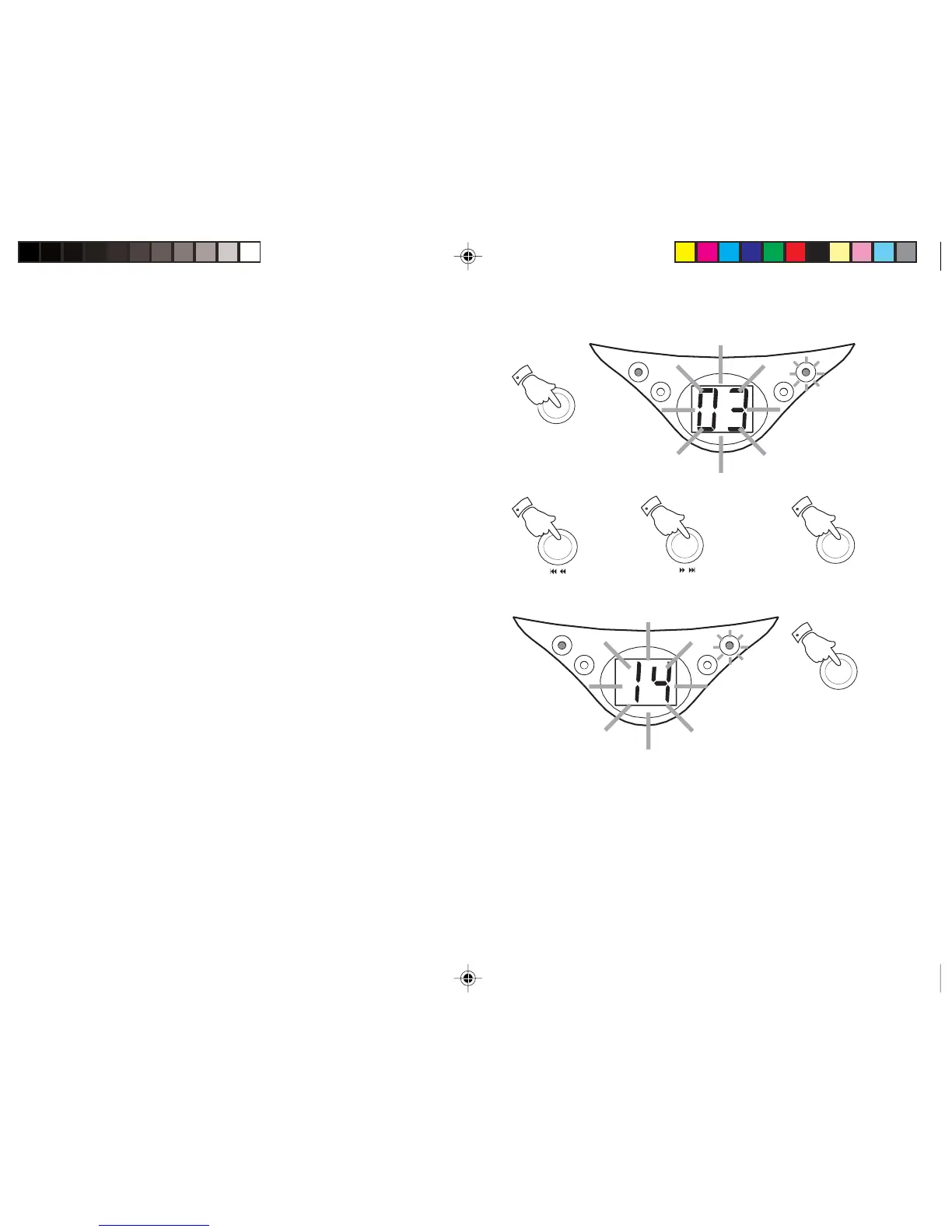
1. Whilst the CD is in Stop mode, repeatedly press the
Program
button
to step through the tracks programmed until you find the
desired counter number. The display will flash the counter number
(‘03’) once before flashing '00'. The
Program indicator
will flash.
2. Select a new track using the
F.skip
or
B.skip buttons
. The track
number will flash on the display. Store this track by pressing the
Program button
. The display will flash the selected track number
(‘14’). The new track has been stored in the program.
3. Press the
Play/Pause
button to play the revised program tracks.
PLAY/PAUSE
POWER
REPEAT
PROGRAM
PROGRAM
1
/
2
/
2
PROGRAM
2
PLAY/PAUSE
3
PLAY/PAUSE
POWER
REPEAT
PROGRAM
CD9959_INSTRUCTION_BOOK.pmd 11/25/2003, 12:07 PM15


 To Next Page