DYNAMIXEL
AX-12
Communication ->[Dynamixel]:FF FF 00 05 03 18
01 01 DD (LEN:009)
<-[Dynamixel]:FF FF 00 02 00 FD (LEN:006)
Status Packet Result NO ERROR
You can verify the Torque Enabled status by trying to move the output of the actuator by
hand.
Example 17
Setting the Compliance Margin to 1 and Compliance Slope to 0x40 for a
Dynamixel actuator with an ID of 0
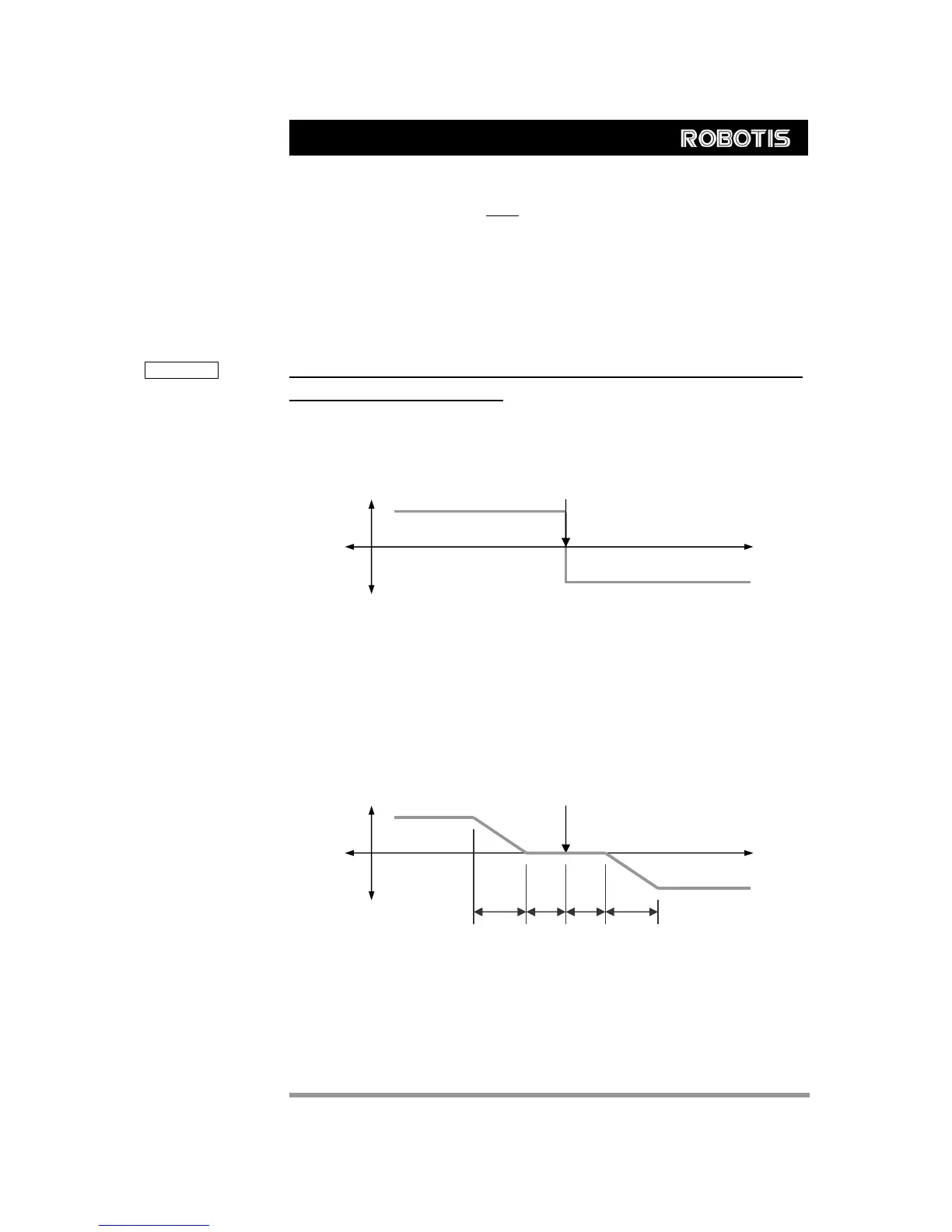
Compliance The Angle Error and Torque Output can be represented with the following graph.
CCW
X:Angle Error
CW
Goal Position CW
CCW
Even if the position deviates a little from the goal position in the CW direction, a large
amount of torque is generated in the CCW direction to compensate for this. However,
since inertia must be considered, a realistic implementation differs from this approach.
Considering this, the given conditions can be represented by the following graph.
CW Goal Position
Output Torque
Angle(Position)
D C
A
B
CCW
CW
CCW
A : CCW Compliance Slope (Address0x1D) = 0x40 (about 18.8°)
B : CCW Compliance Margin (Address0x1B) = 0x01 (about 0.29°)
C : CW Compliance Margin (Address0x01A) = 0x01 (about 0.29°)
D : CW Compliance Slope (Address0x1C) = 0x40 (about 18.8°)
27



 To Next Page