The Rocket® PSU™ Portable Suction Unit is a medical device designed for portable suction, primarily used in conjunction with chest drain bottles. This quick user guide provides essential information for its operation, maintenance, and service.
Function Description:
The Rocket® PSU™ is a portable suction unit that provides controlled negative pressure for medical applications, specifically for chest drainage. It is designed to be attached to a chest drain bottle, creating an underwater seal and facilitating the removal of air or fluid from the patient's chest cavity. The device offers various suction levels and provides real-time information on suction performance, flow rate, and air leak detection. It is equipped with a battery for portability and includes features for setting up, monitoring, and disconnecting the unit.
Important Technical Specifications:
- Power Supply: The unit is charged using a supplied 18V power supply module. A full charge takes approximately 3 hours.
- Measurement Units: The PSU™ can measure negative pressure in KPa, cmH2O, and mmHg.
- Suction Level Increments: Suction levels can be adjusted in increments of -0.5 KPa, -5 cmH2O, and 3.75 mmHg.
- Gravity Drainage Setting: A gravity drainage setting of 0.25 KPa is available.
- Filter: The R54571 filter must be changed every 24 hours. Contaminated filters must be replaced immediately to prevent compromise of suction levels and protection of the pump mechanism from fluid ingress.
- Flow Rate Measurement: Flow rate is measured in L/min.
- Data Recording: The device records data, and patient numbers are issued or maintained for continued treatment, which is important for data reading and recording.
Usage Features:
- Initial Setup:
- Unpacking and Charging: Remove all packaging, connect the 18V power supply to the PSU™ via the protected port on the back, and charge for approximately 3 hours until the battery display is full. The unit's battery is not charged upon opening and should not be connected to a patient immediately.
- Clock Time Adjustment: The clock time can be adjusted on the "New Patient" screen by pressing button 1 and holding it while pressing button 3. Alternatively, it can be set using the software program (refer to the full operator's guide).
- Attaching to Chest Drain Bottle:
- Remove the red bayonet sealing cap from the chest drain bottle by rotating anti-clockwise.
- Prime the bottle with 500ml of sterile water. Attach the tubing set by inserting the straw and cap into the aperture and twisting clockwise until it clicks shut, being careful not to touch the straw.
- Once the underwater seal is established, place the bottle on the floor and connect the drainage catheter to the tubing connector.
- Remove the handle and the green venting cap from the chest drain.
- Unwrap and place the filter onto the suction port of the R54500 or R54509 Chest Drainage bottle, ensuring the location peg is placed in the aperture where the green venting cap was.
- Place the PSU™ over the filter unit, ensuring the filter fits into the filter recess under the suction unit.
- Place the PSU™ onto the chest drain unit. With slight downward pressure, rotate the locking ring clockwise (when facing the unit) until it locks into position.
- Operating Instructions:
- Power On: Press the power button for longer than 2 seconds to turn on the device. It will perform a self-test.
- Patient Verification: Verify if the PSU™ is connected to a new patient. Confirming "YES" issues a new patient number, while "NO" maintains the current patient number for continued treatment and data recording.
- Filter Change Confirmation: The unit will prompt to confirm if the filter has been changed. Confirming "YES" proceeds to the next setup screen. If the filter needs replacing, confirming "NO" will prompt to change the filter and shut down the unit.
- Unit of Measurement: Confirm the preferred unit of measurement (KPa, cmH2O, or mmHg).
- Suction Level Setting: Set the desired suction level using the increase/decrease buttons. The levels increase in specified increments. A gravity drainage setting of 0.25 KPa is also available. Confirm the setting by pressing the appropriate button.
- Commencing Suction: Pressing and holding the confirmation button for over 2 seconds will commence the application of suction.
- Changing Suction Levels: To adjust suction levels during operation, press buttons 2 and 3 together for longer than 2 seconds. This returns to the suction level setting screen, allowing re-adjustment as per instruction 5 and 6.
- Display Modes: While suction is applied, four different display modes are available by pressing button 1:
- Screen 1: Shows suction level and flow rate (volume of air removed in L/min).
- Screen 2: Shows suction level and time of suction applied.
- Screen 3: Flow vs. Time Graph, illustrating flow and pressure progression. This includes "30 Minute Flow (high)" measured from 10 L/min, "30 Minute Flow (low)" measured from 0.5 L/min, and "Previous Minutes Flow" (not shown) measured from 0.5 L/min.
- Screen 4: Air leak indicator. If the suction pump is not engaged for a 4-hour period, it indicates no air leak and changes color. This scrolls through 4-hour blocks. This is an indication only, and further clinical checks (e.g., X-ray) should be performed before chest drain removal.
- Fall and Tilt Information: If the PSU™ or chest drain unit tips or falls, an audible alarm will sound, and specific screens will show:
- Tilt Detected: If the tilt screen is displayed, the alarm and screen will automatically switch off when the device is placed upright. The PSU™ will continue at the programmed suction level.
- Fall Detected: If the fall screen is displayed, the user is prompted to check the filter and then manually switch off the alarm and screen. The PSU™ will continue at the programmed suction level.
- Switching Off: Press and hold the power button for longer than 2 seconds to turn off the device.
- Disconnecting from Chest Drain Bottle:
- With slight downward pressure, rotate the locking ring anti-clockwise.
- Lift the PSU™ from the chest drainage bottle.
- Remove the filter from the bottle and dispose of it.
- Recharge the PSU™ for future use.
Maintenance Features:
- Filter Replacement: The R54571 filter must be changed every 24 hours. If the filter becomes contaminated by fluid, it must be replaced immediately. Contamination can compromise suction levels and the pump mechanism.
- Troubleshooting: In case of an unsuccessful self-test, refer to the troubleshooting instructions on page 26 of the full operator's guide.
- Service Information: For all service inquiries, contact Ultrasound Technologies Ltd. at +44(0)1291 425425 or via email at Service@Doppler.co.uk. Rocket Medical plc. provides customer services at 0191 419 6988.

 Need help?
 General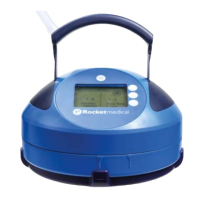

 To Next Page