3
Charging the PSU
IMPORTANT:
The suction unit battery is not charged.
DO NOT CONNECT TO A PATIENT IMMEDIATELY UPON OPENING.
1. Remove all packaging for the device and the power supply.
2. Connect the correct mains lead to the supplied 18V power supply module
and connect to an electrical supply.
3. Connect the power supply to the PSU, the power supply connection port
is on the back of the device.
It is protected, and is behind the door marked.
4. Charge the device for approximately, 3hrs until the battery display is full.
Changing the clock time
Please check the time on the device and if required change to local time.
The clock time can be changed in 2 ways:
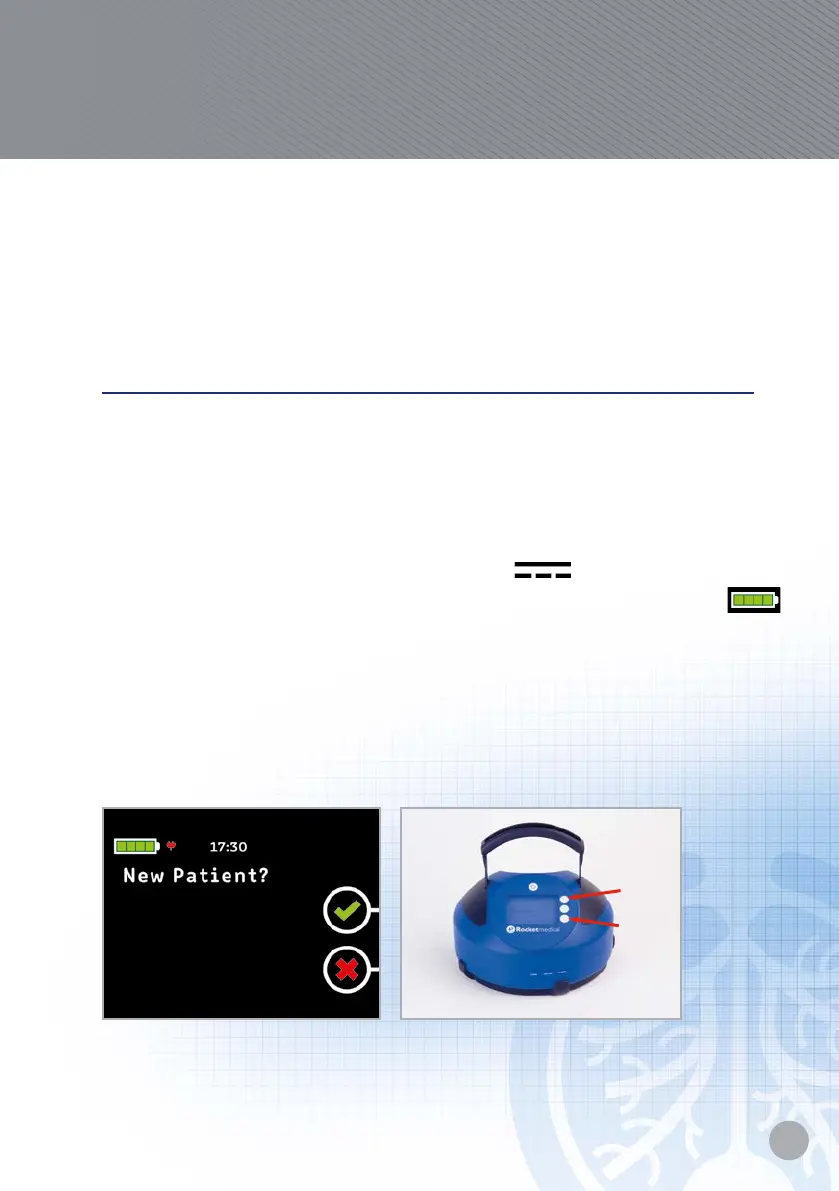
1. On the new patient screen press button 1 and while holding button 1
press button 3.
2. By using the software program – see full operators guide for instructions
on how to do this.
Rocket
®
Quick User Guide
Rocket
®
PSU
™
Portable Suction Unit
Press
1st and
hold.
Then
press.


 To Next Page