6
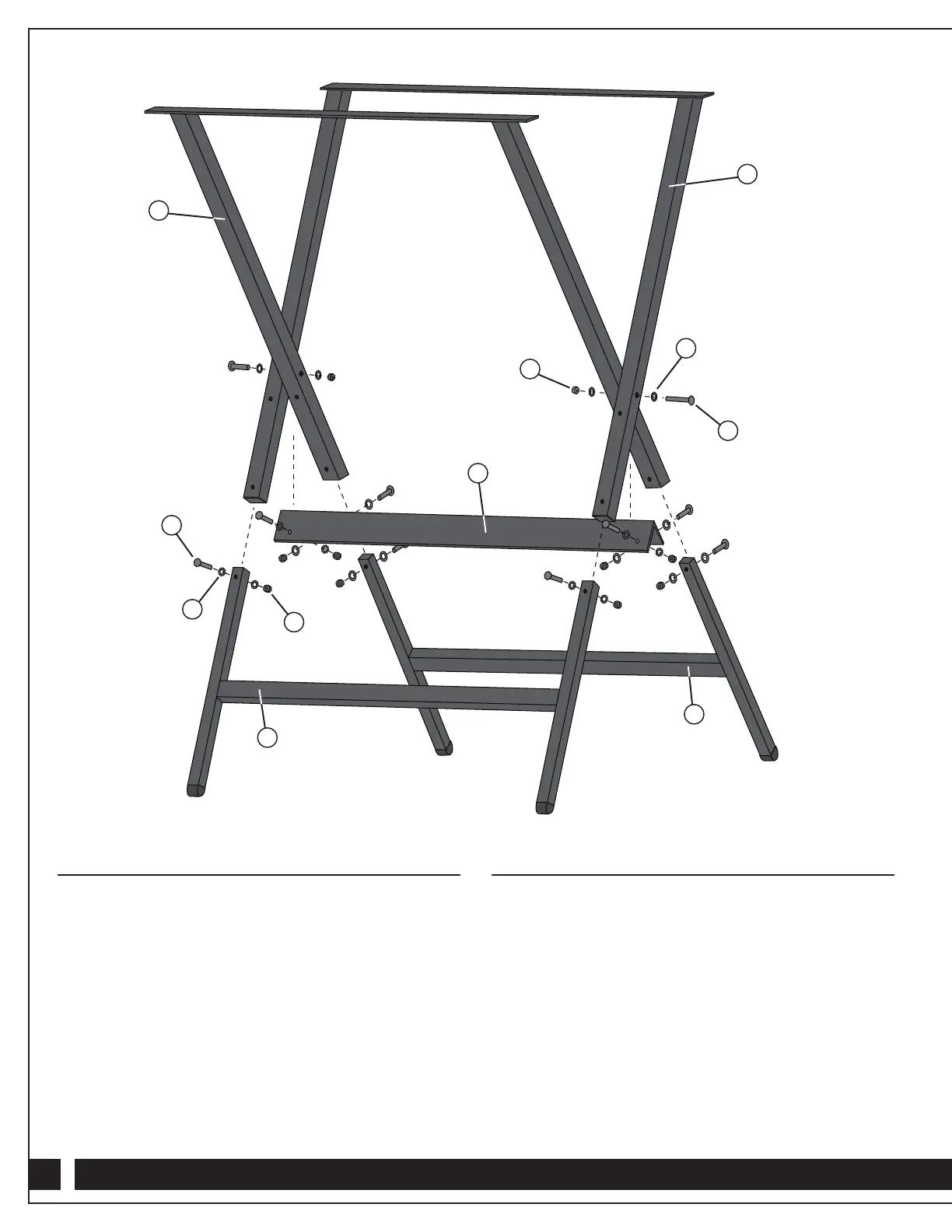
Assembling the Leg Brackets
1. Insert the Bottom Inner Leg Bracket (16) into the Top Inner
Leg Bracket (14) and align the predrilled holes.
2. At each hole, slide a Small Washer (20) onto a 5/16"-18 TPI
Hex Cap Bolt (19) and insert the Hex Cap Bolt through the
hole, making sure that the bolt head will face outward when
the legs are fully assembled. Install another Small Washer (20)
on the other end and secure with a 5/16" Nylon Nut (21) on
each bolt.
3. Repeat Steps 1 and 2 for the Bottom Outer Leg Bracket (17)
and Top Outer Leg Bracket (15).
Connecting the Leg Brackets
1. Position the Inner Leg Bracket and Outer Leg Bracket
assemblies so that their center axis holes align. Make sure
that the tops of the assemblies are oriented properly for
mounting to the router table.
2. Slide a Large Washer (23) onto each of the 3/8"-16 TPI
Hex Cap Bolts (22).
3. From the outside of the assemblies, insert a 3/8"-16 TPI Hex
Cap Bolt (22) through each of the center axis holes to join
the Inner and Outer Leg Bracket assemblies. Install another
Large Washer (23) and a 3/8" Nylon Nut (24) on each bolt
and hand tighten.
14
19
20
21
18
24
23
22
15
16
17


 To Next Page