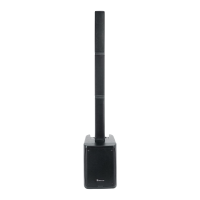
The Rockville Titan Portable Array (TPA) is a battery-powered PA speaker system with an 8-inch subwoofer, designed for portability and versatility in various settings, including outdoor performances, street parties, band practice, and small gigs. It features a built-in mixer amplifier and a rechargeable battery, making it suitable for situations where power outlets might be scarce.
Function Description
The TPA system consists of an 8-inch powered subwoofer, which houses the mixer amplifier and rechargeable battery, and three column speakers. One column contains four drivers, while the other two are empty and serve to elevate the loaded column, optimizing sound dispersion. The system is designed to deliver a clean, balanced sound with clear vocals and deep bass, thanks to its DSP-tuned audio.
It offers multiple input options for various audio sources. Channels 1 and 2 feature combo XLR/¼" TRS inputs, allowing for the connection of microphones, line-level devices, or electric guitars/basses with passive audio pickups. Channel 3 provides RCA and 3.5mm auxiliary inputs for connecting stereo signal sources like CD players, DVD music players, MP3 players, smartphones, and tablets. Each input channel has dedicated volume, treble, bass, and reverb controls, providing granular control over the audio mix.
A key feature of the TPA is its true wireless stereo (TWS) Bluetooth linking capability. This allows two TPA units to be linked wirelessly to create a stereo sound system, ideal for larger venues or events requiring broader sound coverage. The Bluetooth 5.0 chip ensures crystal-clear music streaming with a range of up to 30 feet.
The system also includes a MONITOR OUT XLR port, enabling the output of the amplifier signal to external devices such as another powered speaker, a subwoofer, an amplifier, or a mixer. This expands the system's flexibility for integration into larger audio setups. Additionally, a USB 5V/1A charging port is available to charge portable devices like phones.
A limiter function is integrated to protect the amplifier and speakers from damage by preventing clipping at extremely high volumes, ensuring consistent sound quality even when pushed to its limits. The unit operates with a highly efficient Class D amplifier, which minimizes current draw and maximizes amplifier power.
Usage Features
Setting up the TPA involves connecting the column speakers to the subwoofer and plugging in your audio sources. For optimal sound, it's recommended to set input volumes (gains) systematically. This involves unplugging all inputs except the one being adjusted, setting the line-level input device volume to 60%, the MASTER VOLUME to 75%, and then slowly increasing the AUX volume until the CLIP indicator LED illuminates or distortion is heard, at which point the volume should be slightly reduced. When connecting a mixer, the TPA's MASTER VOLUME and channel volumes should be set to 50%, with fine adjustments made on the mixer's channel level control.
For microphone presentations, it's crucial to position microphones behind the speaker to avoid feedback. The MIC/LINE selector switch on channels 1 and 2 must be correctly set (down for mic, up for line) depending on the connected device. For guitars, the HI-Z button on channel 2 should be pressed.
Bluetooth pairing is straightforward: switch on the TPA, ensure the BT/AUX selector is set to BT, activate Bluetooth on your device, and then press and hold the BT/TWS button on the TPA for 2 seconds. The unit will appear as "TITAN PORTABLE ARRAY" on your device's list. For TWS linking, one unit is designated as primary and paired with the Bluetooth device, then the BT/TWS button is pressed for 1 second on the primary unit to link with the secondary TPA.
The battery status LED indicators provide clear information on the remaining charge (100%, 60%, 25%, LOW, CHARGE), allowing users to monitor power levels during operation. The system offers a variable voltage selector (110/230V), making it adaptable for use in different regions.
Maintenance Features
To ensure the longevity and safe operation of the TPA, several maintenance guidelines are provided. The unit should never be opened, as there are no user-serviceable parts, and all servicing should be referred to an authorized Rockville service center. It is important to protect the unit from moisture and ensure it is situated in a properly ventilated area on a level and stable surface.
In case of no power, users should check if the unit is plugged in, the power switch is ON, the power cable is securely connected, and the fuse is intact. Damaged power cables should be replaced immediately. For issues with no sound or distorted sound, verifying cable connections, checking level settings, and ensuring correct input source selection (MIC/LINE button) are crucial steps. If using a mixing console, fader and balance settings should be checked.
To address buzzing sounds, using the appropriate cable type (instrument, TS unbalanced, or TRS balanced) is recommended. Microphone feedback can be avoided by positioning microphones away from and behind the speaker. Poor microphone sound may indicate that the wrong part of the combo XLR/Line port is being used.
For Bluetooth/TWS pairing failures, troubleshooting steps include ensuring both devices are on and discoverable, power cycling both devices, verifying the BT/AUX selector is set to BT, ensuring the Bluetooth device is within 5 feet of the unit, and moving both devices away from other electronics that might cause interference. It's also important to confirm that the unit is not already paired to a previously connected device or another speaker. The user-serviceable fuse in the IEC AC input port allows for easy replacement if needed.


 To Next Page
 General