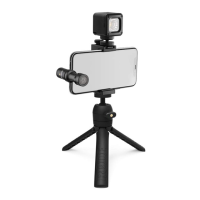
The RØDE USB-C Vlogger Kit is a comprehensive mobile content creation solution designed for use with USB-C equipped smartphones. It includes three primary components: the VideoMic Me-C, the MicroLED, and the Tripod 2, along with necessary accessories to facilitate high-quality audio and video recording.
VideoMic Me-C (USB-C Microphone)
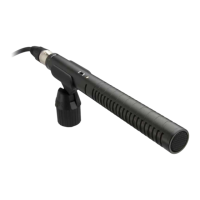
The VideoMic Me-C is a compact, high-quality directional microphone designed to plug directly into the USB-C port of a smartphone. Its primary function is to capture clear, crisp audio, significantly improving upon the built-in microphone of most mobile devices. The directional pickup pattern helps to reduce distracting background noise, focusing on the sound directly in front of the camera.
- Function Description: The VideoMic Me-C is a condenser microphone that connects directly to a smartphone's USB-C port. It features a 3.5mm headphone jack on the rear, allowing for real-time audio monitoring during recording, which is crucial for ensuring optimal sound levels and quality. This pass-through jack also enables playback of recorded audio without needing to unplug the microphone. The microphone is designed for quick and easy setup, making it ideal for on-the-go vlogging and content creation.
- Important Technical Specifications:
- Power: 5V 100mA (powered by the smartphone via USB-C).
- Connectivity: USB-C for smartphone connection, 3.5mm TRS for headphone monitoring.
- Country of Origin: Australia.
- Regulatory Compliance: CE, R-R-R72-VMMC.
- Usage Features:
- Direct Plug-in: Connects directly to the USB-C port, eliminating the need for additional cables or adapters for power and audio transmission.
- Headphone Monitoring: Integrated 3.5mm jack for real-time audio monitoring, allowing users to hear exactly what the microphone is capturing.
- Flexible Mounting: Can be oriented to face either the front or rear camera, providing versatility for different shooting scenarios (e.g., vlogging yourself or recording subjects in front of you).
- Wind Shield: Includes a furry wind shield (dead cat) to effectively reduce wind noise in outdoor environments, ensuring clear audio even in challenging conditions.
- Maintenance Features:
- No User-Serviceable Parts: The product housing should not be opened, as this will void the warranty. All service and repair should be referred to RØDE-approved service personnel.
- Cleaning: Do not use solvents or corrosive cleaning agents.
MicroLED (On-Camera Light)
The MicroLED is a compact, rechargeable on-camera light designed to provide additional illumination for mobile video recording, especially in low-light conditions. It enhances video quality by brightening the subject and reducing shadows.
- Function Description: The MicroLED provides continuous, adjustable light output to illuminate subjects. It features multiple brightness settings and a diffuser to soften the light, creating a more flattering look. The light is rechargeable via USB-C and includes a built-in battery.
- Important Technical Specifications:
- Power: 5V 900mA (for charging).
- Battery: Internal rechargeable battery.
- Battery Life Indicator: LED indicators show battery status (charging, full, >35%, <5%).
- Connectivity: USB-C for charging.
- Country of Origin: Australia.
- Regulatory Compliance: CE, R-R-R72-Micro-LED.
- Usage Features:
- Adjustable Brightness: Multiple brightness levels (indicated by green LEDs) allow users to adapt the light output to different shooting environments.
- Softening Diffuser: A clip-on diffuser helps to spread and soften the light, reducing harsh shadows and creating a more professional look.
- Integrated Battery: Powered by an internal rechargeable battery, offering portability and independence from external power sources during use.
- USB-C Charging: Conveniently recharges via a standard USB-C cable, compatible with various power adapters or computer USB ports.
- Battery Status Indicators: Clear LED indicators show charging status (red when charging, green when full) and remaining battery life (green for >35%, red for <5%), allowing users to manage power effectively.
- Power On/Off: A dedicated power button with a 2-second press to turn on/off prevents accidental activation.
- Maintenance Features:
- No User-Serviceable Parts: The product housing should not be opened, as this will void the warranty. All service and repair should be referred to RØDE-approved service personnel.
- Cleaning: Do not use solvents or corrosive cleaning agents.
- Charging: Recharge the device using the provided USB-C cable.
Tripod 2 (Tabletop Tripod)
The Tripod 2 is a versatile and compact tabletop tripod designed to provide a stable platform for smartphones and other lightweight cameras. It can be used as a desktop tripod or folded into an ergonomic grip for handheld shooting.
- Function Description: The Tripod 2 serves as a stable base for recording, preventing camera shake and allowing for hands-free operation. Its legs can be folded out to create a tripod or folded in to form a comfortable grip for handheld use, offering flexibility for various shooting styles. It features a standard 1/4-inch thread for mounting accessories.
- Important Technical Specifications:
- Mounting Thread: Standard 1/4-inch thread.
- Material: Durable construction suitable for mobile devices and lightweight cameras.
- Usage Features:
- Two-in-One Design: Functions as both a tabletop tripod for stable shots and a handheld grip for mobile shooting.
- Adjustable Angle: The ball head allows for flexible positioning and angling of the mounted device, enabling precise framing.
- Compact and Portable: Its small size and foldable design make it easy to carry and set up anywhere.
- Secure Mounting: Provides a stable and secure platform for smartphones, ensuring steady footage.
- Maintenance Features:
- Cleaning: Do not use solvents or corrosive cleaning agents.
Smartphone Grip
The kit includes a smartphone grip that securely holds the smartphone and provides mounting points for the VideoMic Me-C and MicroLED.
- Function Description: The smartphone grip securely clamps onto a smartphone, providing a stable base for attaching the microphone and LED light. It typically features cold shoe mounts or similar attachment points.
- Usage Features:
- Secure Smartphone Holding: Ensures the smartphone is firmly held during recording.
- Accessory Mounting Points: Provides dedicated spots to attach the VideoMic Me-C and MicroLED, creating an integrated vlogging setup.
- Adjustable Clamp: Accommodates various smartphone sizes.
Overall Kit Assembly and Usage
The RØDE USB-C Vlogger Kit is designed for easy assembly and immediate use.
- Mount the Smartphone: Place the smartphone into the grip, ensuring it is securely held.
- Attach the Microphone: Plug the VideoMic Me-C directly into the smartphone's USB-C port. Ensure the microphone is oriented correctly (e.g., facing forward for vlogging).
- Attach the LED Light: Slide the MicroLED onto one of the accessory mounts on the smartphone grip.
- Attach to Tripod: Mount the entire smartphone-grip-microphone-light assembly onto the Tripod 2 using the standard 1/4-inch thread.
- Power On and Record: Turn on the MicroLED, adjust its brightness as needed, and begin recording using your smartphone's camera app. Monitor audio through the VideoMic Me-C's headphone jack.
- Read and understand all instructions and safety guides completely before use.
- Ensure manuals are accessible to all users, including third parties.
- Only use with authorised RØDE accessories.
- Do not open product housing; this voids the warranty.
- Refer all service and repair to RØDE-approved personnel.
- Do not use if damaged during transportation, exposed to liquid/rain/moisture, or not operating normally.
- Use only as described in instructions.
- Keep away from liquids and electrically conductive objects not necessary for operation.
- Do not use solvents or corrosive cleaning agents.
- Do not adjust controls in environments requiring full attention (e.g., driving).
- To prevent hearing damage, do not listen at high volume levels for long periods when using the microphone's monitoring feature.
The RØDE USB-C Vlogger Kit provides a comprehensive and user-friendly solution for mobile content creators, offering enhanced audio, improved lighting, and stable camera support in a portable package.

 Need help?
 General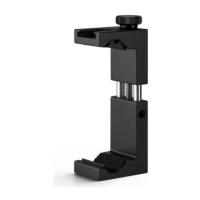

 To Next Page