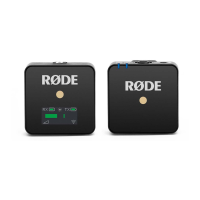
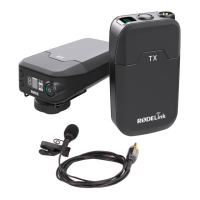
The RØDE Wireless ME is an ultra-compact wireless microphone system designed to make recording professional audio for videos effortless. It consists of a transmitter (TX) and a receiver (RX), both featuring an in-built lithium-ion battery that provides up to seven hours of operation. The system is designed for ease of use, with pre-paired units out of the box and simple manual pairing.
Function Description
The Wireless ME system captures audio from a transmitter and sends it wirelessly to a receiver. The transmitter can pick up audio using its in-built microphone or an external microphone connected via its 3.5mm input. The receiver then outputs this audio via either USB-C or its 3.5mm output to a camera, phone, computer, or other audio device.
A unique feature of the Wireless ME is the 'ME Mic' on the receiver, which allows for recording audio from both in front of and behind the camera when connected to a phone or computer and enabled via RØDE Central. This dual-microphone capability enhances versatility for various recording scenarios.
The system supports pairing up to two Wireless ME transmitters to a single receiver, expanding its utility for multi-person interviews or dual audio sources. When using multiple microphones (including the ME Mic), the system offers 'Split' and 'Merged' recording modes. In 'Merged' mode, all audio sources are combined into a single summed output, simplifying post-production. In 'Split' mode, the transmitter(s) and receiver's microphone audio are recorded onto separate channels (left and right), allowing for independent editing and mixing.
Important Technical Specifications
- Components: One transmitter (TX) and one receiver (RX).
- Microphone Inputs (TX): In-built microphone, 3.5mm TRS input for external microphones (e.g., Lavalier GO, VideoMicro II).
- Audio Outputs (RX): 3.5mm TRS output, USB-C output.
- Connectivity: Wireless (proprietary RØDE Series IV 2.4GHz digital transmission), USB-C.
- Battery: In-built lithium-ion, up to 7 hours battery life per unit.
- Charging: Via USB-C (SC22 USB-C to USB-C cable included).
- OS Requirements for RØDE Central: MacOS 10.14 or later; Windows 10 Version 1803 or later; iOS 14 or later; Android 9.0 or later.
- Included Cables: SC2 TRS cable (for camera connection), SC21 USB-C to Lightning cable (for iOS devices), SC22 USB-C to USB-C cable (for Android/computers). An optional SC7 TRS to TRRS cable (grey plug) can be used for phones, tablets, and laptops with TRRS inputs.
- Output Gain Control: Three levels (Low - 0dB, Medium - 10dB, High - 20dB).
Usage Features
- Powering On/Off: Press and hold power buttons on both TX and RX for three seconds.
- Pairing: Units are pre-paired. For manual pairing, short-press the power button on both powered-on units. Unpaired units automatically power down after three minutes.
- Attachment: Both TX and RX feature a clip for attaching to clothing, belts, or camera cold shoe mounts. The optional MagClip GO allows direct attachment to magnet-compatible smartphones (e.g., MagSafe iPhones).
- External Microphone Connection: Plug an external microphone into the TX's 3.5mm input to bypass the in-built microphone.
- Camera Connectivity: Use the supplied SC2 TRS cable to connect the RX to a camera's 3.5mm TRS input.
- Computer Connectivity: Use the supplied USB-C to USB-C cable to connect the RX to a computer's USB-C input, selecting "Wireless ME RX" as the input device. For USB-A ports, an optional USB-C to USB-A cable (e.g., RØDE SC18) is required.
- Mobile Device Connectivity: Use the supplied SC21 USB-C to Lightning cable or SC22 USB-C to USB-C cable to connect the RX to a smartphone or tablet.
- RØDECaster Series Integration: Up to two Wireless ME transmitters can be paired with a RØDECaster Pro II or RØDECaster Duo, integrating them as input channels with APHEX® processing and effects.
- GainAssist Technology: Intelligent automatic level control with three modes:
- Auto: Provides a smoother, more consistent sound, ideal for interviews with fluctuating audio levels.
- Dynamic: Balances audio while maintaining dynamics for a more "natural" sound in controlled environments.
- Off: Disengages GainAssist.
- ME Mic (Receiver Microphone): Can be enabled via RØDE Central to record audio from the receiver, allowing for dual-camera recording perspectives.
- Output Gain Adjustment: Adjustable via RØDE Central to match the input sensitivity of the connected recording device.
- Camera Settings Optimization: Recommended to turn off camera's internal audio processing (equalization, noise reduction, AGC) when using Wireless ME for optimal sound quality.
- Windshields: Two furry windshields are included for reducing wind noise. They attach by aligning white dots on the windshield with black dots on the TX/RX unit, then pushing down and twisting clockwise to lock.
- RØDE Capture App: A video recording app for professional video and audio capture, offering Wireless ME device configuration and a dual-camera mode that automatically enables the ME Mic.
- RØDE Connect Software: A desktop application for podcasting and streaming, allowing connection of up to four Wireless ME receivers/transmitters to a single computer with dedicated outputs for streaming software.
- RØDE Reporter App: A mobile recording app for iOS and Android that serves as a companion for RØDE microphones, providing a simple solution for recording audio on a phone.
Maintenance Features
- LED Indicators: Provide feedback on battery status and connectivity.
- Connectivity LED: Flashes slowly when unpaired, flashes quickly when attempting to pair, solid when successfully paired. Amber when ME Mic is off, green when ME Mic is on.
- Battery LED: Amber when battery is low, red when very low, flashing red when critical. Flashes green while charging, solid green when fully charged.
- RØDE Central Software: A desktop and mobile companion app for comprehensive device configuration, including:
- Enabling/disabling the ME Mic.
- Setting GainAssist mode (Auto, Dynamic, Off).
- Pairing/unpairing up to two transmitters.
- Switching between Split and Merged modes.
- Setting output gain.
- Adjusting LED brightness (via "Dim" option).
- Updating to the latest firmware.
- Firmware Updates: Performed via RØDE Central by connecting the RX and TX units to a computer (or mobile device, one unit at a time). Users are typically prompted for updates, or can manually initiate them.
- Charging: Units can be used while charging.

 Need help?
 General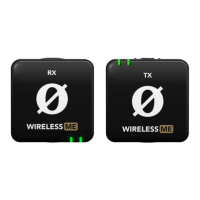

 To Next Page