EasyManua.ls Logo

RODE Microphones Wireless ME - Getting Started; Powering On and Pairing; Manually Pairing Devices

RODE Microphones Wireless ME
23 pages
Print Icon
To Next Page IconTo Next Page
To Previous Page IconTo Previous Page
Loading...
2/20/24, 9:52 AM
Wireless ME | USER GUIDE & SUPPORT | RØDE
https://rode.com/en-us/user-guides/wireless-me
3/23
6
Connectivity
Indicator
LED
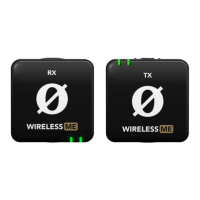
Getting Started
The
Wireless
ME
consists
of
both
a
transmitter
TX
and
receiver
RX
.
The
transmitter
picks
up
audio
either
with
its
in
-
built
microphone
or
an
external
mic
plugged
into
its
3.5
mm
input
,
and
then
transmits
this
audio
to
the
receiver
wirelessly
.
The
receiver
then
sends
this
audio
via
either
USB
C
or
its
3.5
mm
output
to
your
camera
,
phone
,
computer
or
another
audio
device
.
Powering
On
and
Pairing
To
turn
on
your
Wireless
ME
,
simply
press
and
hold
the
power
buttons
on
both
the
transmitter
and
receiver
for
three
3
seconds
.
Repeat
the
process
to
power
down
both
units
.
The
Wireless
ME
s
transmitter
and
receiver
are
already
paired
out
of
the
box
.
When
you
turn
them
both
on
,
you
ll
notice
the
connectivity
indicator
LED
on
the
RX
unit
flash
amber
*
briefly
before
turning
to
solid
amber
,
indicating
that
it
has
paired
to
the
transmitter
.
Manually
Pairing
With
both
units
powered
on
,
simply
short
-
press
the
power
button
on
the
transmitter
and
receiver
to
enter
pairing
mode
.
As
long
as
neither
unit
is
already
paired
to
another
device
,
they
will
quickly
pair
and
the
connectivity
indicator
LEDs
will
remain
solid
.
Note
:
Both
the
transmitter
and
receiver
will
automatically
power
down
after
three
3
minutes
if
they
aren
t
paired
.
*
The
connectivity
LED
may
be
green
rather
than
amber
if
the
ME
Mic
is
switched
on
.
See
the
below
section
on
the
ME
Mic
to
learn
more
.
Wireless
ME
/
USER
GUIDE
&
SUPPORT
EN
US
0

Other manuals for RODE Microphones Wireless ME

Related product manuals