Need help?
Do you have a question about the Rogerblack Gold and is the answer not in the manual?
Safety guidelines to follow before and during the equipment assembly process.
Precautions for safe operation, including user weight limits and environment.
Lists and illustrates all the various parts included with the cross trainer.
Lists and illustrates all the hardware like bolts, nuts, and washers for assembly.
Instructions for attaching the front and rear stabilizers to the main frame.
Attaching footplates to bars and connecting them to the crank connector.
Securing the front post and connecting the wire harness to the main frame.
Connecting the left and right footplate bars to their respective action arms.
Securing the fixed handle and mounting the console unit.
Inserting and fixing the left and right handlebars into the action arms.
Attaching covers, bottle bracket, and footplate bar covers.
Defines the necessary clearance around the equipment for safe use.
Instructions for connecting the power charger and moving the cross trainer.
Explanation of each button on the computer console and its function.
Details on the LCD display elements and technical specifications.
Guide to choosing and setting up manual, fixed, and body fat programs.
Steps to perform and interpret the body fat measurement.
Instructions for setting up and using the target heart rate program.
Using programs that automatically adjust resistance based on heart rate.
Guide for setting up a custom user program with specific resistance levels.
How to perform the recovery test and understand the results.
Visual representation of resistance levels for programs 1 through 8.
Visual representation of resistance levels for programs 9 through 13.
Advice on preparing for exercise and managing intensity with heart rate.
Identifies the primary muscle groups worked by the exercise routine.
Guidance on structuring workouts with warm-ups, cool-downs, and frequency.
Instructions for performing various stretches for different muscle groups.
Steps for examining, lubricating, cleaning, and tightening the equipment.
Guidance on proper disposal of the equipment and batteries.
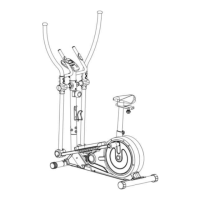
A visual breakdown of the cross trainer showing all assembled parts.
A comprehensive list of all parts with their descriptions and quantities.
Continuation of the parts list with additional components and quantities.
 General
| Brand | Rogerblack |
|---|---|
| Model | Gold |
| Category | Fitness Equipment |
| Language | English |


 To Next Page