Button Function
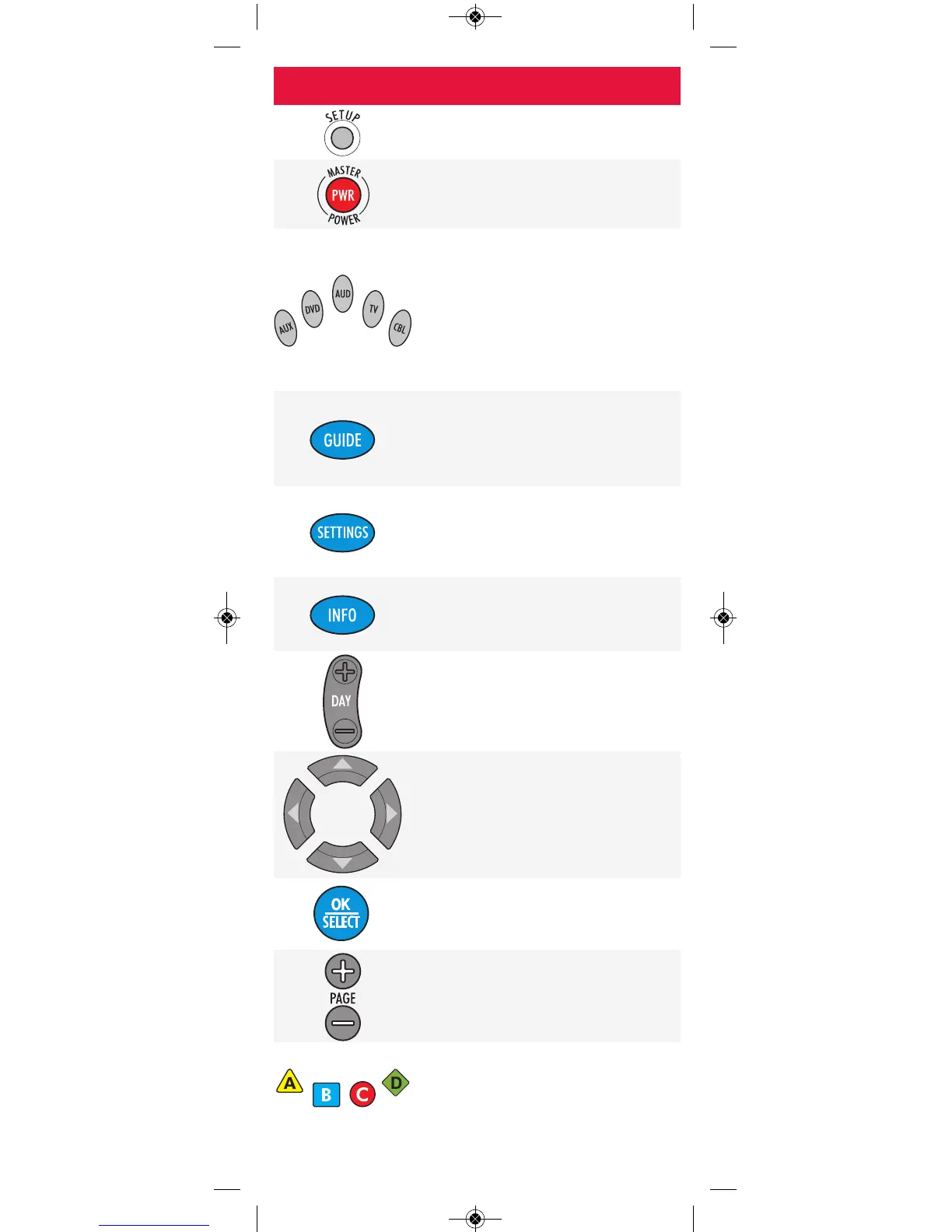
Use SETUP for all programming
sequences.
Press PWR once to turn on or off a
home entertainment device or
component.
Press AUX, DVD, AUD, TV or CBL
once to select the home entertainment
device you want to control. Also see
the Device Types table on page 5.
Each device button has a light that
blinks when selected and indicates the
remote is working.
Press GUIDE once to display the
Quick Start Menu, press GUIDE a
second time to display the Interactive
Program Guide.
Press SETTINGS once to display the
Quick Settings menu, press SETTINGS
a second time to display the General
Settings menu.
Press INFO to display the current
channel/program information or
highlighted menu option.
Press DAY+ (or DAY-) to move a day
forward (or back) within the
Interactive Program Guide.
Use the arrow buttons to navigate
within the Interactive Program Guide,
Settings, Quick Start Menu and most
other screens.
Press OK/SELECT to choose options,
PPV events and to tune to programs
from the Interactive Program Guide.
Press PAGE+ (or PAGE-) to page up
(or page down) through menu screens
and the Interactive Program Guide.
A, B and C buttons can be used to
access additional menu options. The D
button (where applicable) is for future
use.
-3-


 To Next Page