EasyManua.ls Logo

Rohr HP-200PP - Quick Start Guide - Setup

Default Icon
9 pages
Print Icon
To Next Page IconTo Next Page
To Previous Page IconTo Previous Page
Loading...
HP-160L
/HP-200PP /
HP-250PP
ROHR
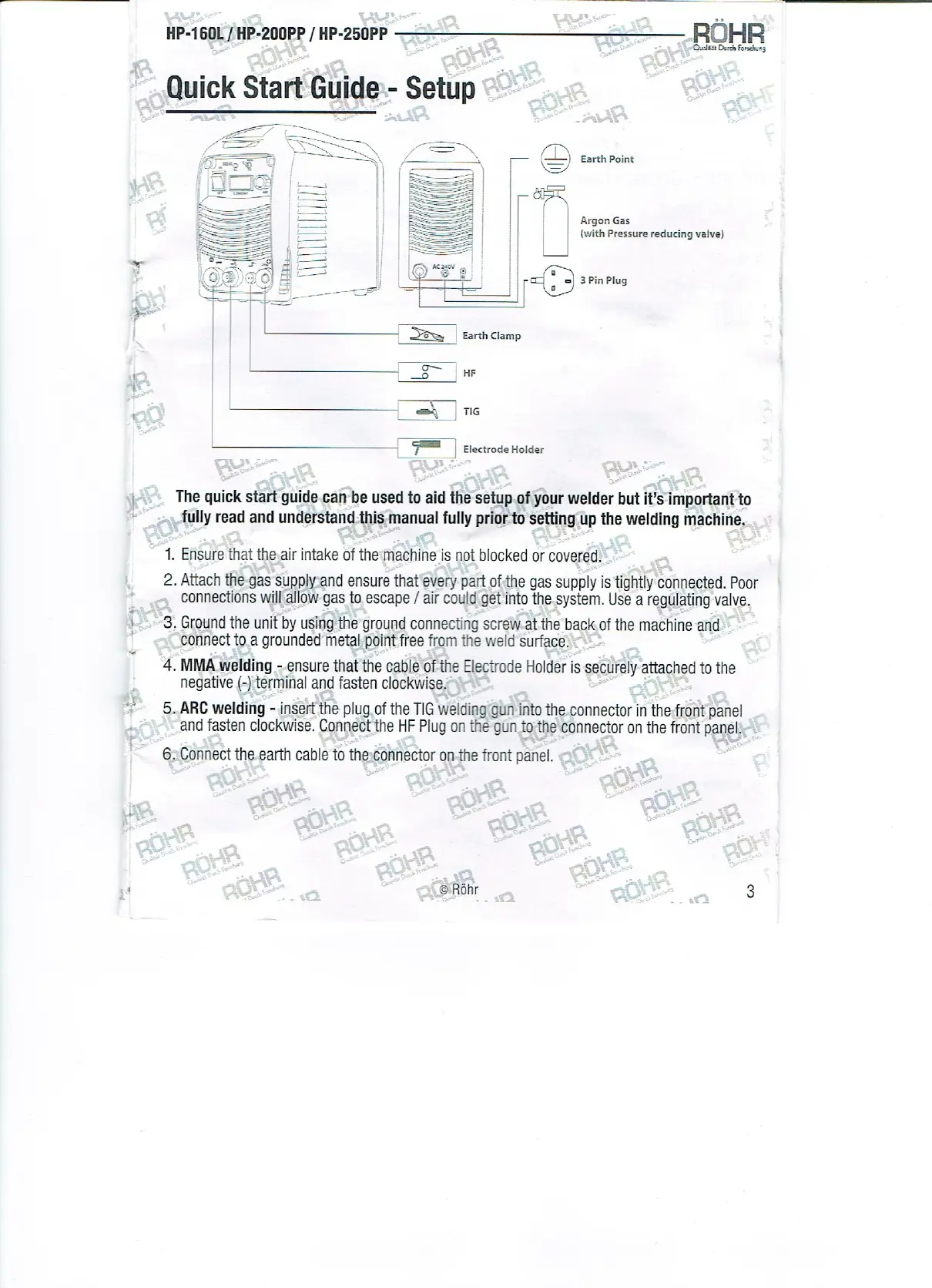
Quick
Start
Guide--
Setup
Qusssr Durch
Forschung
©
rears
oS
arth Poin
fy
|
Argon
Gas
|
(with
Pressure
reducing
valve)
oO”
e
a
“-
=
re
3 Pin
Plug
Ye,
Earth
Clamp
a
HF
=,
TIG
Fs
Electrode
Holder
The
quick
start
guide.can
be used to aid the
setup.of your
welder but it’s
important
to
fully
read and
understand:this
manual
fully
prior
to
setting up
the
welding
machine.
1. Ensure that the.air
intake
of the machine is not
blocked
or covered.
2. Attach
the-gas supplyand
ensure that
every part
of
the
gas
supplyis tightly
connected. Poor
connections will
allow-gas
to
escape
/ air
could
get
into the
system.
Use a
regulating
valve.
3.
Ground the unit
by
using
the
ground connecting
screw.at
the back.
of the machine
and
connect to.a
grounded
metal
point
free from the weld
surface.
4, MMA
welding
--ensure that the cable of the
Electrode
Holderis
securely-attached
to the
negative
(-)
terminal and fasten
clockwise.
5. ARC welding
-
insert
the
plug
of
the TIG
welding gun
into the.
connector in
the-front
panel
and fasten
clockwise.
Connect the HF
Plug
on the
gun
to
the connector on the
front
panel:
6> Connect the-earth cable
to
the:connector on-thefront
panel.
©
Rohr
2

Other manuals for Rohr HP-200PP

Related product manuals