WWW.FOSCAM.COM FI8918/FI8918W User Manual
3.6 Wireless LAN Settings
Please view How to set Wireless LAN Settings in Quick Installation Guide.
3.7 ADSL Settings
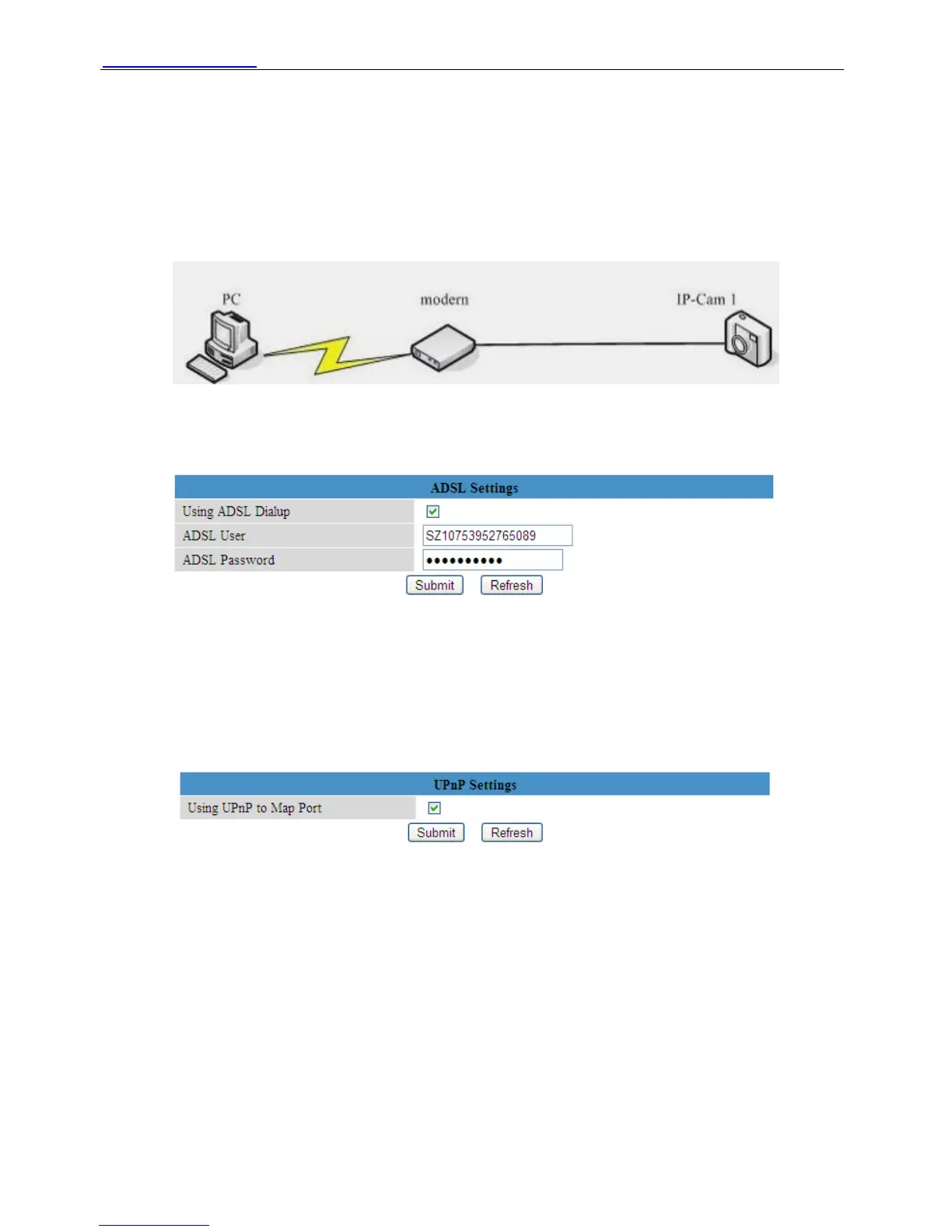
Figure 3.15
When connected to the Internet through ADSL directly, you can enter the ADSL username and
password obtained from ISP.
Figure 3.16
3.8 UPnP Settings
Choose Using UPnP to MAP Port and then click Submit.
Figure 3.17
Here the software inside the camera for UPnP only contains port forwarding now. It also has
much relation with security settings of your router, sometimes, it may show error information. So
we recommend you do port forwarding manually in your router.
3.9 DDNS Service Settings
Please view the detail information in Quick Installation Guide about How to set DDNS Service
Settings.
Shenzhen Foscam Intelligent Technology Co., Limited
Tel: 86 755 2674 5668 Fax: 86 755 2674 5168
28


 To Next Page