WWW.FOSCAM.COM FI8918/FI8918W User Manual
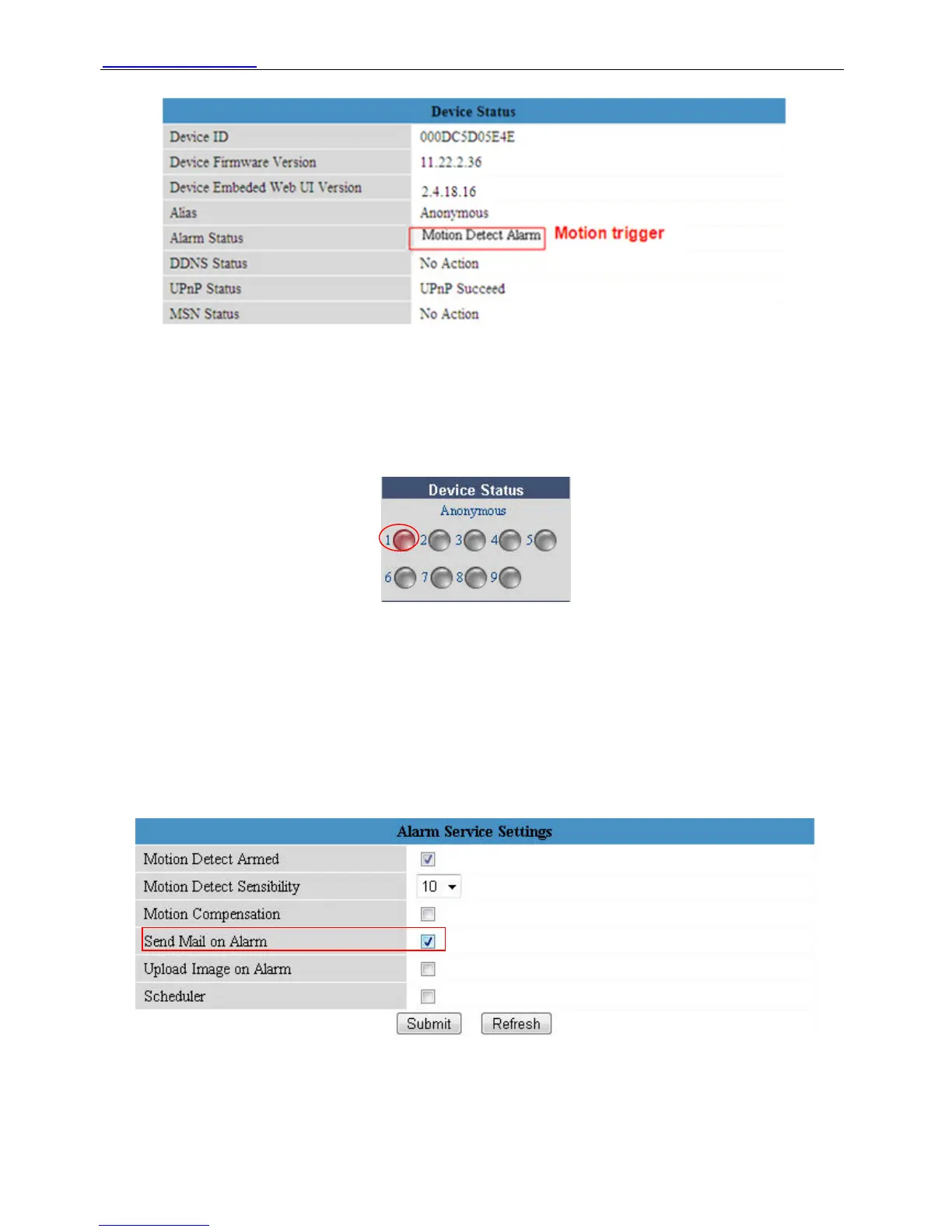
Figure 3.26
If motion trigger after you enable Motion Detect Armed. Alarm Status will turn to Motion Detect
Alarm.
There are five representation of alarm.
1) The light turns red when motion trigger.
Figure 3.27
2) Plug an earphone or a speaker in the computer; you can hear beep sound when the light
turns red.
3) The camera will record automatically It will recording for one minute after motion trigger.
You can find the recording file in the folder which you set to store alarm record. (Figure 3.3)
4) Send mails when motion trigger.
If you want to receive images when motion trigger. You need set Mail Service Settings first.
(Figure 3.18) Then set motion alarm as follows:
Choose it
Figure 3.28
If you want the camera send mails in a special time range, not all the time when motion trigger,
but only during the time you wish. You can choose Scheduler and set time range for motion
alarm. (Figure 3.30)
Shenzhen Foscam Intelligent Technology Co., Limited
Tel: 86 755 2674 5668 Fax: 86 755 2674 5168
34


 To Next Page