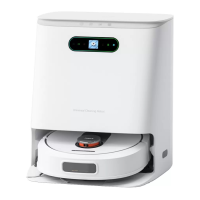
This document describes the ROIDMI Self-Cleaning and Emptying Robot Vacuum, a smart appliance designed for automated floor cleaning. It includes a robot cleaner and a base station, offering functionalities such as vacuuming, mopping, self-cleaning, and automatic dust collection.
Function Description:
The Robot Cleaner is equipped with a variety of sensors and components to navigate and clean effectively. Key features include:
- LDS sensor: For precise mapping and navigation.
- Bumper: To detect obstacles and prevent collisions.
- Infrared window/receiving sensor: For communication and obstacle detection.
- Wall sensors: To follow walls and clean edges.
- Anti-fall sensors (x6): To prevent falling down stairs or ledges.
- Carpet detection sensor: To adjust cleaning mode on carpets.
- Universal wheel and Driving wheels (x2): For mobility.
- Side brush: To sweep debris from edges and corners into the main cleaning path.
- Roller brush: For deep cleaning and agitation of dirt.
- Mops (x2): For wet cleaning and mopping.
- Dust box: To collect dry debris, with a removable filter element.
- Charging contacts (x2): For automatic recharging at the base station.
- Function buttons: Including an Area cleaning button (short press for local cleaning, automatic recharge after cleaning, or pause), a Switch button (short press for overall cleaning, automatic recharge after cleaning, long press to switch on/off, or pause), and a Recharge button (short press to recharge).
The Base Station serves as the central hub for the robot cleaner, providing multiple functions:
- Automatic dust collection: Empties the robot cleaner's dust box into a disposable dust bag.
- Charging: Recharges the robot cleaner's battery.
- Mop cleaning: Washes and air-dries the robot's mops.
- Water tanks: Includes a clean water tank (4L capacity) and a dirty water tank (4L capacity).
- Dust bag: A disposable bag for collected dust (3L capacity).
- Display screen: Provides status indicators and error messages.
- Infrared lens (x2) and Charging ports (x2): For communication and charging with the robot.
- Function buttons: Mop cleaning, Recall/issue (robot cleaner), Start/Pause (base station), and Automatic dust collection.
- Status indicators: Light strip, color display screen, and specific icons for automatic dust collection, network connection, waste water tank status, clean water tank status, robot cleaner battery, and smart air-drying.
Important Technical Specifications:
Robot Vacuum:
- Product Model: SDJ06RM/SDJ06RMB
- Operating Voltage: 14.4V
- Battery Capacity: 5200mAh (Lithium battery)
- Product Weight: Approximately 4.2kg
- Charging Time: Approximately 250 minutes
- Dust Box Volume: Approximately 220ml
- Rated Power: 48W
- Charging Limit Voltage: 24V-1.2A
- Product Size: 330 x 330 x 106mm
- Noise: <77dB (A)
- HVIN: SDJ06RM/SDJ06RMB
Base Station:
- Product Model: JCZ06RM/JCZ06RMB
- Dust Collection Power: 850W
- Cleaning Power: 40W
- Rated Output: 24V-1.2A
- Product Weight: Approximately 9.8kg
- Dust Collection Time: Approximately 12 seconds
- Clean Water Tank: Approximately 4L
- Charging Power: 30W
- Rated Input: 100-130V~, 50-60Hz
- Product Size: 400 x 382 x 465mm
- Noise: <86dB (A)
- Dust Bag Capacity: Approximately 3L
- Waste Water Tank: Approximately 4L
- HVIN: JCZ06RM/JCZ06RMB
- Network Standby Power Consumption: 1.68W (Base Station only), 0.90W (Robot Vacuum + Base Station)
- Network Standby Time: 5 minutes
- Frequency Range: 2400-2483.5MHz
- Maximum Transmitting Power: 20dBm (EIRP)
- Class I Laser Product: DC5V, 240mA, WA 800nm, IEC
Usage Features:
- Quick Installation: Involves removing protective materials, attaching mops, placing the base station horizontally (at least 0.5m from sides, 1.5m from front, and 0.5m from top obstacles), filling the clean water tank, and connecting to power.
- APP Integration: Supports both ROIDMI APP and Mi Home APP for remote control, scheduling, and programming. Users can scan QR codes to download the apps and follow instructions for device pairing.
- Cleaning Modes: Offers overall cleaning and area cleaning.
- Automatic Recharge: The robot automatically returns to the base station for charging when needed.
- Product Operation and Programming:
- Powering On/Off: Long press the switch button on the robot.
- Charging: The robot automatically returns to the base station.
- Overall Cleaning: Short press the switch button on the robot or use the app.
- Area Cleaning: Short press the area cleaning button on the robot or use the app.
- Operation Failure: The robot provides voice broadcasts and flashing lights for troubleshooting.
- Dormant Mode: Enters dormant mode after 10 minutes of inactivity.
- Automatic Dust Collection: The base station automatically collects dust after cleaning.
- Reset Button: Used to reset the system and Wi-Fi connection.
- Safety Precautions: Emphasizes not using the appliance on wet surfaces, with flammable liquids, or near combustible dust. Users are warned against self-disassembly and to keep children and pets away. Specific warnings are provided for both the robot cleaner and the base station regarding power cords, abnormal operation, and environmental conditions.
- RF Exposure: Complies with FCC and ISED RF radiation exposure limits, requiring a minimum distance of 20cm between the radiator and the user's body.
Maintenance Features:
- Roller Brush Cleaning: Remove the roller brush by pressing release buttons, clean entangled hair and fibers, and reinstall. Recommended replacement every 3-6 months.
- Side Brush Removal and Cleaning: Unscrew and remove the side brush, clean entangled debris, and reinstall. Replace according to factory configuration.
- Dust Box and Filter Element Cleaning:
- Remove the dust box by opening the top cover and pressing the release button.
- Dump trash and clean hard-to-reach corners with a cleaning brush.
- Remove the filter element, clean it with a cleaning tool, and reinstall or replace.
- Rinse the dust box and filter element with clean water, ensuring complete dryness before reinstallation to prevent odors and clumping.
- Mop Disassembly and Cleaning: Remove the mopping module and mops, rinse with clean water, and air-dry. Recommended replacement every 3-6 months.
- Robot Cleaner Part Cleaning:
- Wipe charging contacts, anti-fall sensors, LDS sensors, and infrared transmitters with a soft, dry cloth.
- Clean the universal wheel by pulling it out, removing hair and dirt, washing with water, and reinstalling after drying.
- Base Station Cleaning:
- Dust Bag Replacement: Replace the dust bag every 6-8 weeks when the dust-full indicator flashes.
- Dust Channel Cleaning: In power-off state, check for blockages in the transparent module of the dust channel and dust inlet, and clean as needed.
- Infrared Lens and Charging Ports Cleaning: Wipe with a soft, clean cloth to ensure they are free of debris.
- Waste Water Tank Cleaning: Open the top cover, remove the waste water tank, dump dirty water, clean the tank and filter sponge, and reinstall.
- Cleaning Plate/Base Cleaning: After use, discharge water from the cleaning plate, clean with a long cleaning brush, and suck up sewage.
Troubleshooting:
The manual provides extensive troubleshooting tables for both the robot cleaner and the base station, addressing common issues such as:
- Robot not booting, not charging, slow charging, or unable to recharge.
- Abnormal noise during cleaning.
- Wi-Fi connection issues.
- Roller brush, side brush, or main wheel getting stuck.
- Dust box or filter issues.
- Battery temperature abnormalities.
- Sensor blockages.
- Base station errors related to recharge failure, restricted areas, mop component issues, water tank problems (empty, full, abnormal), and dust bag status.
- Abnormal dust collection or wind pressure.
Many solutions involve checking for obstructions, cleaning specific parts, ensuring proper installation of components, or resetting the device/Wi-Fi. For persistent issues, contacting after-sales service is recommended.

 Need help?
 General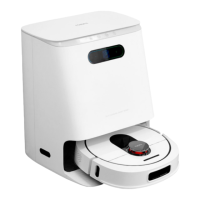

 To Next Page