EN
ELBA LCD DIGITAL TOWEL RAIL
17
5.4. SELECT EITHER THE MANUAL, AUTOMATIC OR PILOT MODE*
(*ONLY UPON DEMAND)
To select either the MANUAL, AUTO, AUTO1, AUTO2, AUTO3, AUTO4 or PILOT modes you
need to press the button and keep pressing until the mode you want is highlighted.
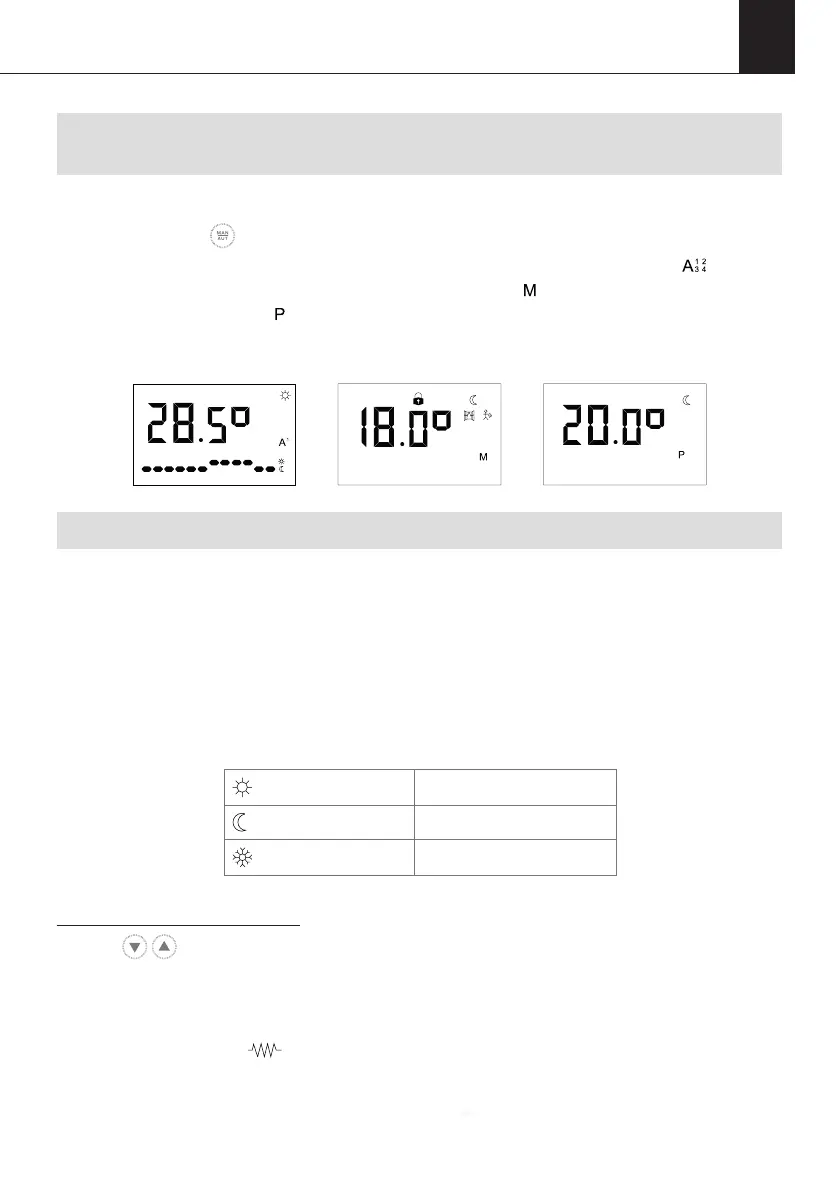
On the display panel, the A icon will appear when you are in AUTO mode. The icon will
appear when you are in one of the AUTO modes (1-4), the icon will appear when you are
in MANUAL mode and the icon will appear when in PILOT mode (not available).
5.4.1. MANUAL MODE
When MANUAL mode is selected the set temperature, MANUAL mode icon, COMFORT/
ECO/ANTI-FROST icon and the time/day of the week will be displayed on the screen. The
set temperature and the hour will alternate every 5 seconds on the screen.
In MANUAL mode you can choose a set temperature and the corresponding COMFORT/
ECO/ANTI-FROST icon will appear on the screen according to the ranges below:
To adjust the set temperature:
Use the buttons to either increase or decrease the temperature respectively. When
you choose a temperature in the table above, the corresponding icon will appear on the
screen.
When the room temperature is lower than the set temperature on the display panel, the
product will display the symbol in the top right of the screen.
00 01 02 03 04 05 06 07 08 09 10 11
AM
COMFORT
19 - 30
o
C
ECO
7.5 – 18.5
o
C
ANTI-FROST
7
o
C


 To Next Page