18
5.4.2. AUTOMATIC MODE
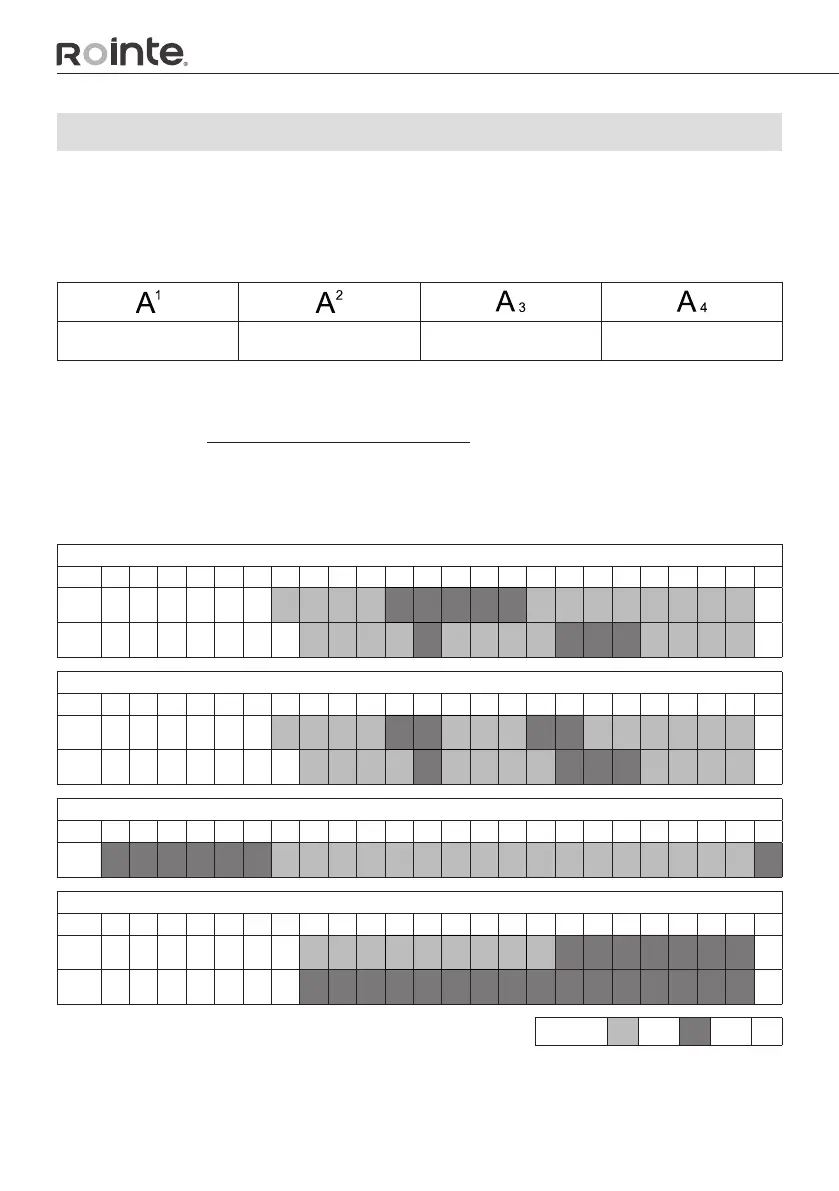
When AUTOMATIC mode is selected, the custom programming or one of the
preprogramming already set in the product is activated. You can choose between custom
programming or one of the four pre-installed programmes in your Rointe product:
Auto 1 Auto 2 Auto 3 Auto 4
You can also modify these pre-installed schedules to suit your needs and lifestyle.
Read the section "Setting or modifying a schedule" to learn, step by step, how to modify
one of these pre-programs, how to modify one of these pre-programmed schedules.
AUTO pre-installed programme scheduling
PREPROGRAM 1
0 1 2 3 4 5 6 7 8 9 10 11 12 13 14 15 16 17 18 19 20 21 22 23
Mon-
Fri
Sat-
Sun
PREPROGRAM 2
0 1 2 3 4 5 6 7 8 9 10 11 12 13 14 15 16 17 18 19 20 21 22 23
Mon-
Fri
Sat-
Sun
PREPROGRAM 3
0 1 2 3 4 5 6 7 8 9 10 11 12 13 14 15 16 17 18 19 20 21 22 23
Mon-
Sun
PREPROGRAM 4
0 1 2 3 4 5 6 7 8 9 10 11 12 13 14 15 16 17 18 19 20 21 22 23
Mon-
Fri
Sat-
Sun
COMFORT ECO OFF


 To Next Page