EN
ELBA LCD DIGITAL TOWEL RAIL
19
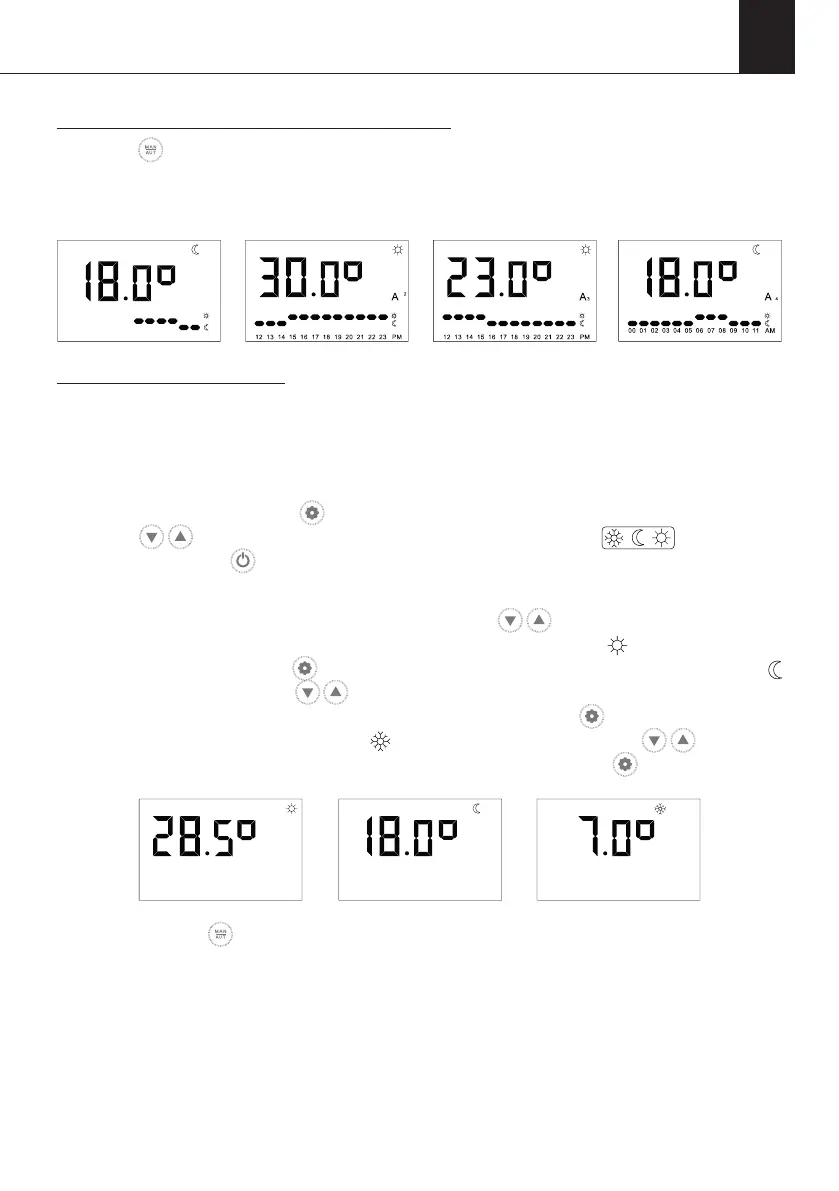
To activate one of the pre-installed programmes:
Press the button on the keypad until either AUTO, AUTO 1, AUTO 2, AUTO 3 or AUTO 4
is highlighted. The pre-installed programme will now be active and the corresponding icon
will appear on the screen.
To set or modify a schedule:
After selecting the desired custom programming or pre-programming, perform the following
following steps.
STEP 1 - You will need to establish the set temperature of the COMFORT/ECO/ANTI-FROST
modes rst. Please press the button to access the Settings Menu. Then you will need
to use the buttons to scroll between the menus to select the menu on the
screen and press the button to conrm.
The COMFORT temperature is adjusted rst. Press the buttons to either increase or
decrease the temperature respectively within the pre-set COMFORT temperature range
(see table above). Press the button to conrm and you will then move to the ECO
temperature settings. Use the buttons to either increase or decrease the temperature
respectively within the pre-set ECO temperature range. Press the button to conrm and
you will then move to the ANTI-FROST temperature settings. Use the buttons to
either increase or decrease the temperature respectively and press the button to conrm.
STEP 2 - Press the button on the keypad until the custom or pre-installed programming
that you wish to or pre-installed programming you wish to modify (AUTO, AUTO1, AUTO2,
AUTO3, AUTO4) appears on the display. The selected programming will be activated and
the corresponding icon will illuminate on the display.
1
A
00 01 02 03 04 05 06 07 08 09 10 11
AM


 To Next Page