20
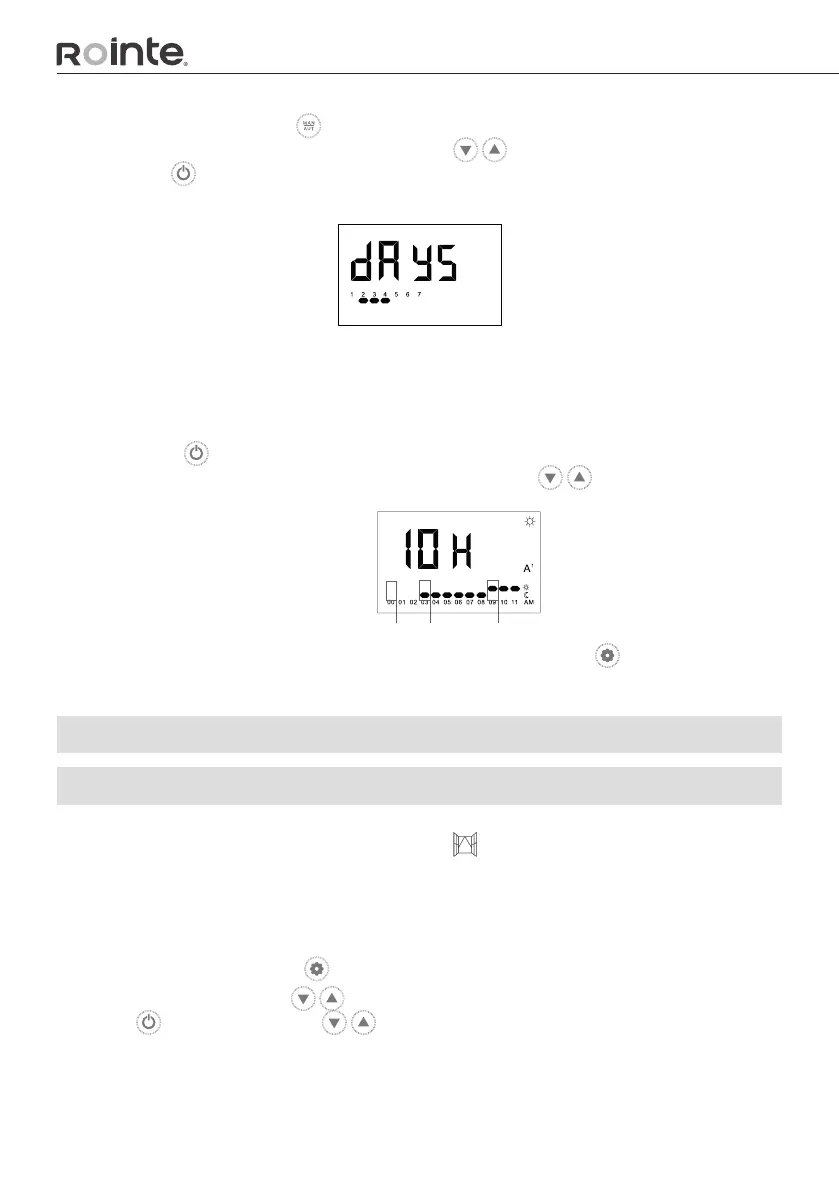
STEP 3 - Press AND hold the button on the keypad for 2 seconds to modify the hours
and days. The days can be modied rst. Use the buttons to select the chosen days
and press the button to select the days you want to modify.
STEP 4 - Then you will move onto setting the mode for each hour, of the day which will
begin at 0h (midnight).
You will need to go through each hour and select a mode for each hour. Select the mode
by pressing the button - press once for COMFORT, press twice for ECO and press three
times for ANTI-FROST. To move onto the next hour, use the buttons.
Once all 24 hours of the day have been assigned a mode, press the button to save your
settings and return to the main screen.
5.5. ADVANCED FUNCTIONS
5.5.1. OPEN WINDOWS FUNCTION
The Rointe towel rails have the OPEN WINDOWS function set to ON to begin with. This
function is activated when the temperature sensor detects a drop of 4ºC from the set
temperature within a 30 minute time period.
The OPEN WINDOWS function will be active for 2 hours. When the OPEN WINDOWS function
is activated, the product will move into ANTI-FROST mode at 7ºC. To activate or deactivate
this function, please press the button to access the Settings Menu.
Then you will need to use the buttons to select the OPEN WINDOWS. Once selected,
press the button and use the buttons to activate or deactivate this function.
The function PRESENCE DETECT (ALSO DISPLAYED IN THIS MENU) is not available on
the product.
1
A
ANTI-FROST ECO COMFORT


 To Next Page