1
5
2 6
3 7
4
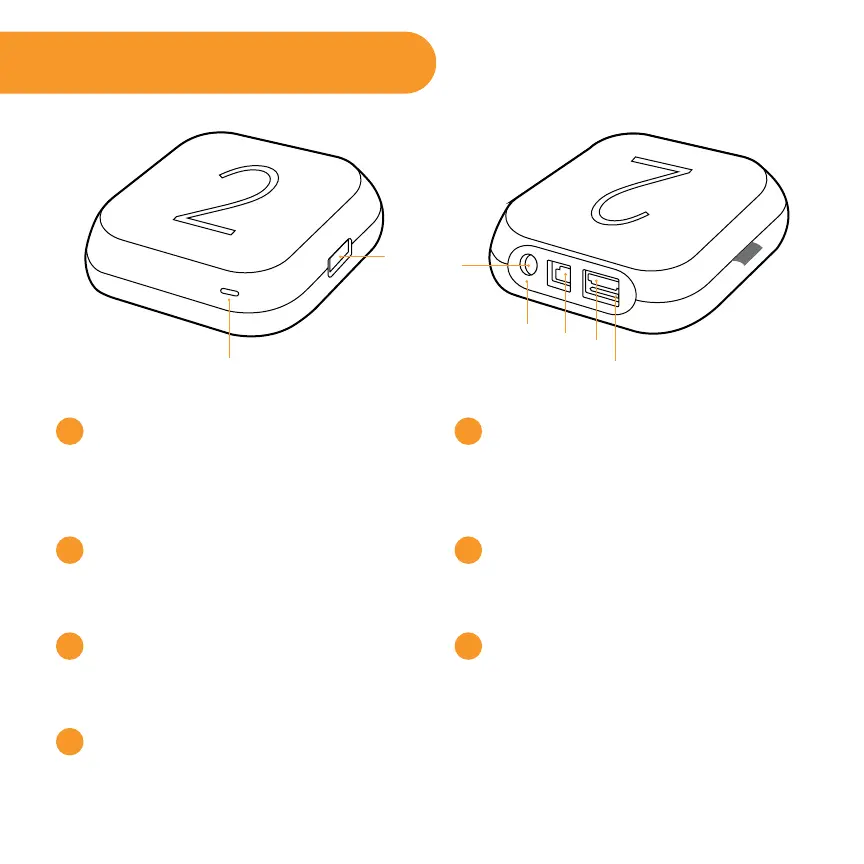
Status light – Flashes slowly when
the Roku player starts up. Glows
when it’s on. Flashes once with
each press of the remote control.
USB port – Connect a compatible
USB device for browsing photos,
music and movies.
Power port – Connect your player
to the power source with the
included power cable.
Reset Button - Reset your Roku
player (you probably won’t ever
have to use this)
Ethernet port – Connect your
Roku player to a wired network
with an Ethernet cable (not
included).
HDMI port – Connect your player
to an HDTV with an HDMI cable
(not included).
Storage expansion slot – Connect
a microSD card (not included)
to expand internal storage for
channels and games.
Front view
Back view
Get to know your Roku 2
1
2
3
4
5
6
7



 To Next Page