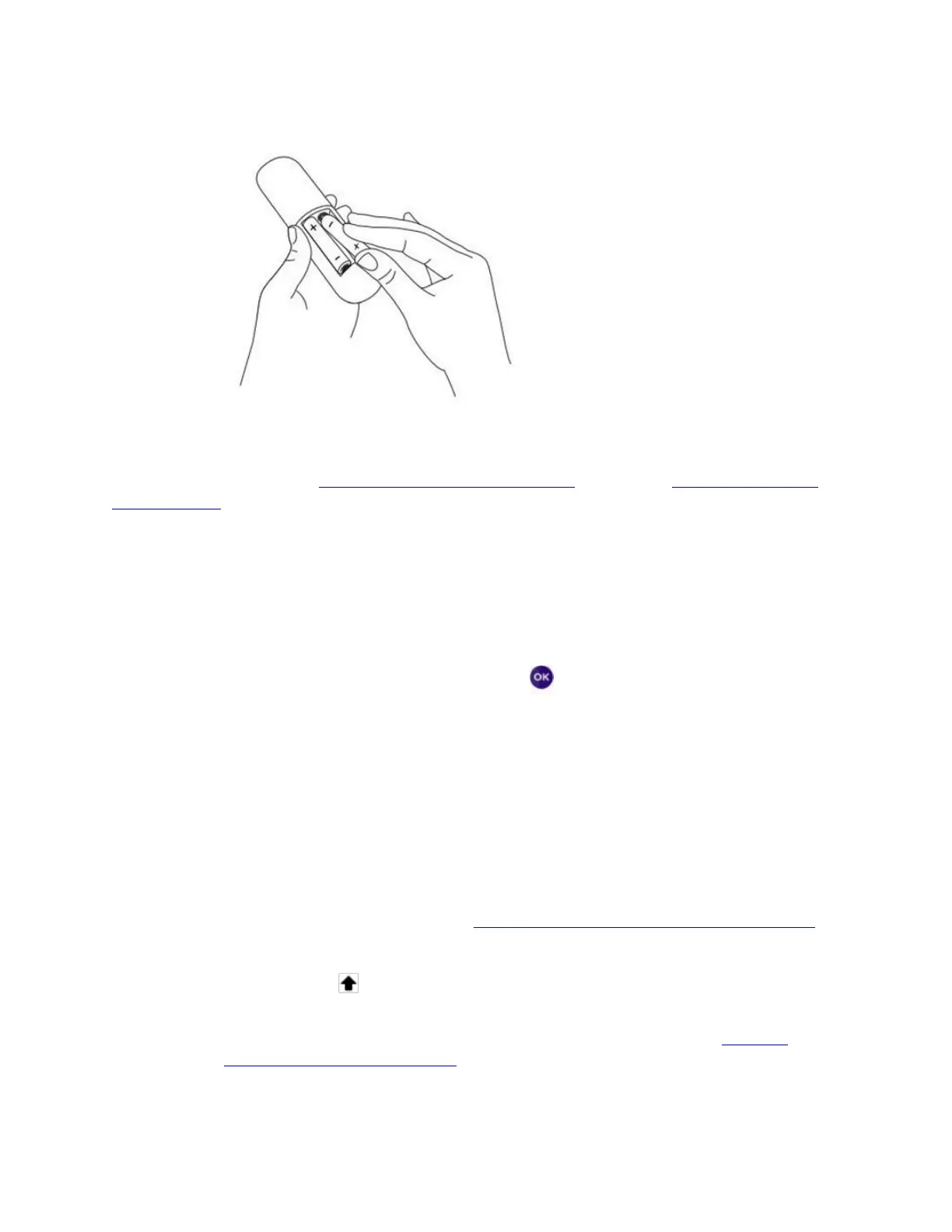
4. Open the battery cover of your remote and insert batteries.
Make sure the correct TV input is selected on your TV (the input to which your Roku player is
connected). You should now see the Roku logo on the TV screen as your Roku player powers
on. Help is available if you do not see any picture on your TV or you have problems with your
remote control.
Going through Guided Setup
1. Choose a language
When your Roku Player powers on, the first screen will prompt you to choose a language. All
text and dialog within the Roku application will be displayed in the selected language.
Scroll up and down the list and press the OK button on your Roku remote to choose a
language.
o Note: It is the responsibility of the channel provider to translate their channel and some
channels may not support your chosen language.
2. Connect your Roku player your network and the internet
o Choose your wireless network from the list of available networks and enter your
password. This is most often the same network you use to connect your computer or
smartphone to the internet. If you do not see your network, select Scan again to see all
networks. For more assistance, see help finding your wireless network and password.
o If you want to see your password as you type, choose Show password. This can help
prevent entering the wrong password. Remember, passwords are case-sensitive. Use
the shift button on the on-screen keyboard to enter a capital letter.
o Once you have entered your password and selected Connect, your Roku player will
automatically connect to the internet. You can get more help if you are unable to
connect to your wireless network.
3. Wait for your Roku player to download the latest software



 To Next Page