2 3
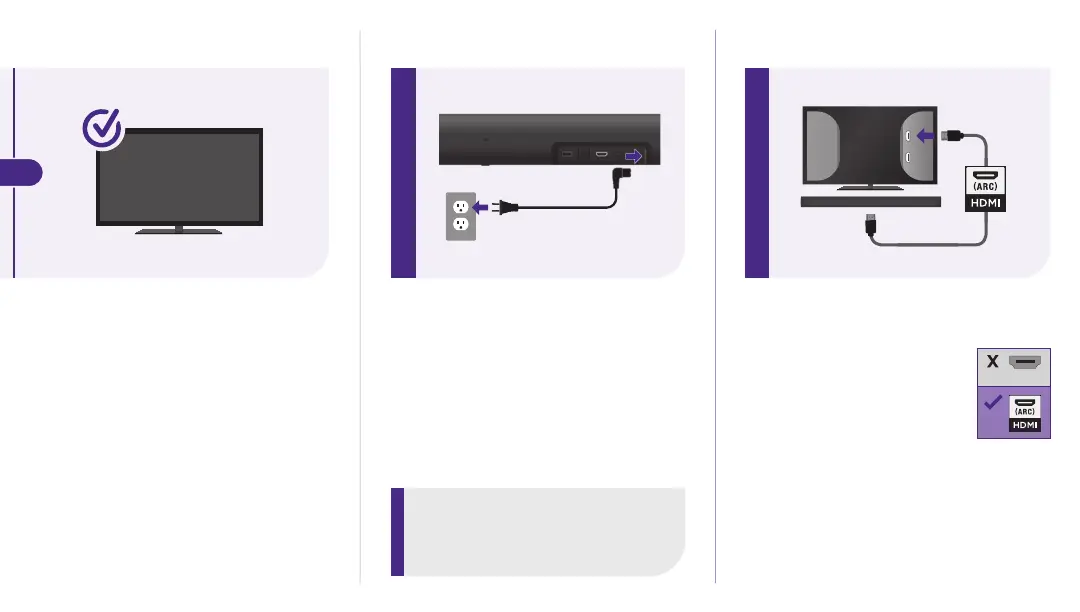
STEP 2: Connect to power
Use the included power cable to
connect your Roku Streambar Pro
to a wall outlet.
STEP 3: Connect to TV
Connect your Roku
Streambar Pro to the
HDMI port on your TV
labeled “ARC”with the
included cable.
Don’t see an HDMI-ARC port?
Use the included optical cable
along with the HDMI Cable to
connect. Remember to remove
the plastic caps before use!
IHDM
TIP:
Place your Roku Streambar Pro at
the front edge of your TV stand for
the best sound experience.
HDMI
(ARC)
HDMI
All other TVs
You may need to enable your
TV’s HDMI-CEC and ARC
settings.
TV manufacturers use
dierent names for these
settings. For help, visit
go.roku.com/streambarpro
OR



 To Next Page