EasyManua.ls Logo

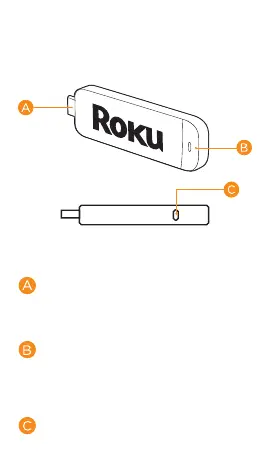
Roku Streaming Stick - Know your Streaming Stick; MHL Connector; Status Light; Reset Button

Roku Streaming Stick
24 pages
Print Icon
To Next Page IconTo Next Page
To Previous Page IconTo Previous Page
Loading...
Know your
Streaming Stick
[MHL CONNECTOR] Plugs into the
MHL® port on the back of your TV.
[STATUS LIGHT] Signies it is on
when lit, or activity whenashing.
[RESET BUTTON] Used to reset
your Streaming Stick (you probably
wont ever have to use this).
Other manuals for Roku Streaming Stick

Related product manuals