EasyManua.ls Logo

Roland 405 - Control and Jack Functions; Detailed Control Functions; Jack Functions Explained; Stacking Setup

Roland 405
10 pages
Print Icon
To Next Page IconTo Next Page
To Previous Page IconTo Previous Page
Loading...
1.
Input
Jack
Connect
a
guitar
to
this
jack.
2.
Channel
Select
Switch
This
selects
the
Clean
or
Lead
Channel.
3.
Volume
This
adjusts
the
volume
of
the
Clean
Channel.
4.
Pre
Volume
This
adjusts
the
amount
of
distortion
sound
in
the
Lead
Channel.
*
By
adjusting
the
Pre
Volume,
you
can
express
various
differ-
ent
distortion
sounds.
(Refer
to
“SETTING
EXAMPLES.”)
5.
Post
Volume
This
adjusts
the
volume
of
the
Lead
Channel.
6.
Bass
This
adjusts
the
volume
of
the
bass.
7.
Middle
This
adjusts
the
volume
of
the
midrange.
8.
Treble
This
adjusts
the
volume
of
the
treble.
9.
Presence
This
adjusts
the
presence
of
the
sound.
10.
Power
Switch
Press
to
switch
on
the
unit—the
indicator
will
light.
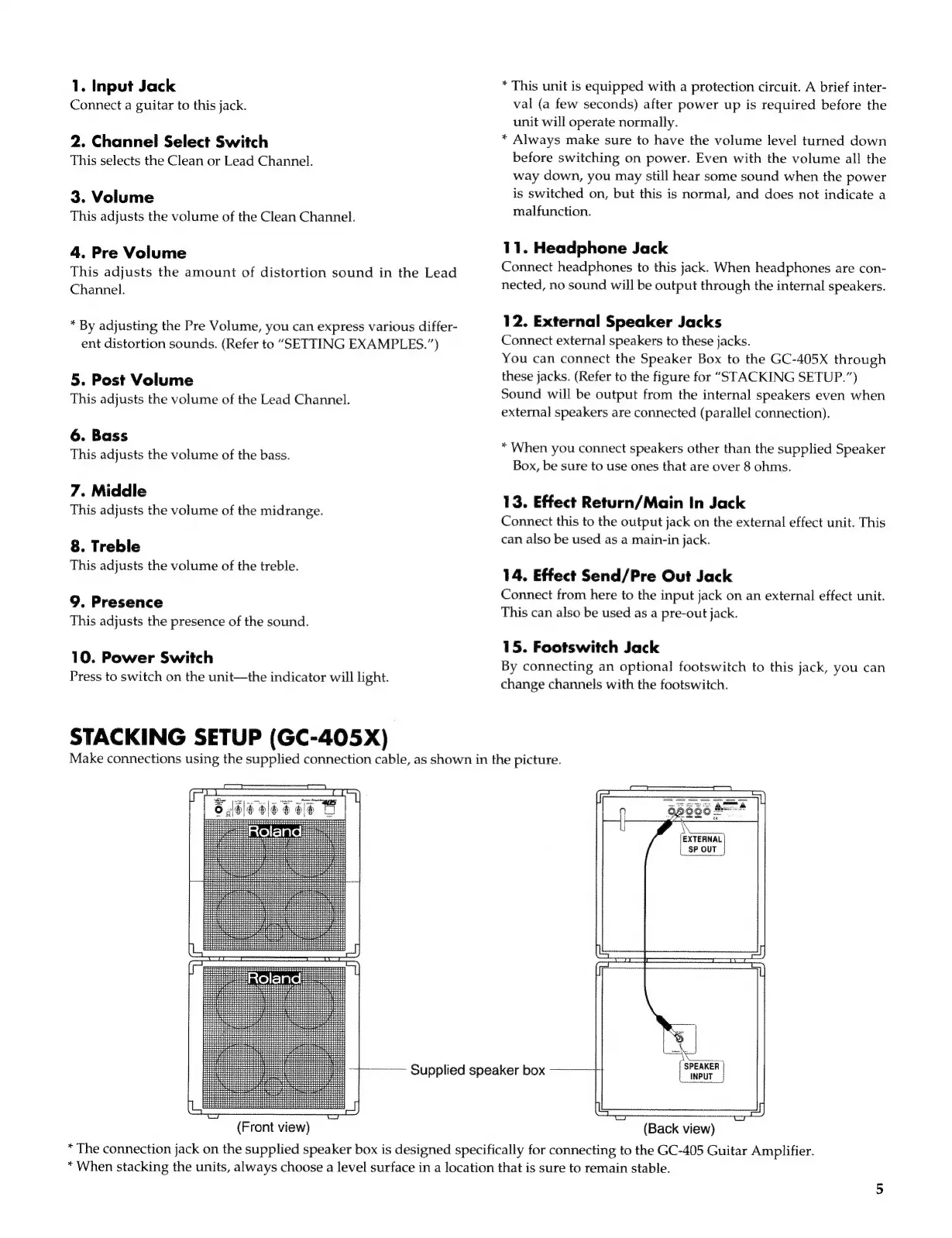
STACKING
SETUP
(GC-405X)
*
This
unit
is
equipped
with
a
protection
circuit.
A
brief
inter-
val
(a
few
seconds)
after
power
up
is
required
before
the
unit
will
operate
normally.
*
Always
make
sure
to
have
the
volume
level
turned
down
before
switching
on
power.
Even
with
the
volume
all
the
way
down,
you
may
still
hear
some
sound
when
the
power
is
switched
on,
but
this
is
normal,
and
does
not
indicate
a
malfunction.
11.
Headphone
Jack
Connect
headphones
to
this
jack.
When
headphones
are
con-
nected,
no
sound
will
be
output
through
the
internal
speakers.
12.
External
Speaker
Jacks
Connect
external
speakers
to
these
jacks.
You
can
connect
the
Speaker
Box
to
the
GC-405X
through
these
jacks.
(Refer
to
the
figure
for
“STACKING
SETUP.”)
Sound
will
be
output
from
the
internal
speakers
even
when
external
speakers
are
connected
(parallel
connection).
*
When
you
connect
speakers
other
than
the
supplied
Speaker
Box,
be
sure
to
use
ones
that
are
over
8
ohms.
13.
Effect
Return/Main
In
Jack
Connect
this
to
the
output
jack
on
the
external
effect
unit.
This
can
also
be
used
as
a
main-in
jack.
14.
Effect
Send/Pre
Out
Jack
Connect
from
here
to
the
input
jack
on
an
external
effect
unit.
This
can
also
be
used
as
a
pre-out
jack.
15.
Footswitch
Jack
By
connecting
an
optional
footswitch
to
this
jack,
you
can
change
channels
with
the
footswitch.
Make
connections
using
the
supplied
connection
cable,
as
shown
in
the
picture.
I
ar
ir
==
oe
E
PET
am)
|
i
eects
[EXTERNAL
SPOUT
|
E
EE
in
HEt
i
i
EER
H
+4
333
oe
eee
(em
EE
fr
>
Roland
=
eee
a
pui
—-—
a
p
2
He
İM
RNA
i
SPEAKER
|
Supplied
speaker
box
input
|
2
se
ae
&
nm
aie
Re
(Front
view)
(Back
view)
*
The
connection
jack
on
the
supplied
speaker
box
is
designed
specifically
for
connecting
to
the
GC-405
Guitar
Amplifier.
*
When
stacking
the
units,
always
choose
a
level
surface
in
a
location
that
is
sure
to
remain
stable.

Related product manuals