EasyManua.ls Logo

Roland BT-1 - User Manual

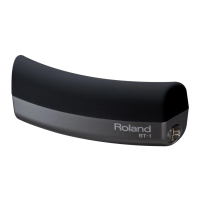
Roland BT-1
16 pages
Print Icon
To Next Page IconTo Next Page
Loading...
* 5 1 0 0 0 3 1 5 6 4 - 0 2 *

Questions and Answers

  • M
    Mrs. Denise OsborneJul 26, 2025
    How to fix Roland Drums when the rim sound plays instead of the head sound?
    • M
      Maria WaltersJul 26, 2025
      When the BT-1 is connected to some drum sound modules, the head sound will not be triggered. The BT-1 will operate only as a rim trigger. This is not a malfunction.
  • K
    Kim RandallAug 1, 2025
    What to do if my Roland BT-1 have no sound?
    • V
      Vanessa OsborneAug 1, 2025
      If your Roland Drums are not producing any sound, there are several things you can check: Make sure the connection cables are properly connected. Ensure that the cable plug is fully inserted into the jack. Try using a stereo cable. Adjust the volume to a suitable level. Verify the instrument assigned to the head or rim trigger. Confirm that the drum sound module is receiving trigger signals by checking the trigger indicator. If you’ve assigned a control function to the pad, the instrument might not sound; refer to your drum sound module's manual for details.
  • J
    Jamie JohnsonAug 7, 2025
    Why does striking the Roland Drums BT-1 trigger other pads?
    • J
      Joseph MitchellAug 7, 2025
      If striking the BT-1 on your Roland Drums causes another pad to sound, it might be because the BT-1 is attached to the hoop of a V-Drums pad. Striking the BT-1 will cause that pad to sound. If this presents a problem, it can be mounted on an optional stand. You can also adjust the crosstalk cancel setting of your drum sound module or try reattaching the BT-1 at a different location.
  • T
    Thomas ColemanAug 13, 2025
    What to do if my Roland BT-1 Drums play multiple notes when I strike once?
    • U
      uroachAug 13, 2025
      If your Roland Drums sound two or more notes when you strike the pad once, ensure the BT-1 is firmly fastened to the hoop or stand, and the attachment is secure. You can also increase the retrigger cancel setting on your drum sound module. If that doesn't work, increase the mask time setting.
  • S
    Samantha GilmoreAug 19, 2025
    Why is the Roland Drums BT-1 triggered when I hit a different pad?
    • D
      Douglas MartinAug 19, 2025
      If the BT-1 on your Roland Drums is triggered when you strike a different pad or drum, try using a stereo cable. Also, if you’re using a drum sound module with which the BT-1 operates as a rim trigger, do not assign an instrument or control function to the head of the trigger input the BT-1 is connected to.

Summary

USING THE UNIT SAFELY

General Safety Precautions

Details essential safety rules for operating, placing, and handling the BT-1 to prevent injury or damage.

Settings

Connecting to Drum Sound Module

Explains how to connect the BT-1 to a drum sound module and verify operation.

Trigger Settings for TD-30, TD-15, TD-11

TD-30 Module Configuration

Specifies trigger parameters for the Roland TD-30 module.

TD-15;TD-11 Module Configuration

Specifies trigger parameters for the Roland TD-15 and TD-11 modules.

Trigger Settings for Octapad SPD-30, SPD-SX, and TD-20 X Series

Octapad SPD-30;SPD-SX Configuration

Details trigger parameter configurations for SPD-30 and SPD-SX modules.

TD-20 X Series Configuration

Specifies trigger parameters for various TD-20X series modules.

Trigger Settings for TD-9 and TD-4 Modules

Troubleshooting

Roland BT-1 Specifications

General IconGeneral
TypeBar Trigger Pad
ZonesSingle Zone
Triggering MethodPiezo
Trigger Input1 x 1/4" TRS
MountingL-rod
CompatibilityRoland drum modules

Related product manuals