EasyManua.ls Logo

Roland V-Drums TD-50X - User Manual

Roland V-Drums TD-50X
30 pages
Print Icon
To Next Page IconTo Next Page
Loading...
USING THE UNIT SAFELY ................................ 2
IMPORTANT NOTES ..................................... 4
Getting Ready ........................................... 5
Making the Power Automatically Turn o After a Time
(AUTO OFF) .............................................. 10
Making Hi-Hat Settings ................................... 10
Performing .............................................. 15
Drum Kits and Instruments ................................ 15
Selecting a Drum Kit ...................................... 15
Selecting a Drum Kit from the List ......................... 15
Cross-Stick Function ..................................... 15
Playing with the Click ..................................... 16
Performing Along with a Song ............................ 16
Performing Along with an Audio Player Song .............. 16
Performing Along with a TD-50X Song .................... 16
Rhythm Training (Coach Mode) ............................ 17
Correctly Playing in Time with the Beat (TIME CHECK) ...... 17
Developing Internal Timing Sense (QUIET COUNT) ......... 18
WARM UPS .............................................. 18
Registering/Recalling Favorite Drum Kits (FAVORITE) ....... 19
Recording ............................................... 20
Recording a Performance ................................. 20
Recording Your Performance Along with a Song ........... 20
Recording on a Connected Computer ...................... 21
Installing the USB Driver .................................. 21
Customizing a Kit ....................................... 22
Editing an Instrument (INSTRUMENT) ..................... 22
Selecting an Instrument .................................. 22
Simulating the Ambience of a Performance Space
(AMBIENCE) .............................................. 23
Editing the Mixer (MIXER) ................................. 23
Adjusting the Volume of Each Pad ........................ 23
Applying Eects ......................................... 23
Comparing with or Reverting to the Unedited Drum Kit
(SNAPSHOT)
.............................................. 24
Editing a Drum Kit (MENU) ................................ 24
Setting the Volume ...................................... 24
Specifying the Illumination Color of the [KIT] Button and
Knobs ................................................... 25
Renaming the Drum Kit .................................. 25
Importing and Playing Audio Files (USER SAMPLE) ......... 25
Importing an Audio File .................................. 26
Assigning a User Sample to an Instrument and Playing It ... 26
Settings ................................................. 27
Trigger Settings .......................................... 27
Specifying the Pad Type .................................. 27
Adjusting the Sensitivity of Individual Pads ................ 27
Backing Up Data .......................................... 28
Backing Up to SD Card ................................... 28
Loading Backup Data from an SD Card .................... 28
Formatting an SD Card .................................... 29
Settings for the Entire TD-50X (SETUP) ..................... 29
Returning to the Factory Settings ......................... 29
Main Specications ..................................... 30
Quick Start (this document)
Read this rst. It explains basic operation.
PDF Manual (download from the web)
5 Reference Manual
This explains all the functions of the TD-50X.
5 Data List
This explains the parameters and sound of the TD-50X.
5 MIDI Implementation
This is detailed information about MIDI messages.
To obtain the PDF manual
1. Enter the following URL in your
computer.
http://www.roland.com/support/
I
2. Choose “TD-50X” as the product name.
Before using this unit, carefully read “IMPORTANT SAFETY INSTRUCTIONS” (inside front cover), “USING THE UNIT SAFELY (p. 2), and “IMPORTANT NOTES”
(p. 4). After reading, keep the document(s) where it will be available for immediate reference.
© 2021
Roland Corporation
Quick Start

Table of Contents

Other manuals for Roland V-Drums TD-50X

Question and Answer IconNeed help?

Do you have a question about the Roland V-Drums TD-50X and is the answer not in the manual?

Summary

Using the Unit Safely

About Warning and Caution Notices

Explains the meaning of WARNING and CAUTION notices used in the manual for safety instructions.

About the Symbols

Explains the meaning of symbols used in the manual to convey important instructions or warnings.

General Safety Precautions

Groups essential safety instructions for usage, placement, and handling to prevent hazards.

Important Notes

Power Supply and Interference

Notes on electrical connections and potential interference from other appliances.

Placement and Maintenance

Guidance on unit placement to avoid interference and maintenance for cleaning.

Data Handling and Precautions

Information on repairs, data backups, and general usage tips for safe operation.

Legal and Memory Device Usage

Information on intellectual property rights and precautions for external memory devices.

Getting Ready

Top Panel Controls and Display

Describes the main controls, buttons, and the display on the unit's top surface.

Rear and Side Panel Connections

Details all ports for connecting external devices, power, and audio.

Powering the Unit On;Off

Step-by-step guide for powering the unit on and off safely.

Hi-Hat Settings Configuration

Adjusts digital hi-hats (VH-14D, VH-13, VH-11/10) for proper detection.

Performing

Basic Operation and Navigation

Explains fundamental controls, screen navigation, and value editing.

Performance Techniques

Details how to play different sounds using various techniques on pads, cymbals, and hi-hats.

Drum Kits, Songs, and Click

Guides on selecting drum kits, playing along with songs, and using the click track.

Rhythm Training and Favorites

Introduces practice modes for timing and skill, and managing favorite drum kits.

Recording

Recording and Playback of Performances

How to record, playback, and export drum performances to an SD card.

Recording Performances with Songs

Steps to record while a song is playing and then playback the result.

Customizing a Kit

Editing Instruments and Sounds

How to modify individual sounds, select instruments, and choose pads for editing.

Ambience, Mixer, and Effects

Adjusting room sound, reverb, mixer settings, pad compressor, equalizer, and multi-effects.

Kit Settings and User Samples

Setting kit volume, snapshot, illumination color, renaming, and importing audio files.

Settings

Trigger and Pad Configuration

Configuring trigger inputs, pad types, and sensitivity for accurate signal processing.

Data Backup, Loading, and Formatting

Saving/restoring settings, and preparing SD cards for use with the unit.

Factory Reset and System Setup

Returning the unit to default settings and configuring system-wide options.

Main Specifications

Drum Kit, Effects, and Sample Specs

Details on drum kits, effects, user samples, and recorder capabilities.

Connectivity and Power Specifications

Information on power supply, dimensions, weight, and included accessories.

Summary

Using the Unit Safely

About Warning and Caution Notices

Explains the meaning of WARNING and CAUTION notices used in the manual for safety instructions.

About the Symbols

Explains the meaning of symbols used in the manual to convey important instructions or warnings.

General Safety Precautions

Groups essential safety instructions for usage, placement, and handling to prevent hazards.

Important Notes

Power Supply and Interference

Notes on electrical connections and potential interference from other appliances.

Placement and Maintenance

Guidance on unit placement to avoid interference and maintenance for cleaning.

Data Handling and Precautions

Information on repairs, data backups, and general usage tips for safe operation.

Legal and Memory Device Usage

Information on intellectual property rights and precautions for external memory devices.

Getting Ready

Top Panel Controls and Display

Describes the main controls, buttons, and the display on the unit's top surface.

Rear and Side Panel Connections

Details all ports for connecting external devices, power, and audio.

Powering the Unit On;Off

Step-by-step guide for powering the unit on and off safely.

Hi-Hat Settings Configuration

Adjusts digital hi-hats (VH-14D, VH-13, VH-11/10) for proper detection.

Performing

Basic Operation and Navigation

Explains fundamental controls, screen navigation, and value editing.

Performance Techniques

Details how to play different sounds using various techniques on pads, cymbals, and hi-hats.

Drum Kits, Songs, and Click

Guides on selecting drum kits, playing along with songs, and using the click track.

Rhythm Training and Favorites

Introduces practice modes for timing and skill, and managing favorite drum kits.

Recording

Recording and Playback of Performances

How to record, playback, and export drum performances to an SD card.

Recording Performances with Songs

Steps to record while a song is playing and then playback the result.

Customizing a Kit

Editing Instruments and Sounds

How to modify individual sounds, select instruments, and choose pads for editing.

Ambience, Mixer, and Effects

Adjusting room sound, reverb, mixer settings, pad compressor, equalizer, and multi-effects.

Kit Settings and User Samples

Setting kit volume, snapshot, illumination color, renaming, and importing audio files.

Settings

Trigger and Pad Configuration

Configuring trigger inputs, pad types, and sensitivity for accurate signal processing.

Data Backup, Loading, and Formatting

Saving/restoring settings, and preparing SD cards for use with the unit.

Factory Reset and System Setup

Returning the unit to default settings and configuring system-wide options.

Main Specifications

Drum Kit, Effects, and Sample Specs

Details on drum kits, effects, user samples, and recorder capabilities.

Connectivity and Power Specifications

Information on power supply, dimensions, weight, and included accessories.

Overview

The Roland TD-50X V-Drums Drum Sound Module is a sophisticated electronic drum module designed to provide a realistic and versatile drumming experience, akin to an acoustic drum set. It offers extensive customization options for drum kits, instruments, and performance settings, along with rhythm training features and recording capabilities.

Function Description:

The core function of the TD-50X is to generate drum sounds in response to trigger signals from connected pads. These sounds are organized into "drum kits," which are sets of instruments assigned to various pads. The module allows for a wide range of performance techniques, including head shots, rim shots, cross sticks, and various hi-hat articulations (open/closed, pressure, bow, edge, choke play), all designed to mimic the nuances of acoustic drumming.

The module features a comprehensive "Kit Customize" section, enabling users to tailor every aspect of their drum kits. This includes editing individual instruments, adjusting the ambience of a performance space, and fine-tuning the mixer settings for each pad. The "Ambience" feature simulates the sound of an overhead microphone and the reverberation of a room, allowing for a more natural and lifelike drum sound. The "Mixer" provides control over volume, pan, multi-effects, equalizer, and compressor settings per pad.

For practice and skill development, the TD-50X incorporates a "Coach Mode" with three distinct menus: "TIME CHECK," "QUIET COUNT," and "WARM UPS." "TIME CHECK" helps drummers play accurately in time with a click, providing feedback on timing. "QUIET COUNT" trains internal timing by alternating between audible and silent click sections. "WARM UPS" offers structured exercises with changing rhythm types and tempos, gradually increasing in difficulty.

Recording is another key function, allowing users to capture their performances. The module supports recording performances along with internal songs or audio files from an SD card. Performances can be saved temporarily or to an SD card. The TD-50X can also be connected to a computer via USB to record multi-track audio or MIDI data into a Digital Audio Workstation (DAW).

Usage Features:

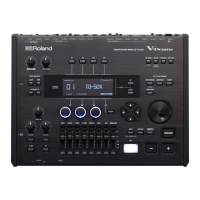
The TD-50X's interface is designed for intuitive control. The top panel features a [MASTER] knob for overall output volume, a [PHONES] knob for headphone volume, and a [MIX IN] knob for external audio input. Faders allow for quick volume adjustments of kick, snare, hi-hat, other percussion, and ambience.

The [TRIG SELECT] section includes [LOCK] to prevent accidental pad deselection, [RIM] to switch between head/rim/bell settings for pads, and [SELECT] buttons to choose specific pads for editing. Function buttons ([F1]-[F5]) and rotary knobs ([R1]-[R3]) change their roles based on the display, providing context-sensitive control. PAGE [UP] [DOWN] buttons navigate through screens, and a TRIGGER ACTIVITY indicator confirms pad strikes.

The [KIT] button accesses the main DRUM KIT screen, while [-] [+] buttons and a dial are used for selecting drum kits or editing values. The [EXIT] button returns to the previous screen, and [ENTER] confirms selections. The [SHIFT] button, used in conjunction with other buttons, expands functionality, such as muting all sound. The [PREVIEW] button allows auditioning instrument sounds. Cursor buttons ([▲][▼][◄][▷]) navigate the display.

The "Kit Customize" section includes dedicated buttons for [INSTRUMENT], [AMBIENCE], [MIXER], and [SNAPSHOT]. [INSTRUMENT] allows detailed editing of individual sounds. [AMBIENCE] controls the simulated performance space. [MIXER] adjusts pad-specific audio settings. [SNAPSHOT] temporarily saves the current drum kit settings, enabling comparison with previous states or reverting to the unedited kit. The [SETUP] button accesses global TD-50X settings, including output assignments and MIDI settings. The [TRIGGER] button configures trigger parameters, and [SET LIST] helps create and navigate drum kit sequences. The [SD CARD] button manages SD card operations like saving and loading data.

For hi-hat settings, the module supports various V-hi-hat models (VH-14D, VH-13, VH-11, VH-10). The offset adjustment ensures correct detection of pedal movements. The process involves loosening the clutch screw, allowing the hi-hat to rest naturally, and then using the [TRIGGER] button and [F4] (HI-HAT) to access and execute the offset adjustment.

The TD-50X supports digital connections for compatible pads, automatically guiding users through the assignment process for trigger inputs.

The module offers an "Auto Off" function to conserve power, which can be enabled or disabled. When enabled, the unit automatically turns off after a period of inactivity.

Maintenance Features:

The manual emphasizes several safety and maintenance guidelines to ensure the longevity and proper functioning of the TD-50X:

  • Power Management: Always connect the power cord to a grounded outlet. To completely power off the unit, unplug it from the outlet after turning off the power switch. Minimize volume before turning the unit on or off to prevent sudden sounds.
  • Environmental Considerations: Avoid using or storing the unit in extreme temperatures, damp conditions, smoky or dusty environments, or places with high vibration. Ensure adequate ventilation.
  • Physical Handling: Do not disassemble or modify the unit. Avoid dropping or subjecting it to strong impacts. Do not place heavy objects on the power cord or the unit itself. Always grasp the plug when disconnecting the power cord.
  • Cleaning: Periodically clean the power plug to prevent dust accumulation. For the unit itself, use a soft, dry cloth; never use benzine, thinners, alcohol, or other solvents, as these can cause discoloration or deformation.
  • Connectivity: Use only the supplied power cord. Connect the power cord to an outlet of the correct voltage. Route all power cords and cables to prevent entanglement. Disconnect all cords and cables before moving the unit.
  • Data Backup: Regularly back up data stored on the unit to an SD card to prevent irretrievable loss due to equipment failure or incorrect operation. The module allows backing up all settings or individual drum kits.
  • SD Card Handling: Format SD cards on the TD-50X before first use. Do not remove the SD card while "Processing..." is displayed.
  • Troubleshooting: If an abnormality or malfunction occurs (e.g., smoke, unusual odor, liquid spills, or abnormal operation), immediately turn off the power, unplug the unit, and contact a Roland service center.
  • Children's Safety: Ensure adult supervision when children are present or using the unit. Keep small items (like screws) out of reach of children to prevent accidental ingestion.

The TD-50X also provides options to return to factory settings, which clears all user data and settings, effectively resetting the module to its original state. This is a useful feature for troubleshooting or preparing the unit for a new user.

Roland V-Drums TD-50X Specifications

General IconGeneral
Sound ModuleTD-50X
Preset Kits100
User Kits100
BluetoothNo
Sound EnginePrismatic Sound Modeling
User Sample ImportYes
Outputs12
SequencerNo
Power SupplyAC Adaptor
MIDIIn, Out
DisplayLCD
PadsNot included
Trigger Inputs14
Direct Outputs8 (1/4-inch TRS)

Related product manuals