EasyManua.ls Logo

Roland V-Drums TD-1KV - User Manual

Roland V-Drums TD-1KV
17 pages
Print Icon
To Next Page IconTo Next Page
Loading...
To obtain the PDF manual
1.
Enter the following URL in your computer.
http://www.roland.com/manuals/
I
2. Choose TD-1KV” or “TD-1K” at the product name.
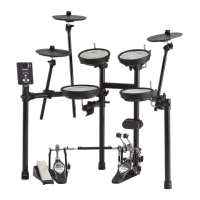
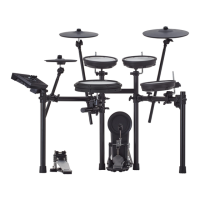
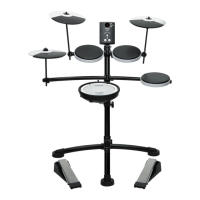
* The illustration shows the TD-1KV.
Before using this unit, carefully read the sections entitledUSING THE
UNIT SAFELY” andIMPORTANT NOTES” (Leaflet "USING THE UNIT SAFELY"
and Owner's Manual p. 16). These sections provide important information
concerning the proper operation of the unit. Additionally, in order to feel
assured that you have gained a good grasp of every feature of your new unit,
read Owner's Manual in its entirety. This manual should be saved and kept on
hand as a convenient reference.
Copyright © 2014 ROLAND CORPORATION
All rights reserved. No part of this publication may be reproduced in any form without the written permission of ROLAND CORPORATION.
ENG
JPN
DEU
FRA
ITA
ESL
POR
NLD
Owners Manual
Let’s Learn About Drums . . . . . . . . . . . . . . . . . . . . . . . . . . . . . . . . . . . . . . . 2
Drum Set Elements . . . . . . . . . . . . . . . . . . . . . . . . . . . . . . . . . . . . . . . . . . . .2
The Basics of Playing . . . . . . . . . . . . . . . . . . . . . . . . . . . . . . . . . . . . . . . . . .2
Assembly . . . . . . . . . . . . . . . . . . . . . . . . . . . . . . . . . . . . . . . . . . . . . . . . . . . . . . 4
Kit Assembly . . . . . . . . . . . . . . . . . . . . . . . . . . . . . . . . . . . . . . . . . . . . . . . . . .4
Connecting the Cables . . . . . . . . . . . . . . . . . . . . . . . . . . . . . . . . . . . . . . . .7
Quick Start . . . . . . . . . . . . . . . . . . . . . . . . . . . . . . . . . . . . . . . . . . . . . . . . . . . . 8
Connecting Your Equipment . . . . . . . . . . . . . . . . . . . . . . . . . . . . . . . . . . .8
Front Panel . . . . . . . . . . . . . . . . . . . . . . . . . . . . . . . . . . . . . . . . . . . . . . . . . . . .8
Switching the Power On and O . . . . . . . . . . . . . . . . . . . . . . . . . . . . . . .8
Playing . . . . . . . . . . . . . . . . . . . . . . . . . . . . . . . . . . . . . . . . . . . . . . . . . . . . . . .9
Selecting a Drum Kit . . . . . . . . . . . . . . . . . . . . . . . . . . . . . . . . . . . . .9
Playing with the Metronome . . . . . . . . . . . . . . . . . . . . . . . . . . . .9
Practicing . . . . . . . . . . . . . . . . . . . . . . . . . . . . . . . . . . . . . . . . . . . . . . . . . . . .10
Practicing in Coach Mode . . . . . . . . . . . . . . . . . . . . . . . . . . . . . . . . . . . 10
Correctly Playing in Time with the Beat . . . . . . . . . . . . . . . . . 10
Playing Along with a Changing Rhythm . . . . . . . . . . . . . . . . 10
Playing Along with a Changing Tempo . . . . . . . . . . . . . . . . . 11
Developing Internal Timing Sense . . . . . . . . . . . . . . . . . . . . . 11
Continuing to Play at a Steady Tempo . . . . . . . . . . . . . . . . . . 11
Matching the Striking Strength of the Right and Left
Hands. . . . . . . . . . . . . . . . . . . . . . . . . . . . . . . . . . . . . . . . . . . . . . . . . 12
Practicing for a Specied Time . . . . . . . . . . . . . . . . . . . . . . . . . 12
Recording and Checking Your Own Performance . . . . . . . 12
Practicing Along with a Song . . . . . . . . . . . . . . . . . . . . . . . . . . . . . . . . 13
Selecting a Song . . . . . . . . . . . . . . . . . . . . . . . . . . . . . . . . . . . . . . 13
Playing/Stopping the Song . . . . . . . . . . . . . . . . . . . . . . . . . . . . 13
Connecting to your Computer/iPad . . . . . . . . . . . . . . . . . . . . . . . . . . . .13
Making Detailed Settings. . . . . . . . . . . . . . . . . . . . . . . . . . . . . . . . . . . . . .14
Adjust the Pad Sensitivity . . . . . . . . . . . . . . . . . . . . . . . . . . . . . . 14
Changing the Type of Pad . . . . . . . . . . . . . . . . . . . . . . . . . . . . . 14
Changing the Time of Auto O . . . . . . . . . . . . . . . . . . . . . . . . . 14
Changing MIDI Note Number of the Pad . . . . . . . . . . . . . . . 14
Restoring the Factory Settings . . . . . . . . . . . . . . . . . . . . . . . . . . . . . . . 14
Appendix . . . . . . . . . . . . . . . . . . . . . . . . . . . . . . . . . . . . . . . . . . . . . . . . . . . . .15
Troubleshooting . . . . . . . . . . . . . . . . . . . . . . . . . . . . . . . . . . . . . . . . . . . . 15
Main Specications . . . . . . . . . . . . . . . . . . . . . . . . . . . . . . . . . . . . . . . . . . 15
USING THE UNIT SAFELY . . . . . . . . . . . . . . . . . . . . . . . . . . . . . . . . . . . . . 16
IMPORTANT NOTES . . . . . . . . . . . . . . . . . . . . . . . . . . . . . . . . . . . . . . . . . . 16
Contents

Questions and Answers

  • R
    Ryan FrancoAug 13, 2025
    Why is there no sound when I press the kick pedal on my Roland Drums?
    • N
      Natalie LeeAug 13, 2025
      If you're not getting any sound when you press the kick pedal on your Roland Drums, ensure that the cable labeled KIK is connected to the kick pedal. Check the connections to be sure.
  • L
    Laura WhiteAug 17, 2025
    Why is there no sound from my Roland V TD-1KV?
    • V
      vedwardsAug 17, 2025
      If you're not getting any sound from your Roland Drums, here are a few things to check: * Ensure the TD-1KV/TD-1K is correctly connected to external devices. Check all connections. * Try a different audio cable in case the current one is broken. * Make sure the TD-1KV/TD-1K volume isn't too low. Adjust the volume to an appropriate level. * Verify the connection cable is correctly connected to the TRIGGER INPUT connector.
  • K
    karenlopezAug 20, 2025
    What to do if my Roland V TD-1KV Drums can’t connect with a computer?
    • J
      Jeffrey RangelAug 20, 2025
      If you're having trouble connecting your Roland Drums to a computer, make sure that the USB cable is correctly connected.
  • U
    ucastilloAug 25, 2025
    Why is there no sound from external MIDI device on my Roland Drums?
    • J
      Jason SanchezAug 25, 2025
      If you're not getting any sound from an external MIDI device with your Roland Drums: * Set the MIDI channel of the external MIDI device to 10. * Check the pad’s “Note#.”
  • A
    Anthony MullinsAug 28, 2025
    What to do if the sound of another pad is also heard when I strike the pad on my Roland V TD-1KV Drums?
    • C
      coreywileyAug 28, 2025
      If you're hearing the sound of another pad when you strike a pad on your Roland Drums, and multiple pads are attached to the same stand, the vibration of a strike can be transmitted to another pad, causing it to sound inadvertently. Reattach the pad at a different location.
  • J
    Jason TurnerSep 1, 2025
    Why do sounds not play reliably on my Roland V TD-1KV?
    • S
      Sarah McintoshSep 1, 2025
      If sounds aren't playing reliably on your TD-1KV Roland Drums, adjust the mesh head tension. Slightly higher tension is good for proper triggering.
  • R
    rebeccamorenoSep 4, 2025
    Why is a specific pad not sounding on my Roland Drums?
    • J
      Jennifer BerrySep 4, 2025
      If a specific pad isn't producing sound on your Roland Drums: * Adjust the pad’s “Sensitivity.” * Set the pad’s “Type.”
  • S
    scott93Sep 8, 2025
    Why are two or more notes sounded when I strike once on my Roland V TD-1KV?
    • N
      Nicole WadeSep 8, 2025
      If two or more notes are sounding when you strike a pad once on your Roland Drums, fasten the pad firmly to the stand.

Summary

Assembly

Kit Assembly

Step-by-step guide for assembling the drum kit components.

Connecting the Cables

Connecting the Cables

Details how to connect pads and pedals to the sound module.

Quick Start

Connecting Your Equipment

Instructions for connecting external devices to the sound module.

Turning the Power On and Off

Procedure for safely powering the unit and connected equipment on and off.

Playing

Playing with the Metronome

Guide to using the metronome for practicing at a steady tempo.

Practicing

Practicing in Coach Mode

Introduction to coach mode exercises for speed, accuracy, and timing.

Recording and Checking Your Own Performance

Connecting to your Computer;iPad

Making Detailed Settings

Restoring the Factory Settings

Restoring the Factory Settings

Procedure to reset all settings to their original factory condition.

Troubleshooting

Problems with sound

Solutions for issues related to sound output and pad triggering.

No sound

Steps to diagnose and fix situations where no sound is produced.

Main Specifications

USING THE UNIT SAFELY

WARNING

Critical safety warnings regarding power, handling, and environment.

CAUTION

Precautions for safe operation, especially regarding moving parts.

Roland V-Drums TD-1KV Specifications

General IconGeneral
Drum Kits15
Coach FunctionYes
MetronomeYes
Recording FunctionNo
USB-MIDIYes
USB FunctionUSB-MIDI
Sound ModuleTD-1
Power SupplyAC adaptor
CymbalsCrash, Ride, Hi-Hat
Kick PedalIncluded
Kit Configuration1 snare, 3 toms, 1 hi-hat, 1 crash, 1 ride, 1 kick
Display7-segment, 3-character LED
ConnectorsMix In, USB-MIDI
Hi-Hat ControlYes
Drum Sounds15
ConnectivityUSB-MIDI, Mix In jack, Output/Phones jack
SnarePDX-8 (mesh-head)

Related product manuals