EasyManua.ls Logo

Roland V-Drums TD-1 - User Manual

Roland V-Drums TD-1
12 pages
Print Icon
To Next Page IconTo Next Page
Loading...
Before using this product, please carefully read “USING THE UNIT SAFELY” and
“IMPORTANT NOTES” (the leaet “USING THE UNIT SAFELY” and the Owner’s
Manual (p. 12)), as well as the notes in the “Setup Guide in order to ensure
that you use the product correctly. After reading, keep the document(s) where
it will be available for immediate reference.
© 2018 Roland Corporation
Owners Manual
Contents
Let’s Learn About Drums .......................................2
Drum Set Elements ............................................2
The Basics of Playing ..........................................2
Quick Start ....................................................4
Connecting Your Equipment ...................................4
Front Panel ....................................................4
Turning the Power On and O .................................4
Playing .......................................................5
Selecting a Drum Kit .....................................5
Playing with the Metronome ............................5
Practicing .....................................................6
Practicing in Coach Mode .....................................6
Correctly Playing in Time with the Beat ...................6
Playing Along with a Changing Rhythm ..................6
Playing Along with a Changing Tempo ...................7
Developing Internal Timing Sense .......................7
Continuing to Play at a Steady Tempo ....................7
Matching the Striking Strength of the Right and Left
Hands. . . . . . . . . . . . . . . . . . . . . . . . . . . . . . . . . . . . . . . . . . . . . . . . . . .8
Practicing for a Specied Time ...........................8
Recording and Checking Your Own Performance .........8
Practicing Along with a Song ..................................9
Selecting a Song ........................................9
Playing/Stopping the Song ..............................9
Connecting to your Computer/iPad .............................9
Making Detailed Settings. . . . . . . . . . . . . . . . . . . . . . . . . . . . . . . . . . . . . .10
Adjust the Pad Sensitivity .............................. 10
Changing the Type of Pad ............................. 10
Changing MIDI Note Number of the Pad ............... 10
Changing the Time of Auto O ......................... 10
Restoring the Factory Settings ............................... 10
Appendix .....................................................11
Troubleshooting ............................................ 11
Main Specications .......................................... 11
USING THE UNIT SAFELY ..................................... 12
IMPORTANT NOTES .......................................... 12

Questions and Answers

Summary

Quick Start Guide

Connecting Your Equipment

Instructions for connecting the TD-1 to external devices like speakers and headphones.

Front Panel Overview

Overview of the TD-1's front panel controls and display elements.

Powering On and Off

Step-by-step guide for powering the TD-1 and connected equipment on and off.

Practicing Techniques

Practicing in Coach Mode

Introduction to the TD-1's Coach mode for improving speed, accuracy, and timing.

Making Detailed Settings

Adjusting Pad Sensitivity

How to adjust the sensitivity of individual pads for optimal response.

Changing Pad Type

Setting the pad type for connected trigger or mesh pads.

Restoring Factory Settings

Procedure to reset all TD-1 settings to their original factory defaults.

Appendix and Specifications

Troubleshooting Guide

Common problems and solutions for the TD-1 drum module.

Safety and Important Notes

AC Adaptor and Voltage Safety

Important warnings about using the correct AC adapter and voltage.

Power Cord Safety

Warning regarding the use of the correct power cord.

Summary

Quick Start Guide

Connecting Your Equipment

Instructions for connecting the TD-1 to external devices like speakers and headphones.

Front Panel Overview

Overview of the TD-1's front panel controls and display elements.

Powering On and Off

Step-by-step guide for powering the TD-1 and connected equipment on and off.

Practicing Techniques

Practicing in Coach Mode

Introduction to the TD-1's Coach mode for improving speed, accuracy, and timing.

Making Detailed Settings

Adjusting Pad Sensitivity

How to adjust the sensitivity of individual pads for optimal response.

Changing Pad Type

Setting the pad type for connected trigger or mesh pads.

Restoring Factory Settings

Procedure to reset all TD-1 settings to their original factory defaults.

Appendix and Specifications

Troubleshooting Guide

Common problems and solutions for the TD-1 drum module.

Safety and Important Notes

AC Adaptor and Voltage Safety

Important warnings about using the correct AC adapter and voltage.

Power Cord Safety

Warning regarding the use of the correct power cord.

Overview

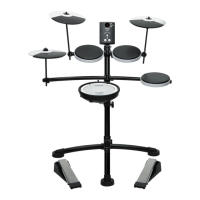
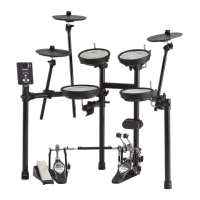
The Roland TD-1 V-Drums electronic drum kit is designed to provide an engaging and effective drumming experience for players of all levels, from beginners to those looking to refine their skills. This owner's manual outlines the core functionalities, usage features, and some maintenance aspects of the TD-1 module and its associated components.

Core Functionality

The TD-1 module serves as the central brain of the V-Drums kit, generating a variety of drum sounds and offering a suite of practice tools. It allows users to select from 15 different drum kits, each with unique sounds assigned to the pads, and to play along with 15 built-in songs. The module features a clear 7-segment, 3-character LED display that shows the selected drum kit number, metronome tempo, and other relevant information.

Basic Usage and Playing Features

To begin playing, users connect the TD-1 module to an amplified speaker or headphones via the OUTPUT/PHONES jack, and power it on using the dedicated power button. The volume can be adjusted in 20 levels using the [▲] [▼] buttons.

The TD-1 supports various drumming techniques, mirroring those of an acoustic drum set. This includes different ways to strike the snare drum (head shot, rim shot), cymbals (bow shot, edge shot, choking), and operate the hi-hat (closed, half-open, open, foot closed, foot splash). The manual provides detailed illustrations and descriptions for holding sticks and using the kick pedal with both "heel up" and "heel down" techniques, allowing players to explore different styles and dynamics.

Metronome and Tempo Control

A crucial feature for practice is the built-1n metronome, which can be started and stopped with the [X] button. The metronome light flashes in time with the tempo, aiding in rhythm development. The tempo can be adjusted using the [-] [+] buttons or set quickly using the Tap Tempo function, where users strike a pad repeatedly while holding the [Select] button. The metronome's sound can be customized by long-pressing the [X] button in Tempo mode, allowing adjustments to the number of beats, rhythm type (e.g., quarter notes, eighth notes, sixteenth notes), volume, and sound type.

Coach Mode for Skill Development

The TD-1 excels as a practice tool through its "Coach Mode," offering ten specific exercises (C-1 to C-10) designed to build speed, accuracy, stamina, and timing.

  • Time Check (C-1 Easy, C-2 Hard): These exercises check the accuracy of playing against the metronome, indicating whether strikes are "behind the beat," "on the beat," or "ahead of the beat." Users can configure the number of measures after which the score result is shown, or turn off scoring entirely.
  • Change-up (C-3): This mode challenges players by automatically changing the rhythm type every two measures, progressing from half notes to shorter note values and back, enhancing adaptability.
  • Auto Up/Down (C-4): Designed to develop stamina and endurance, the metronome tempo gradually increases and decreases over time. Players can set the upper tempo limit during practice. The manual also details how to specify the number of beats at which the tempo changes.
  • Quiet Count (C-5): This exercise helps develop internal timing sense by alternating between sounding and silencing the metronome every four measures, prompting players to maintain rhythm independently.
  • Tempo Check (C-6 Easy, C-7 Hard): These modes allow practice at a steady tempo without constant metronome reliance. The metronome volume dynamically adjusts, becoming softer with accurate playing and louder when the tempo drifts, providing real-time feedback.
  • Stroke Balance (C-8): This practice focuses on reducing volume discrepancies between right and left hand strikes, promoting consistent sound. The display shows the strength of each strike. The time for this exercise can be adjusted.
  • Timer (C-9): Users can set a specified practice time (1-99 minutes) to establish daily goals. An alert tone sounds when the time elapses, and the display shows the remaining time.
  • Recording (C-10): This function allows users to record their own performances, providing a valuable tool for self-assessment and checking drumming progress. Recordings can be played back and stopped as needed.

Detailed Settings and Customization

The TD-1 module offers several detailed settings to personalize the drumming experience:

  • Pad Sensitivity: In Drums mode, users can adjust the sensitivity of individual pads and the kick pedal. Higher sensitivity allows softer strikes to produce loud volumes, while lower sensitivity requires more force for loud sounds.
  • Pad Type: For users with separately sold kick triggers or mesh pads, the module allows changing the pad type to ensure optimal performance.
  • MIDI Note Number: In Coach mode, the MIDI note number assigned to each pad can be changed, offering flexibility for integration with other MIDI devices.
  • Auto Off Time: The TD-1 has an Auto Off function that powers down the unit after a period of inactivity. This time can be adjusted (10, 30, 240 minutes) or disabled entirely.

Connectivity

The TD-1 can be connected to a computer or iPad via a USB cable (sold separately) to use with drumming practice software like V-Drums Tutor. For iPad connectivity, an Apple Lightning to USB Camera Adapter is required. If users wish to hear computer/iPad audio through the V-Drums module, an audio cable can be used to connect the external device's audio output to the MIX IN jack.

Maintenance Features

While the manual primarily focuses on usage, it touches upon some maintenance-related aspects:

  • Troubleshooting: A dedicated section addresses common issues such as no sound, specific pads not sounding, hi-hat pedal problems, unwanted sounds from other pads due to vibration, and connectivity issues (USB, MIDI). Solutions often involve checking cable connections, adjusting volume levels, setting pad sensitivity or type, and ensuring pads are fastened firmly.
  • Mesh Head Tension: For optimal triggering, the manual advises adjusting the mesh head tension, noting that slightly higher tension is generally good.
  • Hi-hat Control Pedal Springs: If the hi-hat foot-close sound is not loud enough, the manual suggests that if two springs are installed, removing one can lighten the feeling, though it may increase noise and vibration.
  • Factory Reset: In case of persistent issues or to revert all settings to their default state, a factory reset procedure is available. Users are warned that this will erase all stored settings.

Safety and Data Precautions

The manual includes important safety information, emphasizing the use of the supplied AC adaptor and power cord. It also highlights precautions regarding data: users are advised to back up data before repairs, as Roland assumes no liability for lost content. It also notes that sound vibrations can transmit through floors and walls, encouraging users to be mindful of others.

The Roland TD-1 V-Drums is a comprehensive electronic drum kit designed to be user-friendly, versatile, and an effective tool for learning and practicing drums, offering a rich array of sounds and interactive coaching features.

Roland V-Drums TD-1 Specifications

General IconGeneral
TypeElectronic Drum Kit
Sound ModuleTD-1
Number of Drum Kits15
MetronomeYes
Snare PadPDX-8
Tom Pads3
Hi-Hat/Cymbal PadCY-5
Kick PedalKT-10
Drum SticksNot included
Sounds100
EffectsAmbience
Coaching FunctionsTime Check, Quiet Count, Auto Up/Down
ConnectivityUSB, MIDI Out
Power SupplyAC Adapter
Weight15 kg

Related product manuals