EasyManua.ls Logo

Roland TD-07 - User Manual

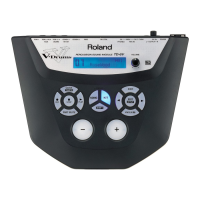
Roland TD-07
30 pages
Print Icon
To Next Page IconTo Next Page
Loading...
Before using this unit, carefully read “USING THE UNIT SAFELY” and “IMPORTANT NOTES” (the leaet “USING THE UNIT SAFELY” and the Owners
Manual (p. 28). After reading, keep the document(s) where it will be available for immediate reference.
Owners Manual
© 2020 Roland Corporation
Contents
Let’s Learn About Drums . . . . . . . . . . . . . . . . . . . . . . . . 2
Drum Set Elements . . . . . . . . . . . . . . . . . . . . . . . . . . . . . . . 2
The Basics of Playing . . . . . . . . . . . . . . . . . . . . . . . . . . . . . . 3
Quick Start . . . . . . . . . . . . . . . . . . . . . . . . . . . . . . . . . . . . . 5
Panel Descriptions . . . . . . . . . . . . . . . . . . . . . . . . . . . . . . . . 5
Connect Your Equipment . . . . . . . . . . . . . . . . . . . . . . . . . . 6
Turning the Power On/O . . . . . . . . . . . . . . . . . . . . . . . . . 6
Playing . . . . . . . . . . . . . . . . . . . . . . . . . . . . . . . . . . . . . . . . . . 7
Selecting a Drum Kit . . . . . . . . . . . . . . . . . . . . . . . . . . . . 7
Playing with the Metronome . . . . . . . . . . . . . . . . . . . . . 7
Practicing in Coach Mode (COACH) . . . . . . . . . . . . . . 8
Selecting a Practice Menu . . . . . . . . . . . . . . . . . . . . . . . . . 8
Correctly Playing in Time with the Beat (TIME
CHECK) . . . . . . . . . . . . . . . . . . . . . . . . . . . . . . . . . . . . . . . . 8
Developing Internal Timing Sense (QUIET COUNT) . . 9
Playing Along with a Changing Tempo (AUTO
UP/DOWN) . . . . . . . . . . . . . . . . . . . . . . . . . . . . . . . . . . . . . 9
Playing Along with a Changing Rhythm
(CHANGE UP) . . . . . . . . . . . . . . . . . . . . . . . . . . . . . . . . . . 10
Performing Along with a Song from Your
Smartphone . . . . . . . . . . . . . . . . . . . . . . . . . . . . . . . . . . . 11
Connecting via a Cable to the MIX IN Jack . . . . . . . . . 11
Connecting Wirelessly via Bluetooth . . . . . . . . . . . . .11
Customizing a Drum Kit (KIT EDIT) . . . . . . . . . . . . . . 12
Editing the Sound of Each Pad (INSTRUMENT) . . . . . 13
Adjusting the Drum Kit’s Volume (KIT VOLUME) . . . . 13
Adjusting the Attack and Release (TRANSIENT) . . . . 14
Adjusting the Tonal Character of Each Pad (PAD EQ) 14
Adjusting the Stereo Feel of the Drum Kit
(OVERHEAD) . . . . . . . . . . . . . . . . . . . . . . . . . . . . . . . . . . 15
Adjusting the Reverberation of the Drum Kit
(ROOM) . . . . . . . . . . . . . . . . . . . . . . . . . . . . . . . . . . . . . . . 15
Applying an Eect to the Drum Kit (MFX) . . . . . . . . .16
Renaming the Drum Kit (KIT NAME) . . . . . . . . . . . . . . 16
Specifying MIDI Note Numbers (MIDI NOTE) . . . . . . .16
Copying a Drum Kit (KIT COPY) . . . . . . . . . . . . . . . . . . 17
Resetting a Drum Kit's Settings (KIT RESET) . . . . . . . . 17
Using the TD-07 with a Computer or
Smartphone App
. . . . . . . . . . . . . . . . . . . . . . . . . . . . . .18
Using the TD-07 with Computer Software . . . . . . . . . 18
Using the TD-07 with a Smartphone App . . . . . . . . .18
Making Detailed Settings (SETUP) . . . . . . . . . . . . . . 19
Making Pad Settings . . . . . . . . . . . . . . . . . . . . . . . . . . . 19
MIDI Settings . . . . . . . . . . . . . . . . . . . . . . . . . . . . . . . . . . 24
Making System Settings . . . . . . . . . . . . . . . . . . . . . . . .24
Viewing Version Information . . . . . . . . . . . . . . . . . . . . 25
Restoring the Factory Settings . . . . . . . . . . . . . . . . . . 25
Troubleshooting . . . . . . . . . . . . . . . . . . . . . . . . . . . . . . . 26
USING THE UNIT SAFELY . . . . . . . . . . . . . . . . . . . . . . .28
IMPORTANT NOTES . . . . . . . . . . . . . . . . . . . . . . . . . . . . 28
Main Specications . . . . . . . . . . . . . . . . . . . . . . . . . . . . 29

Table of Contents

Questions and Answers

Summary

Understanding Drum Sets

Drum Set Elements

Defines basic terms and components of acoustic and V-drum sets.

Playing Techniques

Cymbal and Hi-Hat Techniques

Details techniques for playing cymbals (bow, edge, bell) and hi-hat states (closed, open).

Quick Start

Control Panel Overview

Identifies and explains the functions of the TD-07's control panel buttons and display.

Connecting Your Equipment

Guides on connecting headphones, speakers, and other audio devices to the TD-07.

Power On;Off Procedures

Provides instructions for turning the TD-07 unit on and off, including auto-off function.

Playing the Drum Kit

Selecting Drum Kits

Explains how to browse and select different drum sound sets (kits) on the TD-07.

Using the Metronome

Details how to activate and configure the built-in metronome for practice sessions.

Coach Mode Practice

Practice Menu Selection

Overview of the four practice menus available in Coach Mode for skill improvement.

Time Check Practice

Practice drumming in accurate time with the metronome, focusing on timing and accuracy.

Quiet Count Timing

Develop internal timing by practicing with alternating metronome sounds and silence.

Tempo Variation Practice

Enhance stamina and endurance by practicing with a metronome that gradually changes tempo.

Rhythm Variation Practice

Improve rhythmic accuracy by practicing with changing note values and rhythms.

Smartphone Integration

Smartphone Audio Playback

Connect via cable or Bluetooth to play along with songs from your smartphone.

Bluetooth Pairing and Connection

Step-by-step guide for wirelessly connecting a smartphone to the TD-07 via Bluetooth.

Drum Kit Customization

Kit Edit Menu Overview

Introduction to the Kit Edit function for customizing sounds and effects for each pad.

Pad Editing and Selection

Learn how to select and edit individual pads or their strike locations (head/rim).

Editing Pad Sounds

Modify instrument sounds, pitch, tuning, and decay for each pad.

Adjusting Kit Volume

Fine-tune the overall volume of the drum kit and specific pad sounds.

Transient (Attack;Release) Adjustment

Adjust the attack and release characteristics of individual pad sounds.

Pad Equalizer (Tone Adjustment)

Shape the tonal character of each pad using the pad equalizer settings.

Stereo Feel Adjustment (Overhead)

Adjust the spaciousness and stereo imaging using overhead mic simulation.

Reverberation Adjustment (Room)

Apply room effects to simulate natural reverberation and enhance presence.

Applying Multi-Effects (MFX)

Apply various multi-effects to the entire drum kit, with per-pad control.

Renaming Drum Kits

Edit the name of the currently selected drum kit for better organization.

Specifying MIDI Note Numbers

Assign specific MIDI note numbers to each pad for external control.

Copying Drum Kits

Copy settings from one drum kit to another, overwriting the destination.

Resetting Drum Kit Settings

Return a specific drum kit's settings to their original factory-set state.

Computer and App Integration

Using Computer Software

Connect to a computer via USB for MIDI and audio data transmission with DAW software.

Using Smartphone Apps via Bluetooth MIDI

Connect TD-07 to smartphone apps using Bluetooth MIDI for enhanced control.

Detailed Setup and Configuration

Pad Settings

Adjust pad sensitivity, trigger thresholds, and advanced settings for optimal response.

MIDI Settings

Configure MIDI channels, transmission/reception, and control messages for external devices.

System Settings

Adjust system parameters like display contrast, USB driver, and auto-off function.

Version Information

View the TD-07's current program version and information for updates.

Factory Reset

Restore the TD-07 to its original factory settings, erasing all user data.

Troubleshooting

Sound and Volume Issues

Diagnose and resolve problems related to no sound, insufficient volume, or incorrect pad triggers.

Connectivity Troubleshooting

Resolve issues with USB computer connection, MIDI devices, and Bluetooth functionality.

Safety and Important Notes

Safe Unit Operation

Important warnings and precautions for safe use, power supply, and handling the unit.

Handling and Maintenance Advice

Guidelines on data backup, repairs, display care, and environmental considerations.

Main Specifications

Overview

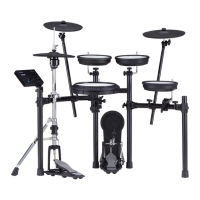
The Roland TD-07 is a drum sound module designed to enhance and customize your drumming experience. It offers a wide range of features for playing, practicing, and personalizing drum kits, making it suitable for drummers of various skill levels.

Function Description:

The core function of the TD-07 is to generate drum sounds based on input from connected pads and pedals. It acts as the central hub for your V-Drums setup, translating physical strikes into a rich array of acoustic and electronic drum sounds. The module comes pre-loaded with numerous drum kits, each comprising different sounds assigned to individual pads. These sounds can vary in response to your playing dynamics, offering expressive control.

Beyond basic sound generation, the TD-07 integrates several advanced functionalities. It features a "Coach Mode" with various practice menus like TIME CHECK, QUIET COUNT, AUTO UP/DOWN, and CHANGE UP, designed to improve speed control, precision, endurance, and timing. This mode provides immediate feedback on your performance, helping you identify areas for improvement.

The module also supports connectivity with smartphones and computers. You can play along with songs from your smartphone either via a cable connected to the MIX IN jack or wirelessly via Bluetooth. This allows for interactive practice sessions where you can drum along to your favorite tracks. For computer integration, the TD-07 can transmit and receive MIDI and audio data via a USB cable, enabling recording, music production, and use with various software applications.

A significant aspect of the TD-07 is its "KIT EDIT" function, which allows for extensive customization of drum kits. You can modify individual pad sounds, adjust the overall kit volume, fine-tune the attack and release (TRANSIENT) of sounds, and alter the tonal character of each pad using the PAD EQ. Additionally, you can adjust the stereo feel (OVERHEAD) and reverberation (ROOM) of the entire drum kit, apply multi-effects (MFX), rename kits, and specify MIDI note numbers for each pad. The module also includes features for copying drum kits and resetting them to their factory settings.

Usage Features:

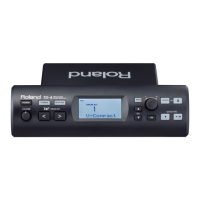
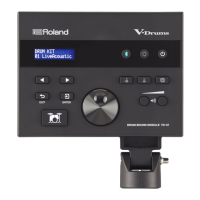
Operating the TD-07 is designed to be intuitive. The front panel features a display screen that shows various information depending on the operation, with a DRUM KIT screen serving as the basic interface. Navigation is primarily done using dedicated buttons for DRUM KIT, COACH, SETUP, KIT EDIT, METRONOME, and Bluetooth, along with page navigation buttons and a dial for selecting items and changing values. A VOLUME button allows for easy adjustment of the overall output.

For playing, simply strike the connected pads. The module supports various drumming techniques, including head shots, rim shots, and cross sticks on the snare, and bow shots, edge shots, bell shots, and choking on cymbals. The hi-hat pedal allows for closed, half-open, open, and foot closed sounds, as well as foot splashes.

The metronome function can be easily activated and deactivated, with options to adjust tempo, volume, beat, rhythm, pan, sound type, and LED sync. This is crucial for maintaining consistent timing during practice.

Connecting to a smartphone for playing along with music involves either a physical cable to the MIX IN jack or wireless Bluetooth pairing. The Bluetooth function allows for both audio streaming and MIDI communication with compatible apps like GarageBand. The pairing process is guided through the module's display and your smartphone's Bluetooth settings.

Customizing drum kits involves selecting a pad by striking it, then using the navigation buttons and dial to adjust parameters within the KIT EDIT menu. The module automatically saves changes, eliminating the need for manual saving operations.

The SETUP menu provides access to detailed settings for pads, MIDI, and the system. Pad settings include adjusting sensitivity, threshold, and cross-stick sensitivity (XStickSens), as well as specifying pad types for optimal performance. MIDI settings cover channel, transmit/receive switches, program change, local control, choke shot behavior, and device ID. System settings allow adjustments for LCD contrast, USB audio levels, USB driver mode, earplugs mode (to decrease volume for hearing protection), and the Auto Off function.

Maintenance Features:

The TD-07 incorporates several features and guidelines to ensure safe operation and data integrity.

For power management, the module has an Auto Off function that automatically turns off the power after a period of inactivity. This can be disengaged if continuous power is desired. It is crucial to always turn off the power using the dedicated POWER button rather than disconnecting the power cord directly, as this ensures settings are saved correctly.

Regarding data, the TD-07 automatically saves changes made to drum kits. However, users are advised to create regular backups of any important data stored within the unit to protect against irretrievable loss due to equipment failure or incorrect operation. Roland explicitly states it assumes no liability for the restoration of lost content.

Physical maintenance includes ensuring proper connections of all cables to prevent malfunction and equipment failure. Volumes should always be turned down on all connected units before making or changing connections.

The manual also provides troubleshooting tips for common issues such as no sound, insufficient volume, specific pads not sounding, or unintended triggering from other pads. These tips often involve checking cable connections, adjusting pad sensitivity, verifying pad types, and ensuring proper tension of mesh heads. For issues related to USB or Bluetooth connectivity, checking driver installations, pairing status, and specific settings within the module and connected devices are recommended.

The module's design also considers the physical impact of drumming. The rubber portion of the striking surface is treated with a preservative to maintain performance, and any white stains that may appear are normal and do not affect functionality. Continuous playing may cause discoloration of the pad, but this also does not affect its function.

Finally, the TD-07 allows for viewing its program version and performing a factory reset, which returns all data and settings to their initial state. This can be useful for resolving persistent issues or preparing the unit for a new user.

Roland TD-07 Specifications

General IconGeneral
Kit Presets25
USBYes (Type B)
MetronomeYes
Coach FunctionsYes
ModuleTD-07
BluetoothYes
RecordingYes
Snare DrumPDX-8
Toms3 x PDX-6
Hi-HatCY-5
Kick DrumKD-10
ConnectivityUSB, Bluetooth, MIDI
Power SupplyAC adapter (included)

Related product manuals