6
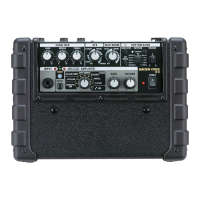
Panel Description
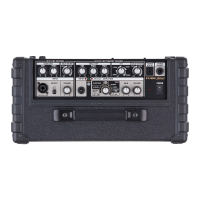
Top Panel
Number Name Explanation
MIC/INSTRUMENT CHANNEL
INPUT
1
INPUT jack
Here you can connect a mic, guitar, keyboard, or other
electronic musical instrument (balanced connection).
* This instrument is equipped with balanced (XLR/TRS) type jacks.
Wiring diagrams for these jacks are shown below. Make connections
after rst checking the wiring diagrams of other equipment you
intend to connect.
2
[SELECT] switch
Switch this to choose the input level that’s appropriate for
the device you’ve connected.
Choose the “MIC” setting if you’re connecting a mic, or
choose the “INST” setting if you’re connecting an acoustic
guitar or a keyboard.
3
[VOLUME] knob Adjusts the volume of the MIC/INSTRUMENT channel.
EQUALIZER
4
[BASS] knob Adjusts the sound level of the low-frequency range.
[MIDDLE] knob Adjusts the sound level of the middle-frequency range.
[TREBLE] knob Adjusts the sound level of the high-frequency range.
REVERB
5
[REVERB] knob Spacious-sounding stereo reverb is provided. Turn the knob to adjust the reverb level.
MIC/GUITAR CHANNEL
INPUT
6
[INPUT] jack
Here you can connect an electric guitar, acoustic guitar, or
mic (unbalanced connection).
* This instrument is equipped with unbalanced (XLR/TRS) type jacks.
Wiring diagrams for these jacks are shown below. Make connections
after rst checking the wiring diagrams of other equipment you
intend to connect.
7
[TUNER] button
The switch lights in red when the tuner function is on;
the switch is unlit when the tuner is o. For more detailed
information, refer to “Using the Tuner” (p. 9).
AMPLIFIER
8
Type switch
You can select from the following six types. When the tuner function (p. 9) is on, you can use this to select the name of the
string (1E - 6E)to be tuned.
Type Explanation
A-GUITAR Choose this if you’ve connected an acoustic guitar that’s equipped with a pickup.
ACOUSTIC SIM
This is an original amp that transforms the sound of a connected electric guitar into the sound of
an acoustic guitar.
CLEAN
This is an original amp that provides a clean and natural sound with a sense of transparency.
When used in conjunction with the chorus and reverb of the CUBE Street EX, it provides a
spacious, three-dimensional sound.
CRUNCH This original amp delivers a fat crunch sound that allows each note to be clearly dened.
LEAD This is a high-gain original amp that produces thick-sounding distortion.
MIC Choose this if you’ve connected a microphone.
9
[VOLUME] knob Adjusts the volume of the MIC/GUITAR channel.
5 12 161510 11 17 18
6 7 1413
1
2 3 8 9
4


 To Next Page
 Loading...