
 Need help?
Do you have a question about the Roland Dimension D SDD-320 and is the answer not in the manual?
Specialty designed chorus effect unit for adding spatial effects to stereo and monaural sound.
Highlights balanced/unbalanced I/O, click-free switching, remote control, fast LEDs, and low noise.
Covers line voltage check, foreign country use, powering on, and essential safety/operational warnings.
Illustrates signal flow and connections from input sources to the amplifier via the SDD-320.
Details connecting to the right channel when using the MONO input mode for stereo output.
Guides on connecting, powering on, and adjusting the output level indicator for optimal sound.
Explains selecting between four dimension modes (1-4) and the OFF setting for normal sound.
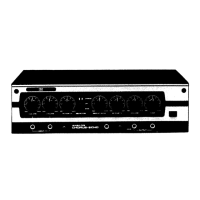
Explains the function of the BYPASS switch, DIMENSION MODE selectors, EFFECT INDICATOR, and POWER switch.
Details input/output connectors, input mode switch, and remote control jack for external switching.
Presents a schematic overview of the SDD-320's internal signal processing and components.
Provides instructions for mounting the SDD-320 in a standard 19-inch rack using 5mm screws.
Details input/output levels, impedance, gain, S/N ratio, power consumption, dimensions, and weight.
Lists optional accessories like foot switches (FS-1, FS-2, FS-3) and a pedal switch (DP-2).
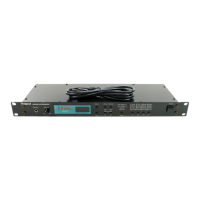
The Roland Dimension D SDD-320 is a specialized chorus effect unit designed to add spatial effects to both stereo and monaural sound sources. It transforms monaural inputs from a single point sound source into a sound that fills the entire stereo field, providing a new dimension without the apparent movement of sound typically produced by most other chorus devices.
The unit offers both balanced and unbalanced inputs and outputs, making it versatile for use in various studio or stage setups. It features click-free, noiseless switching between its four different dimension modes, allowing for smooth transitions between effects. A remote-controlled dimension EFFECT/NORMAL function is also available, providing external control over the effect. Fast-acting LED level indicators are included for easy monitoring of input and output levels. The SDD-320 boasts low noise, with an S/N ratio greater than 95dB ("A" weighted), ensuring a clean signal. It is designed for standard 19" rack mounting, making it easy to integrate into existing rack setups.
Before using the SDD-320, it is crucial to ensure that the line voltage in your area matches the unit's requirements. If you plan to use the SDD-320 in a foreign country, it is recommended to check with your local Roland dealer. Always plug the SDD-320 in before turning on the power switch.
For operation, after making all necessary connections, set the INPUT MODE switch (located on the rear panel) as needed. Both the BYPASS switch and the DIMENSION MODE switch on the front panel should be set to OFF. Turn on the POWER switch and confirm that the pilot light illuminates. Adjust the level of the external sound source so that the OUTPUT LEVEL INDICATOR reads close to "0". It's important to avoid driving the LEVEL INDICATOR above "0" to prevent distortion, and conversely, keeping it below "0" will increase the noise level in the output signal. Once levels are set, select the desired DIMENSION MODE.
The BYPASS switch allows for direct connections between the inputs and outputs, meaning the POWER switch can remain OFF when the SDD-320 is in BYPASS mode. The DIMENSION MODE selectors allow you to choose between four effect modes; MODE 1 produces the softest effect, while MODE 4 produces the strongest. When set to OFF, the sound passes through the SDD-320 without change. A REMOTE jack is provided for remote switching between the OFF mode and the DIMENSION MODE using an optional foot switch (such as the Roland FS-1 or DP-2). To use this feature, select a DIMENSION MODE on the unit, and then use the foot switch to toggle between the selected mode and normal sound. For example, with an organ as the input, you could play a progression of block chords, using the foot switch to make some chords "straight" and others "Dimension D" chords. The EFFECT INDICATOR lights up when the DIMENSION MODE is active and works in conjunction with both the REMOTE jack and the DIMENSION MODE selectors. The OUTPUT LEVEL INDICATOR shows the combined output level, but it does not function when the BYPASS switch is ON. The POWER switch includes a pilot lamp to indicate when the unit is powered on.
The rear panel includes the INPUT MODE switch, which selects the input mode. In MONO mode, the left input is disconnected, and the right input serves both dimension channels. There are balanced INPUT Connectors (XLR) and unbalanced INPUT Jacks (standard phone type). Similarly, there are balanced OUTPUT Connectors (XLR) and unbalanced OUTPUT Jacks (standard phone type). It is important not to use the balanced and unbalanced outputs simultaneously. If balanced inputs are used, balanced outputs should be used, and vice versa. Do not mix balanced inputs with unbalanced outputs, or unbalanced inputs with balanced outputs.
For maintenance and precautions, never open the unit. Unplug the unit if it will not be used for long periods, grasping the plug, not the cord. Avoid placing heavy objects on the power cord. Do not use the unit in areas with very high or low temperatures, and keep it away from heaters and coolers, as extreme temperatures can affect circuit stability. Avoid using the unit in very dusty or humid places. If the unit must be used near neon or fluorescent lights, keep it as far away as possible to prevent high levels of noise. Changing the angle of the unit relative to the lights might also help reduce noise. When connecting the unit, always plug the cord into the external amplifier first, then into the SDD-320 output. To disconnect, reverse the order: remove the cord from the SDD-320 first, then from the amplifier. To clean the unit, wipe it with a cloth dampened with a neutral cleanser; do not use solvents like paint thinner.
 General
| Type | Chorus |
|---|---|
| Outputs | 2 x 1/4" |
| Power Supply | AC 117V |
| Dimensions | 19" x 1.75" |
| Weight | 10 lbs |
| Inputs | 2 x 1/4" TS (mono) |





 To Next Page