131
Editing a Sample
Editing a Sample
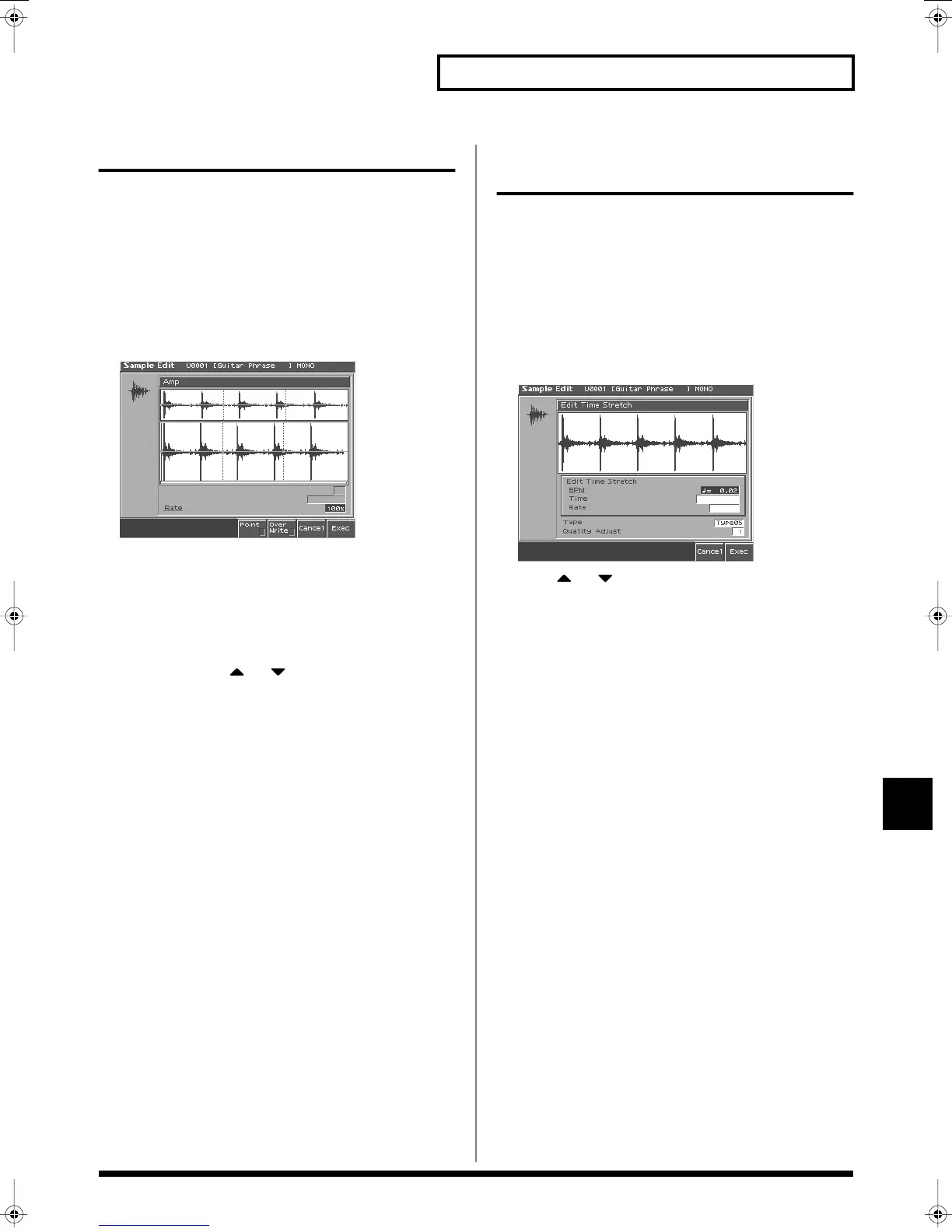
Amp
This operation applies an envelope (time-variant change) to the
volume of the sample.
You can also adjust the volume of the entire sample.
* You cannot execute this with more than one sample selected.
1.
Press [SAMPLE EDIT] to access the Sample Edit screen.
2.
Press [3 (Sample Modify)] to access the Sample Modify
window.
3.
Press [4 (Amp)].
fig.Amp_50
4.
Use VALUE dial or [INC], [DEC] to set the value.
•
Rate 1–4:
Specifies the rate of volume boost.
This specifies how much boost will be applied relative to the
current volume. The entire sample you select will be boosted.
Value:
0–400%
5.
If you want to specify a point, press [5 (Point)] to add a
check mark. Press or to select a parameter, and
then use VALUE dial or [INC], [DEC] to set the value.
•
Current Point:
Specifies the currently selected point. Beginning
near the start point, the points will be numbered 1, 2, 3, or 4.
•
Point 1–4:
Location of the current point
•
Rate 1–4:
Amplification ratio of the current point
Specifies how the volume of each point is to be boosted relative
to the current value.
Value:
0–400%
6.
If you want the edited sample to replace the current sample,
press [6 (Over Writer)] to display the “
✔
” mark.
7.
Press [8 (Exec)].
A message will ask you for confirmation.
8.
To execute, press [8 (Exec)].
* To cancel, press [7 (Cancel)].
Stretching or Shrinking a
Sample (Time Stretch)
This operation stretches or shrinks the sample to modify the length
or tempo. You can stretch or shrink the sample by a factor of one half
to double the original length.
* You cannot execute this with more than one sample selected.
1.
Press [SAMPLE EDIT] to access the Sample Edit screen.
2.
Press [3 (Sample Modify)] to access the Sample Modify
window.
3.
Press [5 (Time Strtch)].
fig.TimeStretch_50
4.
Press or to select the parameter.
•
Edit Time Stretch
BPM:
Change the BPM (p. 116) of the sample to the BPM you
specify.
Time:
Specify the length of the sample as a time value.
Rate:
Specify the length relative to the current length of the
sample.
Value:
50.0–200.0%
•
Type
Lower settings of this value will make the sound more suitable
for faster phrases, and higher settings will make the sound more
suitable for slower phrases.
Value:
TYPE01–TYPE10
•
Quality Adjust
Make fine adjustments to the tonal quality of the Time Stretch.
Value:
1–10
5.
Use VALUE dial or [INC/DEC] to specify the tempo/length.
When setting the BPM (tempo) value, you can hold down
[SHIFT] and turn the VALUE dial, or use [INC] [DEC] to adjust
the value to the right of the decimal point.
6.
Press [8 (Exec)].
The length of the sample will be changed as specified.
* To cancel, press [7 (Cancel)].
Reference_e.book 131 ページ 2003年7月14日 月曜日 午後3時25分


 To Next Page