201
About V-LINK
About V-LINK
What is V-LINK?
V-LINK ( ) is a function that provides for the play of
music and visual material. By using V-LINK-compatible video
equipment, visual effects can be easily linked to, and made part of
the expressive elements of a performance.
(Examples)
By using the Fantom-S and Edirol DV-7PR together, you can:
• Make Edirol DV-7PR playback settings remotely from the
Fantom-S.
• Use the Fantom-S’s sequencer to enjoy synchronized music and
video.
• Use the Fantom-S’s velocity pads to switch the Edirol DV-7PR’s
images (clips/palettes).
• Use the Fantom-S’s knobs to adjust the brightness or color of the
image.
* In order to use V-LINK with the Fantom-S and Edirol DV-7PR, you
will need to make connections using an Edirol UM1/UM-1S (sold
separately).
Connection Examples
Before connecting this unit to other devices, turn off the power
to all units. This will help prevent malfunctions and/or damage
to speakers or other devices.
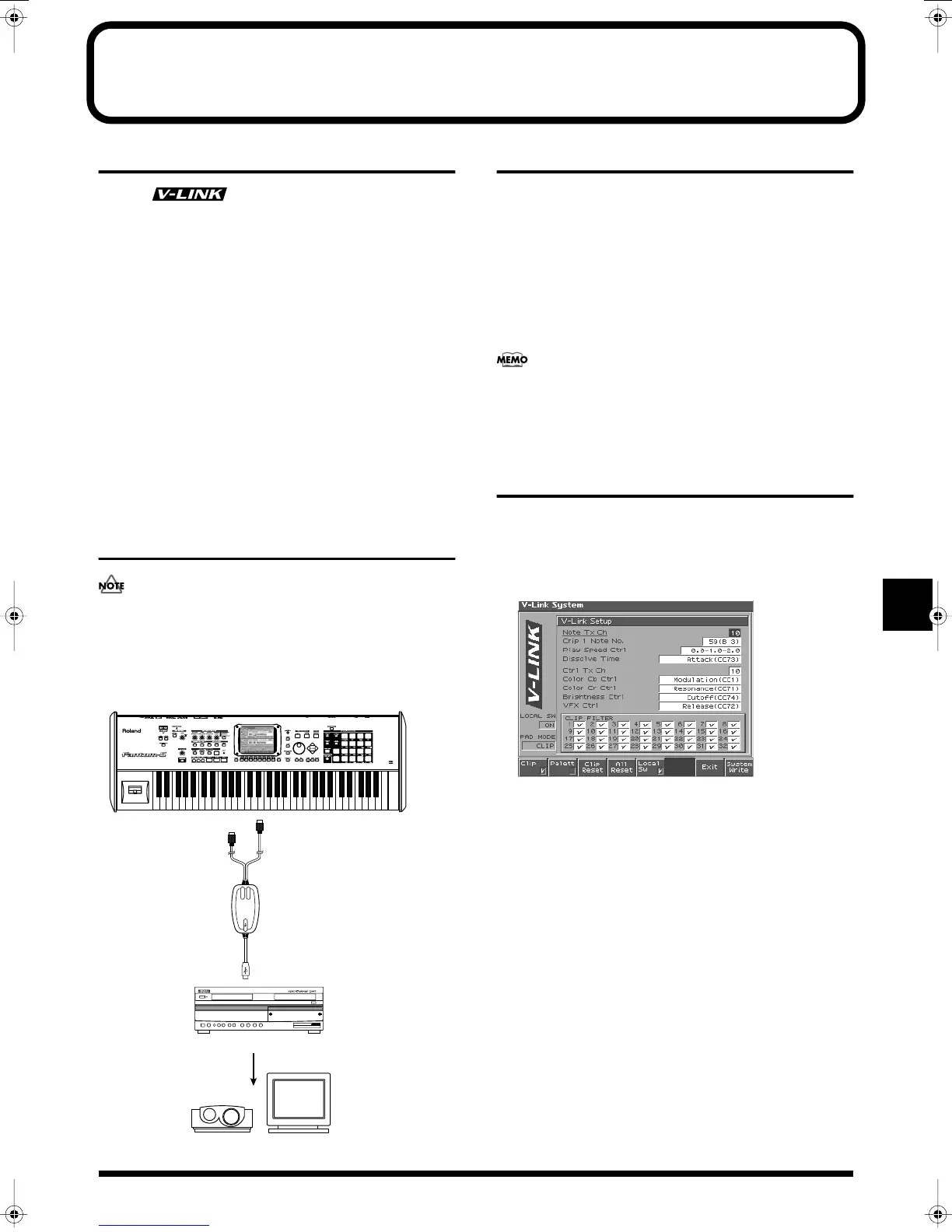
Use a UM-1 to connect the Fantom-S’s MIDI OUT connector to the
DV-7PR’s remote jack.
fig.V-LINK-Connect.e
Turning the V-LINK ON/OFF
1.
In the left of the panel, press [V-LINK] so the indicator is
lighted.
The V-LINK button will light, and the V-LINK setting will be
on.
In this state, you can operate the velocity pads and turntable
emulation slider to manipulate images in sync with the
playback of the Fantom-S.
If you press [EXIT], you will return to the previous screen while
leaving the V-LINK setting on.
Each mode will function as usual even if V-LINK is on.
2.
Press [V-LINK] again.
The V-LINK button will go out, and the V-LINK setting will be
off.
V-LINK Settings
1.
Holding down [SHIFT] and pressing [V-LINK] to access the
V-LINK SETUP screen.
2.
Press [CURSOR] to move the cursor to a parameter, and
turn the VALUE dial or use [INC][DEC] to set the value.
fig.V-LINK01
* Specify the Pad Mode by pressing [1 (Clip)] or [2 (Palett)].
3.
If you want to keep your settings, press [8 (System Write)].
4.
Press [7 (Exit)] or [EXIT].
You’re returned to the previous screen.
Edirol DV-7PR
Display
Edirol UM-1
Projector
MIDI OUT
REMOTE
Fantom-S
Reference_e.book 201 ページ 2003年7月14日 月曜日 午後3時25分


 To Next Page