68
Chapter 2 Automatic Accompaniment
Chapter 2
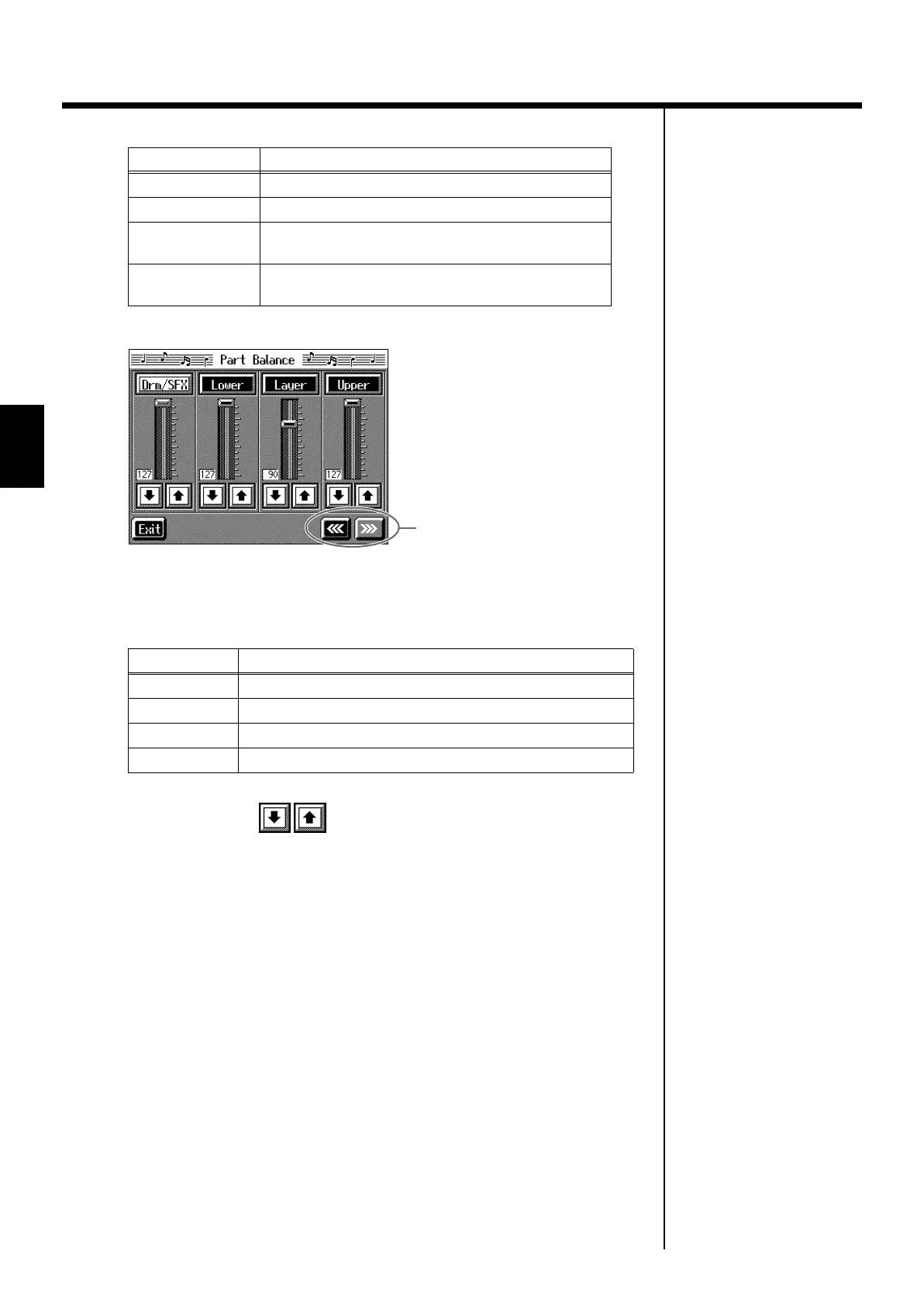
fig.d-partbal2.eps_60
This shows the volume balance between each of the keyboard’s Tones when layer
performance (p. 28) or split performance (p. 29) are used, or the volume balance
when using the keyboard to play percussion instruments or sound effects (p. 26).
2.
Touch each slider to adjust the volume balance.
You can also make these adjustments by touching the adjustment sliders and then
using the [-] [+] buttons or the dial.
Touch <Exit> to go back to the previous screen.
Display
Performance part
Rhythm
Music Style Rhythm Part
Bass
Bass, Bass Tone (p. 59)
Accomp
Accompaniment 1, Accompaniment 2, Accompani-
ment 3, Chord Tone (p. 59)
Phrase (KR-7)
Short phrases sounded when the Performance Pads
are pressed (p. 63).
Displayed
Tone Part
Drums
Percussion instruments or sound effects played with the keys
Lower
Left-hand Tone
Layer
Layer Tone
Upper
Right-hand Tone
Switch the screens
KR-7_5_e.book 68 ページ 2004年7月7日 水曜日 午前10時3分


 To Next Page