EasyManua.ls Logo

Roland LX708 - User Manual

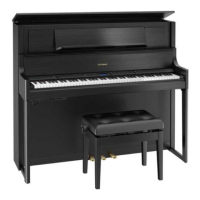
Roland LX708
38 pages
Print Icon
To Next Page IconTo Next Page
Loading...
Owners Manual

Table of Contents

Questions and Answers

  • M
    Michelle BarajasJul 27, 2025
    Why is there no sound coming from my Roland LX708?
    • J
      James GoodmanJul 28, 2025
      The “Local Control” setting might be “Off”. To solve this, in function mode, turn the “Local Control” setting “On” for your Roland Musical Instrument.
  • N
    Nicholas CaldwellAug 2, 2025
    How to fix incorrect pitch on Roland LX708 keyboard?
    • S
      Samantha GreenAug 2, 2025
      The transpose settings on your Roland Musical Instrument might be incorrect. Press the [Transpose] button to cancel any existing transposition settings.
  • B
    Brandon HallAug 8, 2025
    Why is the pitch of my Roland LX708 incorrect?
    • C
      Christopher FosterAug 8, 2025
      The Master Tune setting of your Roland Musical Instrument might not be appropriate. The factory default is 442.0 Hz. Check and adjust the “Master Tuning” setting in the Piano Designer function.
  • T
    Thomas KellyAug 15, 2025
    Is the temperament setting correct on my Roland Musical Instrument?
    • D
      David WoodsAug 15, 2025
      The Temperament setting on your Roland Musical Instrument may be incorrect. The default is “Equal temperament.” Check the “Temperament” setting in the Piano Designer function and adjust if necessary.
  • G
    Gregory FloresAug 21, 2025
    What to do if single note tuning is inappropriate on Roland LX708?
    • C
      Christina Myers PhDAug 21, 2025
      Check the Piano Designer function’s “Single Note settings for your Roland Musical Instrument and adjust as needed.

Summary

Product Overview and Specifications

Main Specifications

Detailed technical specifications for the LX708, LX706, and LX705 digital pianos.

Panel Descriptions

Before You Play

Performing

Managing Performance Settings

Saving and recalling performance settings using the registration function.

Performing - Registration Management

Procedures for exporting and importing registration data to/from USB flash drives.

Recording Your Performance

Recording Keyboard Performance

Step-by-step guide to recording your own keyboard performances.

Recording Your Performance - Advanced Methods

How to record left and right-hand parts separately for complex performances.

Recording Your Performance - Overdubbing and Audio

Adding new recordings over existing ones, including built-in songs.

Recording Audio to USB Flash Drive

Capturing piano performances as audio files on a USB drive.

Creating Your Own Piano Tone (Piano Designer)

Adjusting the Sound of the Overall Piano

Customizing piano sound elements like ambience, touch, and brilliance.

Connecting to Mobile Devices via Bluetooth

Bluetooth Connection Troubleshooting

Resolving Bluetooth Pairing and App Connection Issues

Steps to resolve Bluetooth pairing and connection problems with apps.

Convenient Functions

Making Various Settings (Function Mode)

Troubleshooting

Troubleshooting - Error Messages

Explanations and solutions for various error messages displayed by the unit.

USING THE UNIT SAFELY

General Safety and Handling Precautions

Important safety information regarding fire, electric shock, injury, and unit handling.

USING THE UNIT SAFELY - Care and Legal Notices

Advice on unit placement, cleaning, data handling, and legal disclaimers.

Roland LX708 Specifications

General IconGeneral
KeyboardPHA-50 Keyboard: Wood and Plastic Hybrid Structure, with Escapement and Ebony/Ivory Feel
Sound EngineSuperNATURAL Piano Modeling
PolyphonyUnlimited (for Piano)
Number of Tones324
BluetoothBluetooth Audio: Bluetooth Ver 3.0 (Supports SCMS-T content protection) Bluetooth MIDI: Bluetooth Ver 4.0
PedalsDamper, Soft, Sostenuto
Headphones3D Ambience effect
DisplayGraphic LCD
Touch Sensitivity100 types, fixed touch
USBUSB Computer, USB Memory
Included AccessoriesOwner's Manual, Power Cord, Headphone Hook

Related product manuals