EasyManua.ls Logo

Roland FR-8X - User Manual

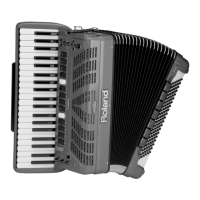
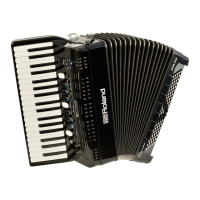
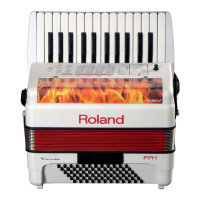
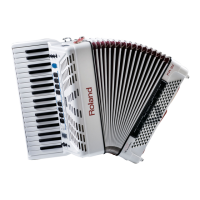
Roland FR-8X
128 pages
Print Icon
To Next Page IconTo Next Page
Loading...
Owner’s Manual (this document)
Read this rst. It explains the basic things you need to know in
order to use the FR-8x.
PDF Manual (download from the Web)
Tone & Drum Kit List
This is a list of the sounds contained in the FR-8x.
To obtain the PDF manual
1.
Enter the following URL in your computer.
http://www.roland.com/manuals/
2. Choose “FR-8x” as the product name.
Owners Manual

Table of Contents

Other manuals for Roland FR-8X

Questions and Answers

  • D
    David YorkAug 19, 2025
    What to do if there is no sound from my Roland Musical Instrument FR-8x?
    • B
      Brittany PalmerAug 20, 2025
      First, ensure that the Roland FR-8x is switched on and the [VOLUME] knob isn't turned down too low; try increasing the volume. Also, the FR-8x only produces sound if you move the bellows while playing notes, similar to an acoustic accordion. Check if an external MIDI Foot Controller is connected to the FR-8x MIDI IN socket and move the expression pedal all the way down. Make sure that you did not select an extreme “Treble/Bass Balance” value, select a center position. Finally, verify that the “Speakers” parameter isn't set to off; if it is, switch it on.
  • H
    hbeanAug 21, 2025
    What to do if no sound is heard when connecting Roland FR-8X Musical Instrument to an external amplifier?
    • C
      chavezsarahAug 22, 2025
      First, verify that the connection cables are not broken and that your amplifier and speaker are functioning correctly by checking them once again. Also, make sure the audio cables are connected to the correct jacks on both the Roland FR-8x and the external amplifier.
  • P
    Paul ClarkAug 23, 2025
    Why Roland FR-8X Musical Instrument power does not turn on?
    • H
      Heather GoodwinAug 23, 2025
      First, check that the included AC adapter/power cord is correctly connected both to an AC outlet and to your Roland FR-8x Musical Instrument. If you're using the battery pack, ensure it's charged, or connect the FR-8x to an AC outlet using the AC adapter. Remember to only use the AC adapter or power cord that came with the unit to prevent malfunctions.
  • L
    Lindsay JonesAug 26, 2025
    How to stop Roland Musical Instrument from turning off automatically?
    • E
      Ethan WestAug 26, 2025
      The Roland Musical Instrument FR-8x is set to automatically turn off after 10 minutes of inactivity. If you prefer it to stay on, you can disable this feature by turning the “Auto Off” setting to “Off”.
  • Y
    Yolanda NormanAug 27, 2025
    Why Roland FR-8x Musical Instrument is not found in the app?
    • J
      Joseph FordAug 28, 2025
      First, ensure that your Roland FR-8x is powered on. Then, check that the wireless USB adapter (WNA1100-RL) is properly inserted into the FR-8x. Verify that the FR-8x is connected to the wireless LAN and that both the FR-8x and your iPhone are connected to the same network. Finally, confirm that your wireless LAN access point is set to allow communication between wireless LAN devices; consult your wireless LAN access point's manual for settings details.
  • L
    Lauren DaughertyAug 29, 2025
    How to fix unstable communication on Roland FR-8X?
    • N
      Nicole GomezAug 30, 2025
      Unstable communication with your Roland FR-8x Musical Instrument may result from radio frequency spectrum usage. To improve stability, try moving the wireless LAN access point and the FR-8x closer together or changing the channel setting of the wireless LAN access point.
  • K
    Karen MillerAug 31, 2025
    Why is the volume too low on my Roland Musical Instrument when connected to an amplifier?
    • A
      Alyssa CareyAug 31, 2025
      The low volume level of your Roland Musical Instrument when connected to an amplifier could be due to the use of a connection cable that contains a resistor. Try using a connection cable that doesn’t contain a resistor.
  • B
    benjaminwilliamsSep 3, 2025
    What to do if Roland FR-8x Musical Instrument does not respond to playing?
    • K
      Kayla SmithSep 3, 2025
      If your Roland FR-8x Musical Instrument isn't responding to your playing, check if the “16.2 External Seq. Playback” parameter is set to “Yes.” If it is, the FR-8x will only respond to MIDI messages received via its USB COMPUTER port, not to the notes you play on its keyboards. Set the parameter to “No”.
  • J
    Jeff BrownSep 4, 2025
    How to fix erratic behavior of bellows on Roland FR-8X?
    • C
      charles72Sep 4, 2025
      If the bellows on your Roland FR-8x Musical Instrument behaves erratically, like producing sounds even when not moved, its sensors may need resetting. Here’s how: a) Switch off the FR-8x. b) Close the bellows, pressing the air button to purge all remaining air. c) Press and hold the [UP] and [DOWN] buttons while switching the FR-8x back on. After a few seconds, the display should show “Calibration Complete!” then return to the main page. d) Switch off and then on the FR-8x again. If the problem persists, contact your Roland dealer.
  • L
    Larry MyersSep 6, 2025
    Why is there a buzzing sound from the external amplifier with my Roland Musical Instrument?
    • G
      George EwingSep 7, 2025
      If you're hearing a buzz from the external amplifier when using your Roland FR-8x Musical Instrument, it might be due to the amplifier being connected to a different AC power outlet. Try connecting the amplifier to the same AC outlet as the FR-8x.

Roland FR-8X Specifications

General IconGeneral
ManualYes
Operating time8 h
Battery voltage24 V
Battery capacity4500 mAh
Power source typeBattery
Display typeLCD
Display diagonal2.4 \
Display resolution320 x 240 pixels
Headphone outputs1
USB connector typeUSB Type-A, USB Type-B
USB ports quantity2
TypePiano accordion
Keys quantity41 keys
Tones quantity16
Tuning presetsAlpine, American L/H, Classic, D-Folk L/H, Dry, F-Folk, French, German L/H, Italian L/H, North Europe, Off, Scottish
RMS rated power50 W
Speaker diameter90 mm
Bass reed quantity5
Drum sets quantity18
Chord reed quantity3
Treble reed quantity7
Organ sounds quantity32
Number of bass buttons120 buttons
User programs quantity1400
Maximum polyphony (notes)128
Orchestral sounds quantity180
Reverberation effects quantity8
Adjustable tone range (octaves)-1 - 3
Bellows resistance adjustment range-63 - 64
Housing colorRed
Weight and Dimensions IconWeight and Dimensions
Depth280 mm
Width543 mm
Height415 mm
Weight12100 g

Related product manuals